🌐 中文版:繁體中文

What is the STL (Standard Template Library)?

In C++, the STL is a collection of containers. Different containers implement different data structures, and they’re actually implemented with heavy use of C++ templates.
Algorithms are implemented on top of these data structures, and the STL also provides operations on containers, with different data-structure containers having different ways of operating on them.

A template, simply put, is a predefined structure that can be used with different data types. For example, I write an array template, but it can be int[], float[], double[], or char[].
template <typename T> is the usual way to define a template. Think of the stuff inside the angle brackets as the compiler doing copy-paste for you.

STL components

There are 6 main components:

  • Container
  • Algorithm
  • Iterator
  • Function object (functor)
  • Adaptor
  • Allocator

For problem solving, the key things to focus on are containers and iterators, plus algorithms like sort, which usually exist as functions and are mostly one-off computations. But on LeetCode you mostly have to implement things yourself, so I won’t go into detail on those.

STL containers

Containers are usually the data-structure part, existing as variables, and can continuously interact with and maintain data.
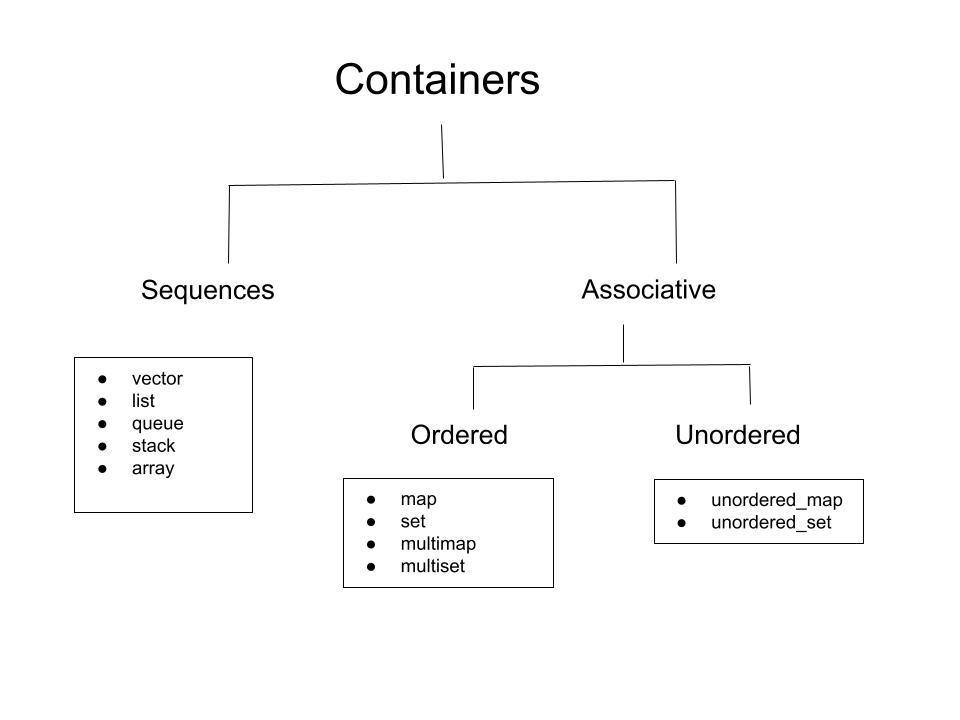
The container types usable on LeetCode are: Vector, List, Stack, Queue, PriorityQueue (Binary Heap), Set/MultiSet, Unordered Set, Map/MultiMap, Unordered Map

STL iterators

An iterator is used to visit all elements of a container in order, and also to refer to a specific element in a container, which can express a search result or the endpoint of a range.

Below is an example

1
2
3
4
5
6
7
8
9
10
11
12
13
14
15
16
17
18
19
20
21
22
23
24
#include <iostream>
#include <vector>
#include <algorithm>
using namespace std;

int main()
{
int n, i;
vector<int> v;
while (cin >> n)
{
v.resize(n);
for (i=0; i<n; i++)
{
cin >> v[i];
}
sort(v.begin(), v.end());
for (vector<int>::iterator it=v.begin(); it!=v.end(); ++it)
{
cout << *it << "\n";
}
}
return 0;
}

From: https://hackmd.io/@sa072686/cp/%2F%40sa072686%2FS11uDpiuH

You can see that inside the for loop we can use vector<int>::iterator to declare an iterator it, which starts from the beginning of the vector and increments by 1 while not equal to the end.

A few key points to observe here:

  1. An iterator is declared as container_type::iterator
  2. Iterators support ++ or -- operations
  3. Containers that support iterators can basically all use .begin() to get the first element and .end() to get the position one past the last element, which is a nonexistent empty slot, matching the STL’s left-inclusive, right-exclusive rule
  4. Using the dereference operator * you can get the value at the iterator’s current address

Most of the time, understanding it as a pointer is fine (a pointer is a special case of an iterator; it’s also an iterator).

auto type deduction

From the example above you’ll notice one thing: declaring an iterator is really verbose, so there’s a lazy trick, using auto to let the compiler do automatic type deduction. The compiler decides the variable’s type based on the type of the initial value.

You can rewrite the for loop like this

1
2
3
4
vector<int> v;
for (auto it=v.begin(); it!=v.end(); ++i){
//...
}

For vector, this is a random-access iterator. What is random access?

Random Access

If a container can be accessed in $O(1)$ complexity, then it has the random access property.

For problem solving, the iterators you’ll use differ by container type. See the table below.

Iterator Type Description Container
Bidirectional iterator Read and Writes forward and backward list,set,multiset,map,multimap
Random access iterator Read and Write with random access vector,deque,array,string

Common STL containers

Vector

Think of it as a dynamic array

  • You can access and modify elements in $O(1)$ time
  • Modifying an element in the middle of the collection is $O(n)$. It’s generally recommended to swap the value to be deleted to the end first, then delete it.
1
# include <vector>

Vector initialization

1
2
3
4
5
6
7
8
9
10
11
12
13
14
15
16
17
18
19
20
// declare an int vector
vector<int> v;

// declare a vector of type T with length N
vector<T> v(n);

// declare an int vector of length N initialized to 0
vector<int> v(n,0);

// initialize a vector from the data in a set
vector<T> v(s.begin(), s.end());

//Subvector
vector<T> sub(v.begin(),v.begin()+5);

//2D vector
vector<vector<T>> v2d;

//declare a 2D vector of size nxm
vector<vector<T>> v_2d1(n, vector<T>(m));

Common Vector operations

1
2
3
4
5
6
7
8
9
10
11
12
13
14
v.empty();
v.size();
v.front();
v.back();

v.push_back(); // push obj to the end of the vector
v.pop_back(); // remove the obj at the end of the vector
v.insert(); // insert at a specified position
v.insert(v.begin(), target); // add target to the front
v.insert(v.begin() + n, target); // add target to an arbitrary position, n <= v.size()
v1.insert(v1.end(), v2.begin(), v2.end()); // insert v2 at the very end of v1
v.reverse(first, last); // reverse the vector from first to last
v.erase(); // remove the element at a specified position
v.clear(); // clear all elements

For the last v.erase(), if you don’t care about order you can use

1
swap(v[n], v.back()); // swap position n with the last position

There are some more operations

1
2
3
4
5
6
7
// Traversal
for(int i = 0; i < v.size(); ++i) {
cout << v[i] << endl;
}

auto it = find(v.begin(), v.end(), val); // find the position where val first appears.
v.count(v.begin(), v.end(), val); // count how many times val appears in the range

Traversal can also be written in the form below, but this involves iterators, which are covered later.

1
2
3
for(auto it = v.begin(); it != v.end(); ++it) {
cout << *it << endl;
}

List

Operations like moving or deleting are all $O(1)$

1
#include <list>
1
2
// delcare list container
list<int> l;

Common operations:

1
2
3
4
5
6
l.empty();
l.size();
l.push_back();
l.pop_back();
l.push_front();
l.pop_front();

Moving a value from one list into another

1
2
3
l.splice(iterator pos, list& x); // splice all of x's elements into l at position pos.
l.splice (iterator pos, list& x, iterator i); // move a single element i from x into l at position pos.
l.splice (iterator pos, list& x, iterator first, iterator last); // move x's elements from first to last into l at position pos.

Stack

Property: LIFO (Last-In-First-Out). A Stack is a finite sequence of objects, and the items that can be deleted, retrieved, and modified in the sequence are only the most recently inserted obj.

1
2
3
4
5
6
7
8
9
#include <stack>
// declare a stack
stack<T> s;
// common functions
s.empty(); // test whether the stack is empty. Returns true if empty, false otherwise.
s.size(); // return how many elements are currently in the stack.
s.push(); // add an element to the stack.
s.pop(); // remove the current topmost element of the stack
s.top(); // get the current topmost element of the stack

Queue

Property: FIFO (First-In-First-Out), so insertion can only happen at the tail, and deletion, retrieval, and modification are only allowed from the head.

1
2
3
4
5
6
7
8
9
#include <queue>
// declare a queue
queue<T> q;
// common functions
q.empty(); // test whether the queue is empty. Returns true if empty, false otherwise.
q.size(); // return how many elements are currently in the queue.
q.push(); // add an element to the queue.
q.pop(); // remove the current frontmost element of the queue (i.e. the earliest to enter).
q.front(); // get a reference to the current frontmost element of the queue

PriorityQueue

It’s actually a heap structure, often used in Dijkstra’s algorithm

1
2
3
4
5
6
7
8
9
10
11
12
13
14
15
16
#include <queue>
// declare a priorityqueue
priority_queue<T> pq; // defaults to the largest on top
priority_queue<T, vector<T>, greater<T> > pq; // change to sort from small to large
// define your own compare function
// sort from small to large, opposite of sort's cmp
auto cmp = [](int& a, int& b) {
return a > b;
};
priority_queue<int, vector<int>, decltype(cmp)> pq(cmp);
// common functions
pq.empty(); // test whether the priority queue is empty. Returns true if empty, false otherwise.
pq.size(); // return how many elements are currently in the priority queue.
pq.push(); // add an element to the priority queue.
pq.pop(); // remove the current highest-priority element of the priority queue.
pq.top(); // get a constant reference to the current highest-priority element.

Note that PQ’s pop and push complexity is $O(\log n)$

make heap operations

There’s a space-saving method: use make_heap to turn a vector into a heap, which makes the space complexity $O(1)$

1
2
3
4
5
6
7
8
9
10
11
12
13
14
15
16
17
18
19
vector<int> nums{1, 3, 5, 2, 4, 6};
make_heap(nums.begin(), nums.end()); // default is max-heap
make_heap(nums.begin(), nums.end(), less<int>()); // max-heap
make_heap(nums.begin(), nums.end(), greater<int>()); // min-heap

// pop, because pop_heap only moves the element to the end,
// you still need pop_back()
pop_heap(nums.begin(), nums.end()); // for max-heap
pop_heap(nums.begin(), nums.end(), greater<int>()); // for min-heap
nums.pop_back();

// push, you need to put the element at the end first
nums.push_back(val);
push_heap(nums.begin(), nums.end()); // for max-heap
push_heap(nums.begin(), nums.end(), greater<int>()); // for min-heap

// sort_heap
sort_heap(nums.begin(), nums.end()); // ascending sort
sort_heap(nums.begin(), nums.end(), greater<int>()); // descending sort

Set and MultiSet

A Set is a set

By default a set sorts from small to large, and the elements in a set container are unique, with no duplicates.
A multiset allows duplicate elements. unordered_set is an unsorted set. unordered_multiset is an unsorted multiset.

1
2
3
4
5
6
7
8
9
10
11
12
13
14
15
16
17
18
19
20
21
22
23
24
25
26
27
28
29
30
31
32
33
34
35
36
37
38

#include <set>
// declare a set
set<T> s;
set<T> s{1, 2, 3, 4, 5}; // with initial value
set<T> s(vector<T>); // can take a vector
set<T> s(vector.begin(), vector.end()); // import data from vector, convenient for lookups
set<T,greater<T>> s2; // sort from large to small
multiset<T> st;

// common functions
s.empty();
s.size();
s.insert();
auto it = s.insert(val); // can get the position after insertion
s.erase(); // can take a key or an iterator; if a key is passed it deletes duplicate keys
// so you must first use find to get the iterator of the value, to ensure only one is deleted
s.erase(s.find(value));
s.clear();
s.count(); // how many elements there are; since a set allows only one, this is effectively checking existence. multiset returns the count.
s.find(); // returns an iterator, so you still need to check whether it's s.end();
// convert set to vector
vector<T> v(s.begin(), s.end());
// Traversal
for(const auto& item : s) { // declaring as const assumes item's value won't be modified in the function.
cout << item << endl;
}
for(auto it = s.begin(); it != s.end(); ++it){
cout << *it << endl;
}
for (auto it = s.rbegin(); it != s.rend(); ++it) {
cout << *it << endl;
}
// get the first and last element
cout << *s.begin() << endl; // get the value of the first element
cout << *s.rbegin() << endl; // get the value of the last element, can't use end() directly
cout << *(--s.end()) << end; // must use the one before end()

Map and MultiMap

A Map is like a lookup table, using key-value pairs to implement a one-to-one mapping
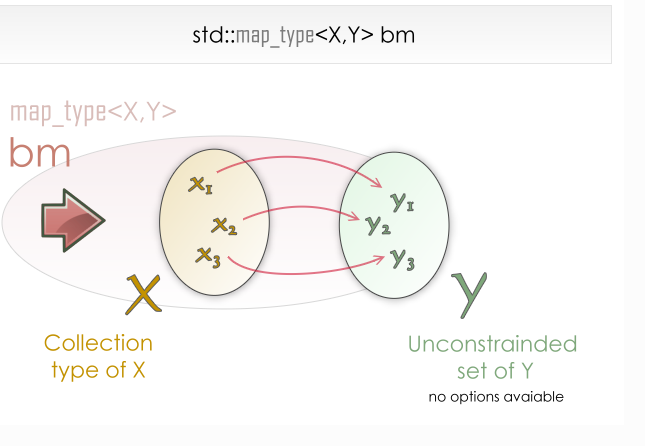
  • By default it also sorts from small to large
  • multimap allows multiple identical key-value pairs.
  • unordered_map is an unsorted map.
  • unordered_multimap is an unsorted multimap.

Simple example:

1
2
3
4
5
6
7
8
9
10
11
12
13
14
#include <map>
using namespace std;

int main(){
map<string, int> m; // maps from string to int

// set the corresponding values
m["one"] = 1; // "one" -> 1
m["two"] = 2; // "two" -> 2
m["three"] = 3; // "three" -> 3

cout << m.count("two") << endl; // 1 -> has a mapping
cout << m.count("ten") << endl; // 0 -> no mapping
}
1
2
3
4
5
6
7
8
9
10
11
12
13
14
15
16
17
18
19
20
21
22
23
24
25
26
27
28
29
30
31
#include <map>
//declare a map
map<T, U> m;
map<T, U, greater<T>> m; // sort from large to small
// common functions
m.empt();
m.size();
m.insert();
m.erase(); // delete an element
m.clear(); // clear all elements
m.count(); // return how many elements there are
m.find(); // return an iterator
m.swap(x); // swap the data of m and x; m and x must be the same type
// Traversal by reference
for (const auto& item : m) {
cout << item.first << ":" << item.second << endl;
}
// Traversal by reference with name
for(const auto& [key, value] : m) {
cout << key << ":" << value << endl;
}
// Traversal by iterator
for (auto it = m.begin(); it != m.end(); ++it) {
cout << it->first << ":" << it->second << endl;
// use prev() to get the one before the iterator
cout << prev(it)->first << ":" << prev(it)->second << endl;
}
// get the first and last element
cout << m.begin()->first << endl; // get the value of the first element
cout << m.rbegin()->first << endl; // get the value of the last element, can't use end() directly
cout << (--m.end())->first << end; // must use the one before end()

Map’s underlying implementation uses a red-black tree, so its mappings are sorted by key, which is why insertion, lookup, and deletion are all $O(\log n)$.
unordered_map’s underlying implementation uses a hash table and is unordered, so the complexity is $O(1)$.

When using unordered_map, you look up the value by the hash produced from the key. Since it’s a hash, there’s a collision problem.

As we know a Bucket is a slot in the container’s internal hash table to which all the element are assigned based on the hash value of their key . Buckets are numbered from 0 to bucket_count.

If the number added exceeds bucket_count, the map automatically enlarges the bucket slots and recomputes the hash of all items.

When the Load Factor(load_factor) reaches a certain threshold, the container increases the number of buckets and rehashes the map.

Using the code below enlarges the buckets to n and recomputes the hash table.

1
m.refresh(n);

If we know the size in advance, we can use the following function to reserve buckets up to n directly, avoiding exceeding the threshold and needing to enlarge the container. Reserving n buckets in advance also helps avoid hash collisions.

1
m.reserve(n);

Reference

[1] https://hackmd.io/@sa072686/cp/%2F%40sa072686%2FS11uDpiuH
[2] https://jasonblog.github.io/note/c++/stl_rong_qi_4e0029_-_ji_ben_jie_shao.html
[3] https://hackmd.io/@meyr543/BkgMaiV6Y#Vector
[4] https://blog.csdn.net/weixin_42292229/article/details/125523668
[5] https://ikaminyou.medium.com/leetcode-%E5%88%B71500%E9%A1%8C%E5%BF%83%E8%B7%AF%E6%AD%B7%E7%A8%8B-8614284f03da