
The Word Hidden Across Five Channels | Isodata Seven | GaianSpace CTF 2026
🌐 中文版:繁體中文
Third post in the series. After the demodulator got its skeleton in True Color Is a Lie, this one swaps in new parameters (implicit header) and upgrades the stego trick from subtracting two copies to clustering across multiple channels.
Rest of the series: Channel Hop、Subsidy Claim、Two Voices、No Name on the Door、Hopscotch
What the challenge is about
Since dawn the tractor has stopped listening to the mast and started listening to a different, unknown transmitter. The Johnripper terminal receives tiles under the dealer’s proprietary settings, and the dealer won’t publish those settings. Babb only has photocopies of pages 14 and 16 of the service manual. Page 15, in between, is missing.
The shared SDR was moved into the tractor shed and recorded that channel. What the stranger sends to the tractor is a whole tile (all channels), and it looks real, except for one patch in the north field that Babb can’t explain.
In the margin of the course notes, double-underlined: “count what actually grows here.”
Goal: find what the stranger planted in the tile. The files given are a ~213 MB .sigmf-data, manual pages 14/16, and the remote-sensing course notes.
Flag format: GAIANSPACE{...}.
This time it’s an implicit header
The radio parameters (manual page 14) are 433.4 MHz, SF7, BW500k, CR4/5, sync word 0x2C, 10-symbol preamble, and no RF header (fixed-length frames).
The missing page 15 holds the frame-length table, so we’ll have to infer it from the data.
Reusing the demodulator skeleton from the last post, the difference here is the implicit header: the first 8 symbols are a low-rate block (CR4/8), after which every 5 symbols form a block; the length is inferred from how many symbols the packet spans in the air.
Once all 779 frames pass the CRC-16 check from manual page 16, they reconstruct into five 128×128 grayscale images:
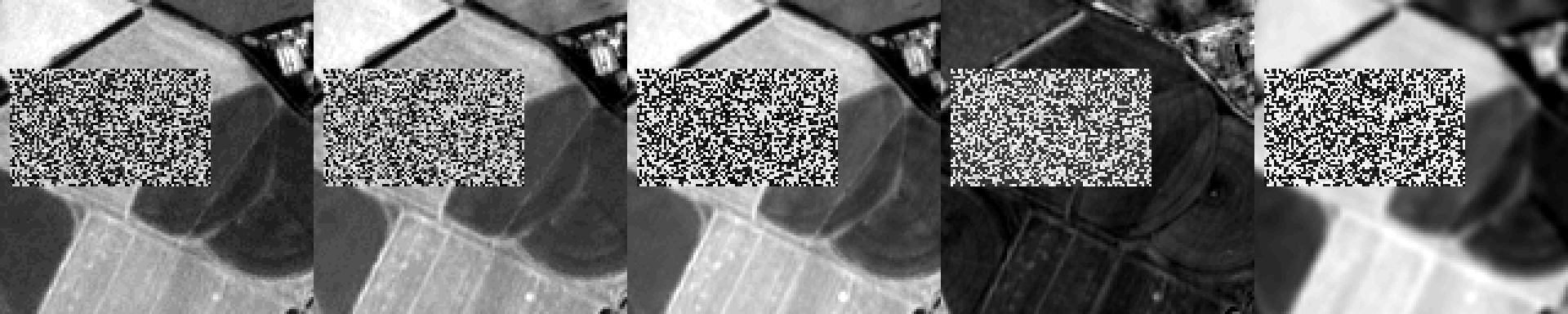
Looked at one channel at a time, that patch looks like random noise in every one, unlike the previous challenge. That’s probably exactly what the challenge means by “no band leaks anything.”
First, understand what this “image” is
A satellite doesn’t take an ordinary RGB camera photo. It records different wavelengths of light separately, storing each wavelength as its own channel (band).
This challenge uses three kinds:
- Visible light: the red/green/blue your eyes can see. A healthy plant’s chlorophyll absorbs red light, so vegetation looks dark in visible light while bare soil looks bright.
- Near-infrared (NIR): a bit longer in wavelength than red, invisible to the eye. Healthy leaf tissue reflects NIR strongly, so “high NIR” is almost the same as “this is a living plant.”
- Short-wave infrared (SWIR): longer still, and especially sensitive to water. More water (wet soil, after irrigation, moist leaves) absorbs SWIR and looks dark; dry ground looks bright in SWIR.
So every pixel carries a little fingerprint: bright or not in visible light, high or low in NIR, high or low in SWIR. Feed those fingerprints to a clustering algorithm and pixels with similar fingerprints get grouped together.
ISODATA / k-means: count what grows here
The course notes hint at using ISODATA with 7 classes (ISODATA is a common unsupervised clustering method in remote sensing, conceptually just k-means).
Running k-means on the 5-dimensional pixels of the noisy patch, the error drops sharply at k=4 (adding more classes beyond that only lowers it slowly), which says the patch really has only 4 true classes. And those 4 aren’t random. They’re exactly the combinations of two switches, each with only two values:
| Class | Visible | NIR | SWIR |
|---|---|---|---|
| vegetation-like + SWIR low | dark | high | low |
| vegetation-like + SWIR high | dark | high | high |
| soil-like + SWIR high | bright | low | high |
| soil-like + SWIR low | bright | low | low |
Read the table as two switches and it’s clear:
- Switch A: does this patch “look like vegetation” or “look like soil” (decided by visible dark/bright and NIR high/low).
- Switch B: is SWIR “high” or “low.”
A × B = 2 × 2 = 4, which lines up perfectly with k=4.
Here’s the key. Normally these two switches pair up naturally (real vegetation shows the combination you’d expect for A and B). But the stranger’s trick is to secretly flip switch B only on the pixels that “draw the text.” The result:
- Looking at NIR alone: the text pixels and the background are both “vegetation” (same A), so there’s no visible difference → nothing leaks.
- Looking at SWIR alone: the text pixels just happen to have SWIR flipped, but SWIR is high and low all over the place anyway, so it looks like noise → nothing visible there either.
- Only by comparing “whether A and B agree“ does the text appear. In digital terms, you XOR the two switches: agree = 0, disagree = 1, and the text is painted exactly on the pixels where XOR = 1.
That’s why you must cluster rather than look at a single channel: clustering considers all channels’ fingerprints at once, so it naturally groups the self-contradictory pixels (“A says vegetation but B is flipped”) into their own small classes, and those small classes are the text. Running k=7 clustering over the whole image, those two “contradictory” small classes each show part of the text:
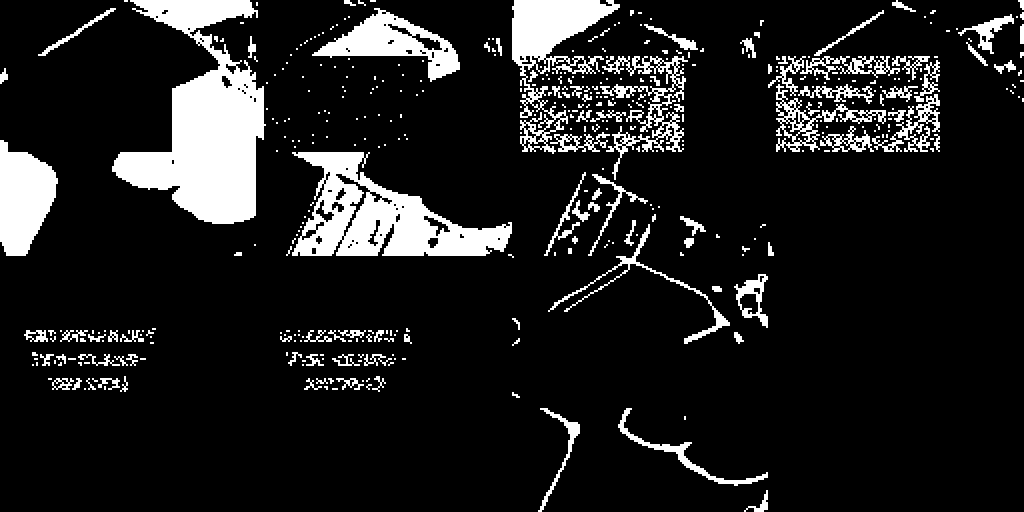
Merge those two classes and draw them, and three lines of text clearly emerge:

Reading the last line
The font is a “bold” variant: each character is a 5×6 base glyph plus a copy shifted 1 pixel to the right.
I used the already-known letters in the first two lines (GAIANSPACE{, 7TH-CLASS-) as a reference and confirmed the last line cell by cell. I hesitated between W/V here; W turned out to be correct.
Flag
1 | GAIANSPACE{7TH-CLASS-XHTXWX} |
Takeaways
- The “implant” here isn’t painted into one channel. It’s the text split into two noisy halves (XOR) spread across different bands. Any single channel is just noise; it only appears when you look at all channels at once (clustering), echoing the note’s line, “the computer only knows which pixels look alike in all channels at once.”
- The k-means error curve tells you how many classes really exist. The error plunges at k=4 and only crawls down afterwards, which is the implementation of the note’s “count what actually grows here.”
- You don’t need the missing manual page. Frame length, channel, and row number can all be inferred directly from the field layout in the data.
- For a tiny font, figure out the drawing rule before reconstructing the glyphs. This one is “bold, shifted 1 pixel right”. Once you know the rule, cell-by-cell comparison is more reliable than just eyeballing a zoomed image.

If you find my articles helpful, please support Kevin!
 Use boba to safe Kevin!