
Passing Functions in C/C++: A Deep Look at Function Pointer Address Changes
🌐 中文版:繁體中文
Function Pointers
When you declare a function in C/C++, it gets allocated a starting memory address, and a function pointer can be used to point to and store that function address. So we can use a function pointer to (1) call a function or (2) pass it to another function.
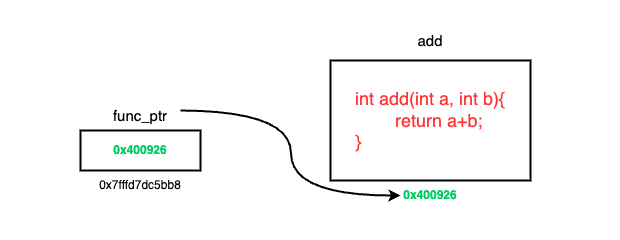
Usage
Declaration:
1 | [return data type] (* function pointer name)(input parameter1, input parameter2, ...); |
Remember to assign the function’s address to the function pointer, which you can do with the address-of operator &. See the example below:
1 |
|
The output of this code is 3. If we integrate it with the binary tree class built earlier, the code looks like this:
1 |
|
The upper part, class TreeNode and class BT, defines the binary tree structure; ignore that for now. Notice that under the BT class we declared a function returnRoot whose only job is to return the node passed in, which isn’t very useful. Then in main, we define a single node with the integer value 1, set it as the tree’s root, and then come to where the function pointer is used:
1 | TreeNode* (BT::func_ptr)(TreeNode*); |
This declares a pointer to a BT class member function, whose parameter and return value are both TreeNode*.
The parameter and return value match returnRoot above.
We take the address of BT’s member function and give it to the func_ptr pointer variable:
1 | func_ptr = &BT::returnRoot; |
Then we print the result. Since returnRoot returns a node, we print its node value:
1 | cout << (T.*func_ptr)(T.root)->val << endl; |
Note here that because func_ptr is declared as a pointer to any BT class member function, accessing it requires an initialized BT class object, which here is T.
Output: 1
Member function pointers
Just now the function pointer was declared and accessed in main. But what happens if we want the function pointer to be a member inside a class?
From my own experiments, the difference you feel is in how the caller (main) accesses it:
1 |
|
Inside a class, the function pointer declaration is the same; you still need to specify which class’s member function this pointer accesses.
But access in main needs care. Since this function pointer still belongs to the BT class, assigning the function address also requires accessing it through the class object T:
1 | T.funt_ptr = &BT::returnt_ptr; |
And the call needs even more attention, since the function is accessed through a member function pointer:
*T.funt_ptrpoints to the target member function, so another object is needed to call the pointerT.*T.funt_ptruses the leadingTto access the pointer that points to the target function
Practical uses of function pointers
- Callback Function: Function pointers are often used to implement callbacks, as in event-driven architectures or interrupt handling.
- Dynamic Dispatch: When there are multiple functions with similar interfaces but different implementations (polymorphism), function pointers can switch between them.
- Function Table: Function pointers can be stored in an array or other data structure to build a function table, selecting which function to call by index.
I think the function table is a very powerful construct. The system call table maintained in the Linux kernel, for instance, is itself a function pointer table, mapping syscall numbers to the corresponding kernel handler functions. Each system call uses a unique syscall number to index into this table’s corresponding function pointer.
For the detailed mechanism, see this article.
The low-level flow
Let’s switch to another example to actually see the memory changes when using a function pointer:
example.cpp
1 |
|
This defines two functions, and we can use a function pointer to call add and subtract separately. We compile the program in a Linux environment and then launch gdb:
1 | g++ -g -o func_pointer_test func_pointer_test.cpp |
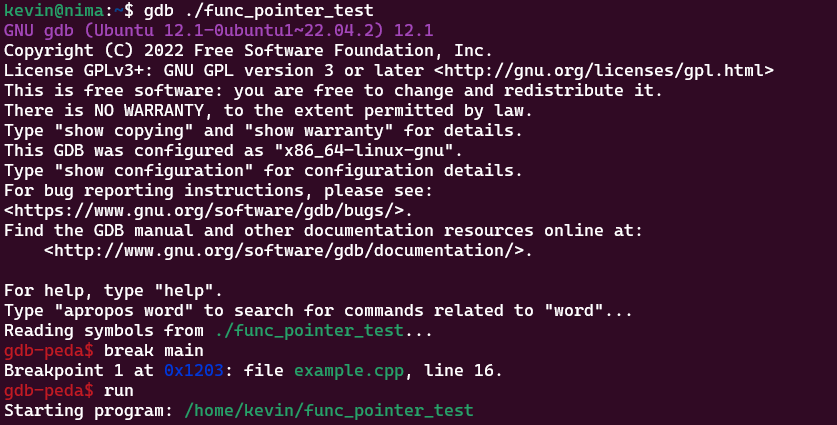
I have gdb-peda installed, which makes the display much nicer; for installation see this article.
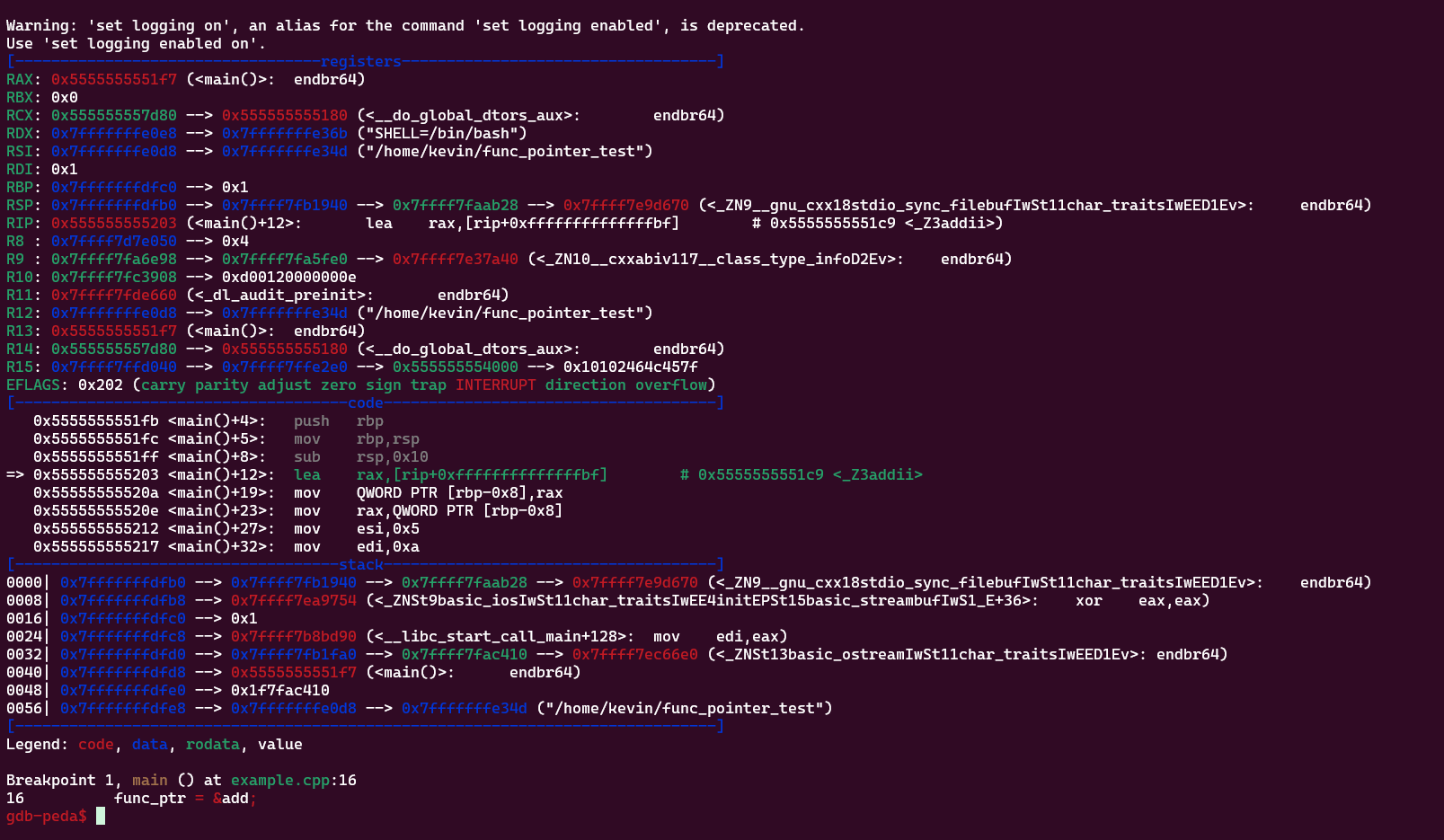
When the program reaches func_ptr = &add;, GDB pauses execution. From the assembly above you can see:
1 | => 0x555555555203 <main()+12>: lea rax,[rip+0xffffffffffffffbf] # 0x5555555551c9 <_Z3addii> |
The lea instruction computes a memory address. Here RAX will be set to an address based on an offset from RIP. This offset is used to load the address of the add function into RAX, which can later be used to call add.
So at this point we can check what’s in the RAX register at the top. RAX is given the address of the add function, which means the function pointer is being initialized.
Let’s see what the next line executes:
1 | 0x55555555520a <main()+19>: mov QWORD PTR [rbp-0x8],rax |
This line stores the value in rax into the address at base pointer minus 0x8, which should be the location of the function pointer.
Then we move to the next instruction, which we can trace with the s command (line 17):
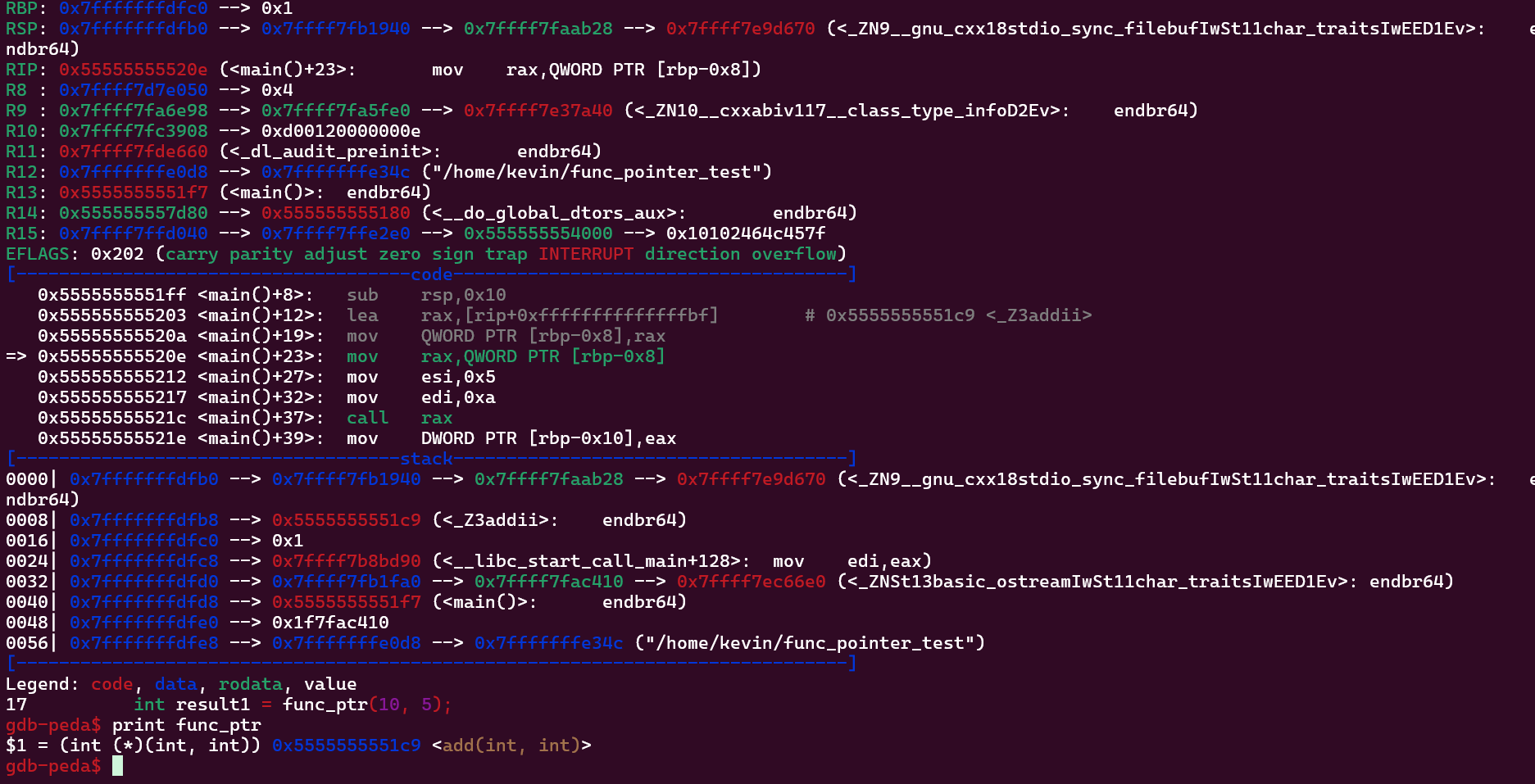
Now we can check func_ptr‘s value to see whether it points to the add function’s address, and the result clearly does point to the add function’s memory address:
1 | print func_ptr |
1 | $1 = (int (*)(int, int)) 0x5555555551c9 <add(int, int)> |
Then we can run r to continue to the next breakpoint, where the function pointer is assigned to the subtract function.
Single-stepping all the way to the func_ptr = &subtract; line, then print func_ptr:
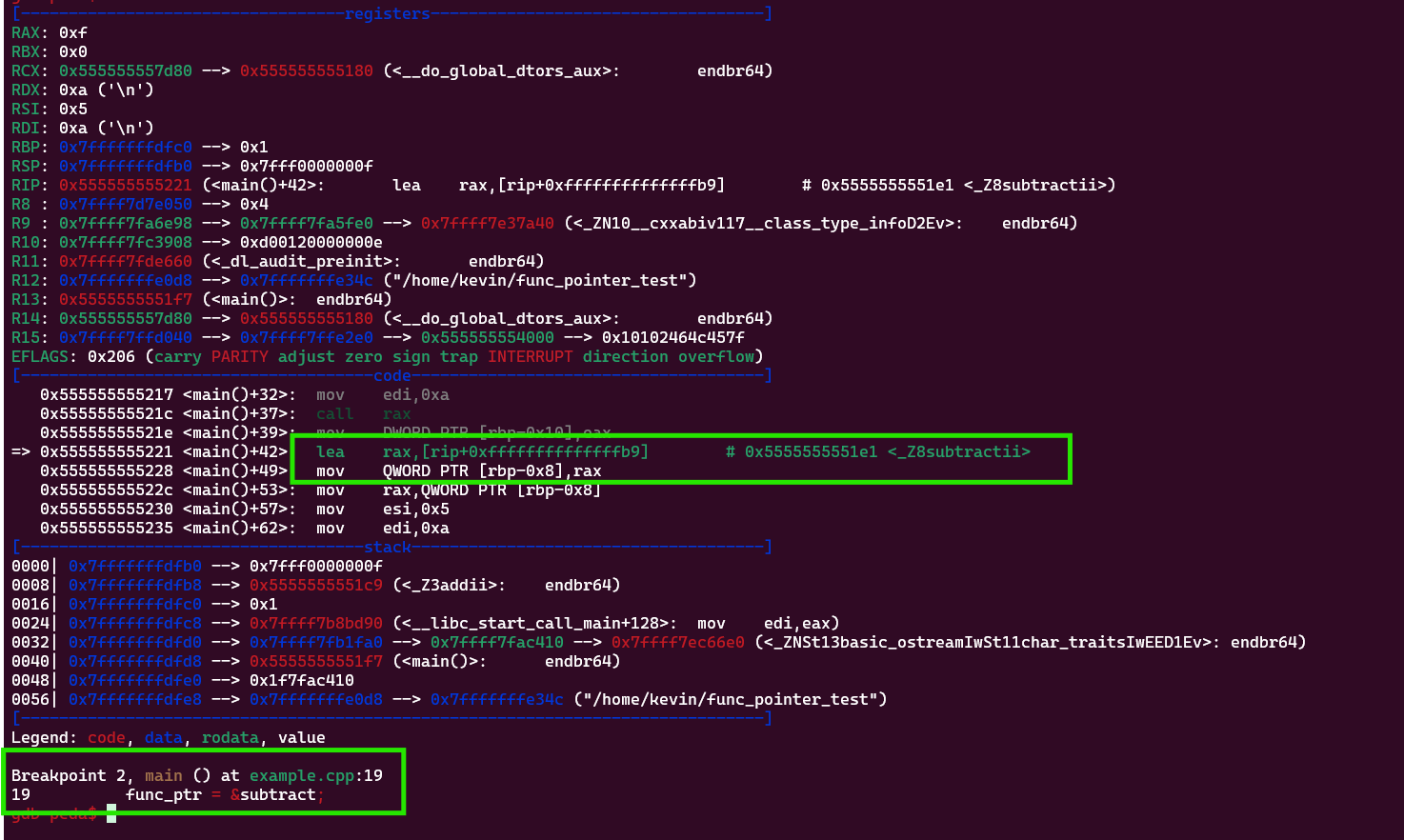
Again you can see this instruction:
1 | => 0x555555555221 <main()+42>: lea rax,[rip+0xffffffffffffffb9] # 0x5555555551e1 <_Z8subtractii> |
This also loads the subtract function’s address into RAX. We can type n to see the next instruction:
1 | => 0x55555555522c <main()+53>: mov rax,QWORD PTR [rbp-0x8] |
This line does the same as before, storing the value in rax into the function pointer’s location.
Then we move to the next instruction, tracing line 22 with n, where the function finishes and prints the result.
At this point we can also check whether the function pointer points to the subtract function’s memory address.

The answer is yes again. If we run to int result1 = func_ptr(10, 5);, we can also observe how the registers change. If the display is too cluttered, you can view register state with the command below. RIP is the next CPU instruction to execute, and RSP is the stack pointer representing the top of the current stack frame, so these two registers reveal the flow during a function call:
1 | info registers |
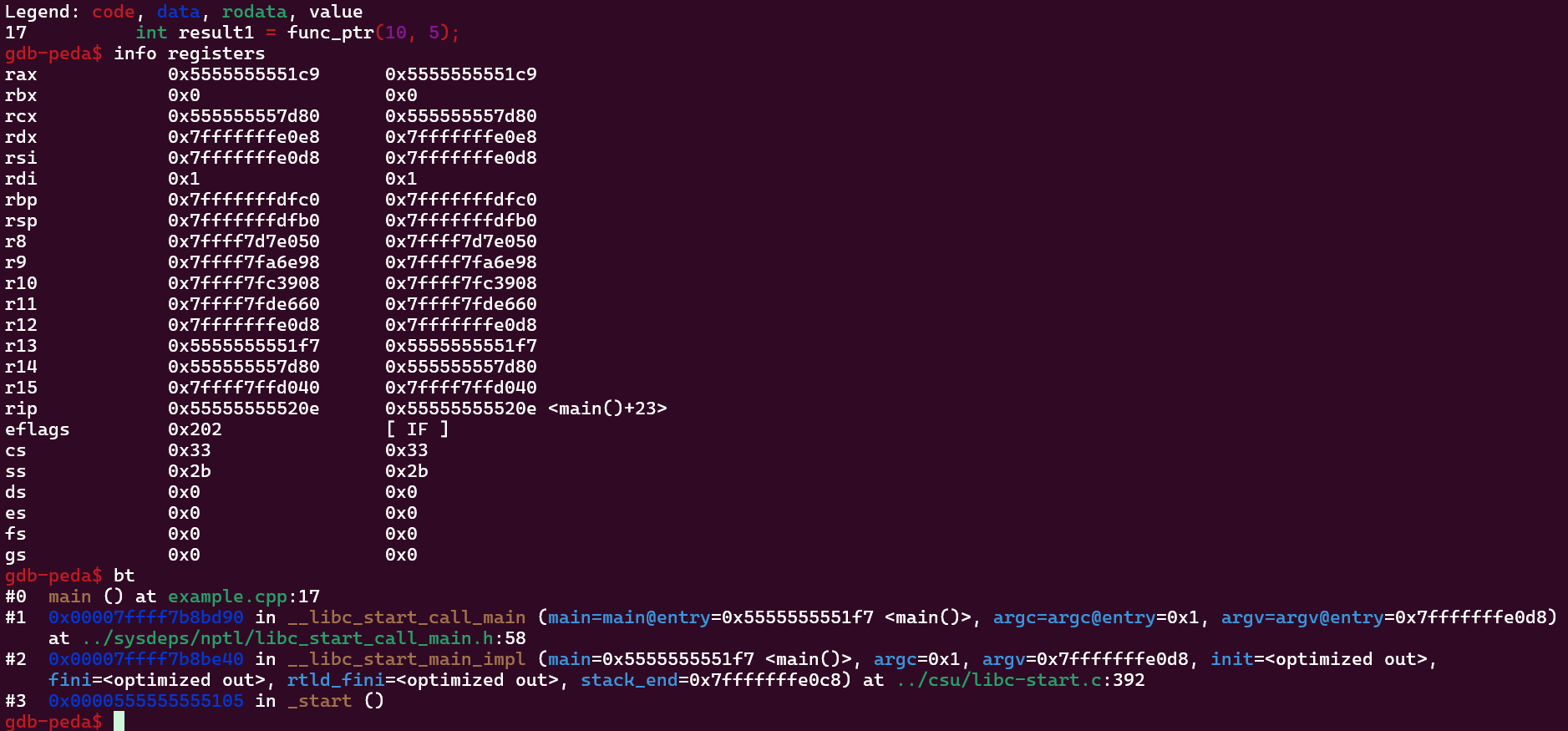
These are rip and rsp before entering add:
1 | rsp 0x7fffffffdfb0 0x7fffffffdfb0 |
And these are rip and rsp after entering add:
1 | rsp 0x7fffffffdfa0 0x7fffffffdfa0 |
You can see the stack differs by about 2 bytes, which can also be seen in the stack view:
Before entering add:

After entering add:
Those 2 bytes include the return address back to main, 0x55555555521e. We then continue with s until we jump back into main, and from the code section you can see we’re at the instruction address right after the previous function’s return address, 0x555555555221.
Finally, print result1 to check the result:
1 | $1 = 0xf |
which is 15.
This experiment gave me a better understanding of function pointers and the memory changes during a function call.
Clarifying the concepts
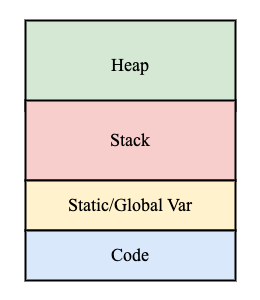
In C/C++, where a pointer variable’s memory address lives depends on how it’s declared:
- If the pointer is a local variable declared inside a function, like
int *ptr;, the pointer itself is stored on the stack. - If the pointer refers to a dynamically-allocated block, like
int *ptr = new int, the pointer itself is still on the stack or global area, but the object it points to is on the heap. - If the declared pointer is global, it’s stored in the global/static area; a static variable like
static int* ptrworks the same way. - The pointer itself is never stored in the code area, but a function pointer points to a function’s entry point in the code area.
- For
void (*func_ptr)() = &myFunction;, the value stored in this pointer (the function address) is in the code section, while the pointer itself is still on the stack or in the global/static area.
- For
Closing
I now understand the memory behavior corresponding to function pointers better. Given the chance, I’ll later actually implement a function table using function pointers.
Reference
[1] - https://medium.com/@hatronix/function-pointers-in-c-unleashing-the-power-of-dynamic-dispatch-29672ffcf502
[2] - https://www.boardinfinity.com/blog/function-pointers-in-c/
[3] - https://www.javatpoint.com/function-pointer-in-cpp
[4] - https://www.geeksforgeeks.org/function-pointer-in-cpp/
[5] - https://kheresy.wordpress.com/2010/11/03/function_pointer/
[6] - https://chenhh.gitbooks.io/parallel_processing/content/cython/function_pointer.html
[7] - https://www.youtube.com/watch?v=ynYtgGUNelE
If you find my articles helpful, please support Kevin!
 Use boba to safe Kevin!
