Problem-Solving Notes | Graphs-2
🌐 中文版:繁體中文
Intro
This continues from the previous post on the basic introduction to graphs. Next we need to understand how to search for a specific vertex in a graph, i.e. how to traverse a graph. There are three basic algorithms:
- Breadth-First Search (BFS): for traversing directed and undirected graphs
- Depth-First Search (DFS): for traversing directed and undirected graphs
- Topological Search: for detecting a Directed Acyclic Graph (DAG).
BFS
I introduced Tree BFS (Level-Order Traversal) before. Level-Order visits nodes of different levels in order, and the level actually corresponds to the distance between nodes in the graph concept, representing the distance between the root and a node. So what’s different about graph BFS? If we want to traverse a connected undirected graph, we can start from any node (say vertex(A)). And since it’s connected, we can traverse all the nodes in the same connected component as vertex(A), and obtain the shortest distance from vertex(A) and the walkable paths.
Algorithm introduction
Before running bfs() we need several data structures to store the data gathered during traversal:
- queue: same as Tree BFS, used to record the nodes of each level in order
- label: records each node’s search status; needs to record
found,not found,removed - distance array: records each node’s distance from the start point
- predecessor array: records which node each node was found from, usable to trace back paths
Step1 Initialize data structures
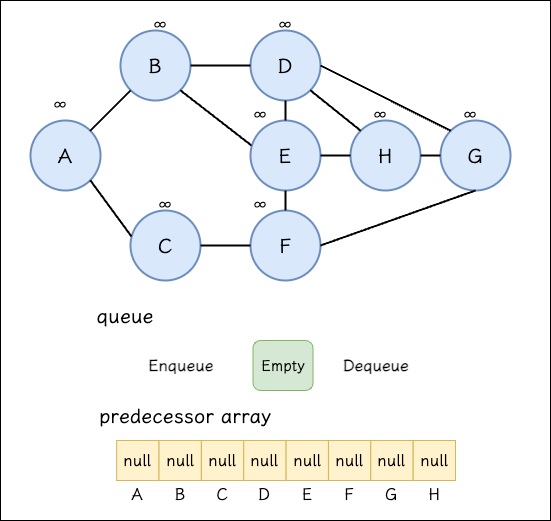
First we need to initialize:
- all vertices are
not found - all vertices’ distances are set to infinity
- clear all vertices’ predecessors (
NULLor-1) - create an empty queue
Step2 Push the start point
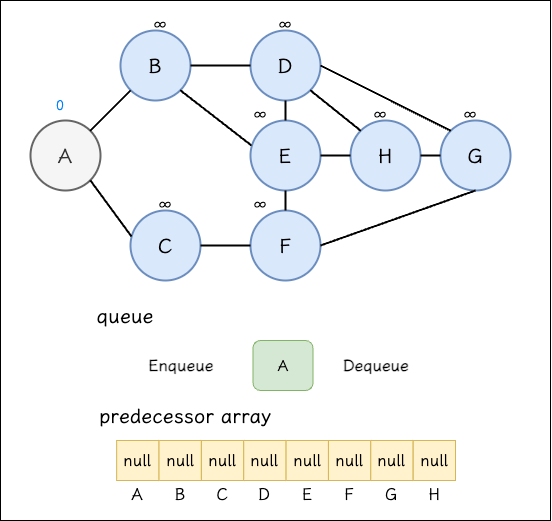
Then
(1) Push the start point into the queue; here we choose vertex(A) as the start
(2) Mark vertex(A) as found (shown in gray here)
(3) Set distance[A] to 0. Setting it to 0 means this vertex is the start point of this connected component
(4) predecessor[A] stays unchanged, so after BFS ends, any node whose predecessor value is null is a start point
Step3 Search Neighbors
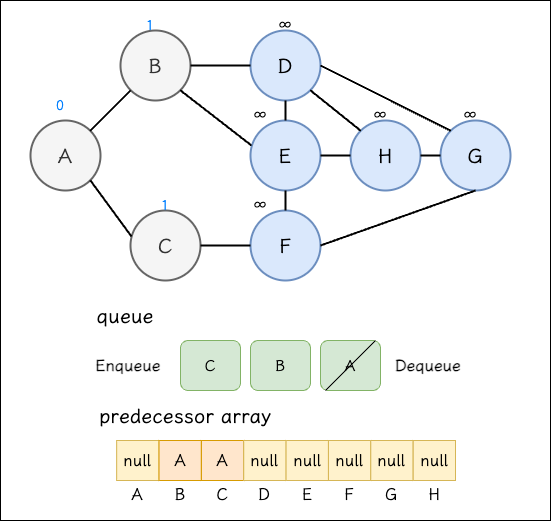
Next we use the queue’s front as the new search start. The new start is vertex(A), so we search vertex(A)’s neighbors, which can be obtained from the adjacency matrix or adjacency list. After finding them we do three things:
(1) Mark the found vertex as found (shown in gray here)
(2) Set the found node’s distance to distance[A]+1
1 | distance[B] = distance[A]+1 = 1 |
(3) Set the found node’s predecessor to vertex(A)
(4) Push into the queue in the order the nodes were found
(5) Remove vertex(A) from the queue
Keep using the queue’s front as the new start to search. Now the new start is vertex(B), so we search vertex(B)’s neighbors.
Step4 vertex(B) Search Neighbors
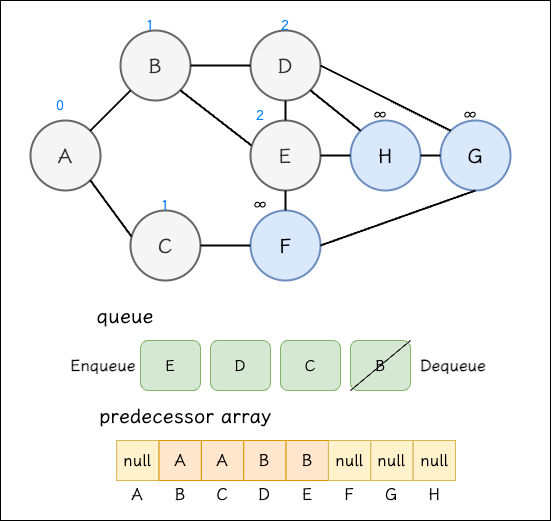
(1) Mark vertex(D), vertex(E) as found (shown in gray here)
(2) Set the found nodes’ distances to distance[B]+1
1 | distance[D] = distance[B]+1 = 2 |
(3) Set the found nodes’ predecessors to vertex(B)
(4) Push into the queue in the order the nodes were found
(5) Remove vertex(B) from the queue
Since vertex(B) has been removed, the queue’s new front, vertex(C), becomes the new start.
Step5 vertex(C) Search Neighbors
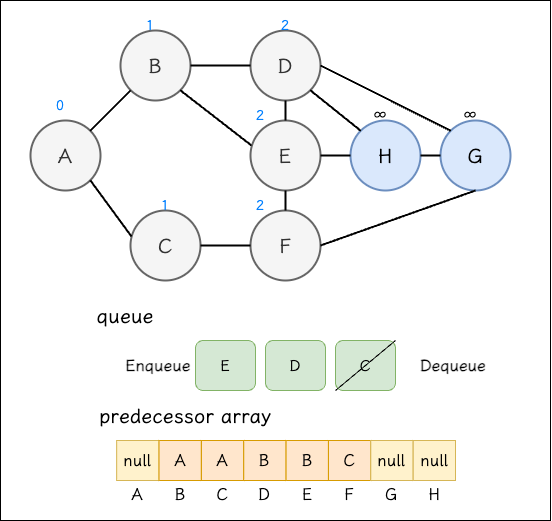
(1) Mark vertex(F) as found (shown in gray here)
(2) Set the found node’s distance to distance[C]+1
1 | distance[F] = distance[C]+1 = 2 |
(3) Set the found node’s predecessor to vertex(C)
(4) Push into the queue in the order the nodes were found
(5) Remove vertex(C) from the queue
Then keep repeating the loop until the queue is emptied, which completes the graph’s BFS traversal.
Following Steps
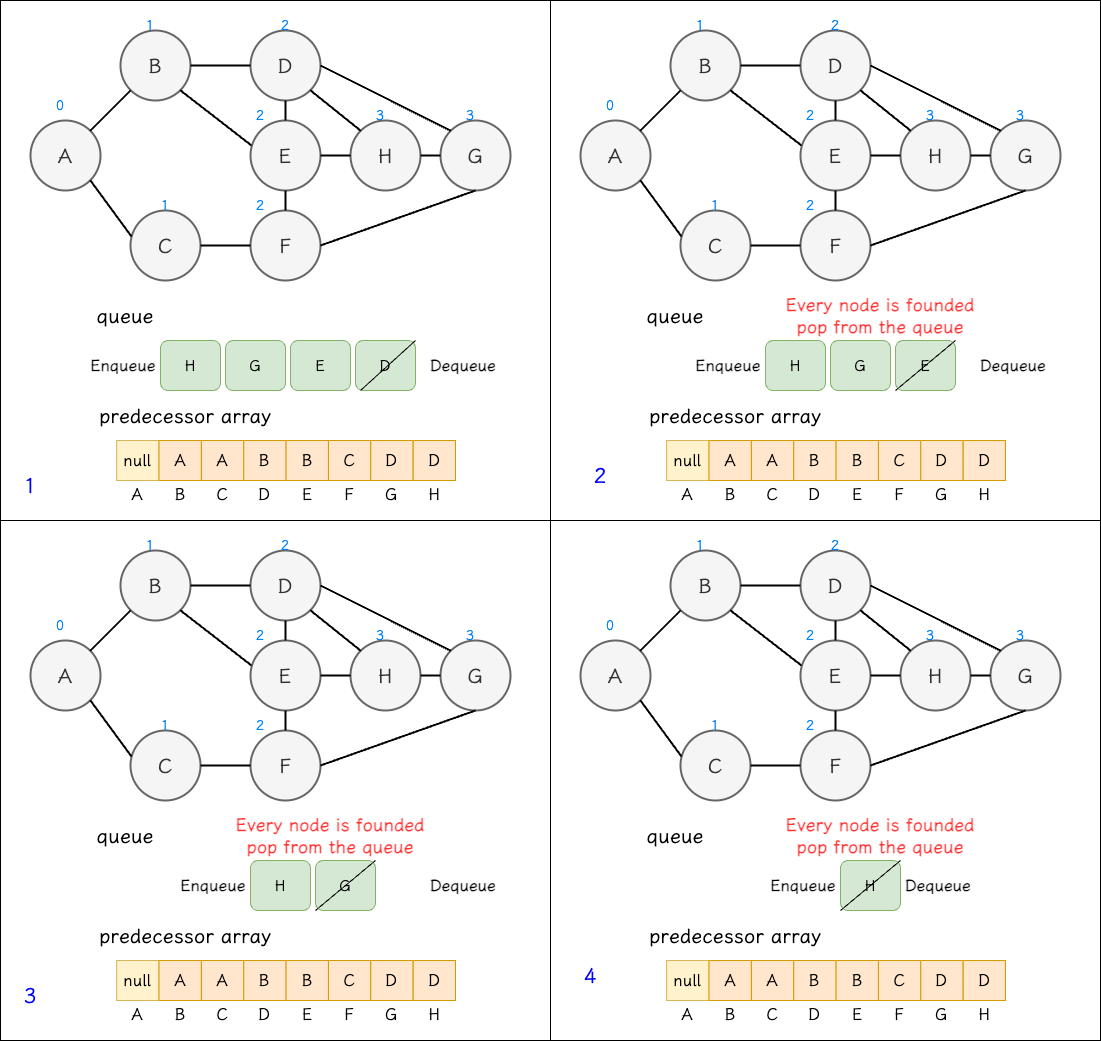
Code implementation
1 |
|
Output:
1 | Distance[0]: 0 | Predecessor[0]: -1 |
Extended concept
With the obtained predecessor array, we can know the order relationship of nodes starting from the start point and draw a predecessor subgraph. It usually has connected and acyclic properties, which makes the predecessor subgraph a tree rooted at the start vertex. This kind of tree is also called a Breadth-First Tree, and the edges connecting the vertices are called Tree Edges.
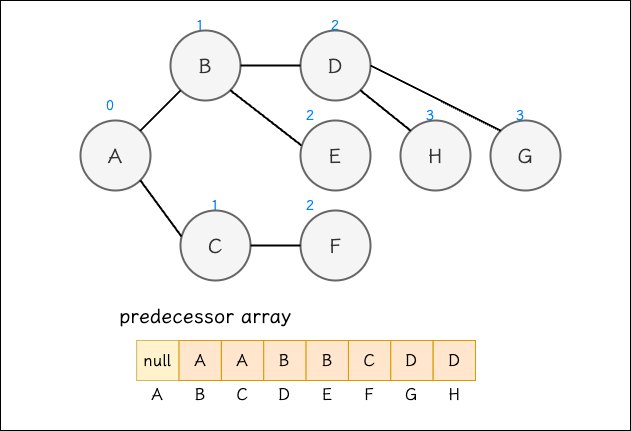
A graph’s Breadth-First Tree may not be unique, because the predecessor array is composed of the order in which vertices are discovered, and the discovery order is affected by the order the adjList is built. A different order produces a different Breadth-First Tree. Although the Breadth-First Tree structures differ, the distances between nodes remain the same in the end. (When using vector<vector<int>> as the adjacency list, the traversal order of neighbor nodes depends on their arrangement in the vector<int>, i.e. the insertion order.)
If the graph itself contains multiple connected components, you may be able to draw a Breadth-First Forest.
DFS
I introduced Tree DFS before. One of the DFS traversal methods is Pre-order Traversal, which visits the node first, then its left subtree, then the root’s right subtree. This “visit the node when you reach it” property is the core spirit of graph DFS. In a graph, visit a node first, then use that node as the new search start, until all vertices connected by an edge are searched. And like tree traversal or walking a maze, as long as vertices are connected by edges, if one path doesn’t work, go back to the previous vertex and take another edge-connected path.
DFS guarantees that if there’s an edge connecting, a path can definitely be found, but it doesn’t guarantee the shortest path.
Algorithm introduction
Before running dfs(), for ease of explanation we need the following data structures:
- time: dfs traversal has an order; think of it as a timeline. N nodes have 2N time points total (each node has a start and an end of search)
- discover array: records the time point when a vertex is discovered; if vertex(B) is found from vertex(A), then discover[B] = discover[A]+1
- finish array: if vertex(B) has fully searched all vertices connected to it by valid edges, then the search starting from vertex(B) has ended, marked as finish[B]
- visited array: records which nodes are not discovered, or discovered but not yet finished searching, and finished states
- predecessor array: records which vertex a visited vertex was discovered from, usable to trace back paths
Step0 Initialize data structures
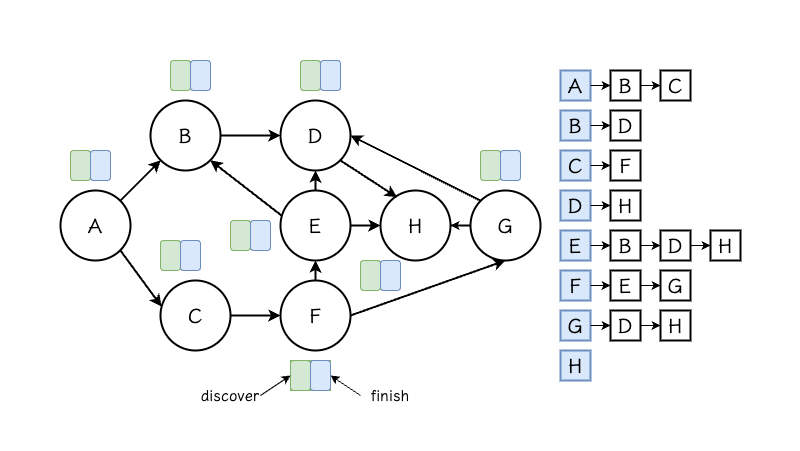
(1) time is 0
(2) visited array initialized to 0
(3) all discover, finish arrays initialized to 0
(4) predecessor array initialized to -1 or null
Step1 ~ Step8 visiting and backtracking nodes in order
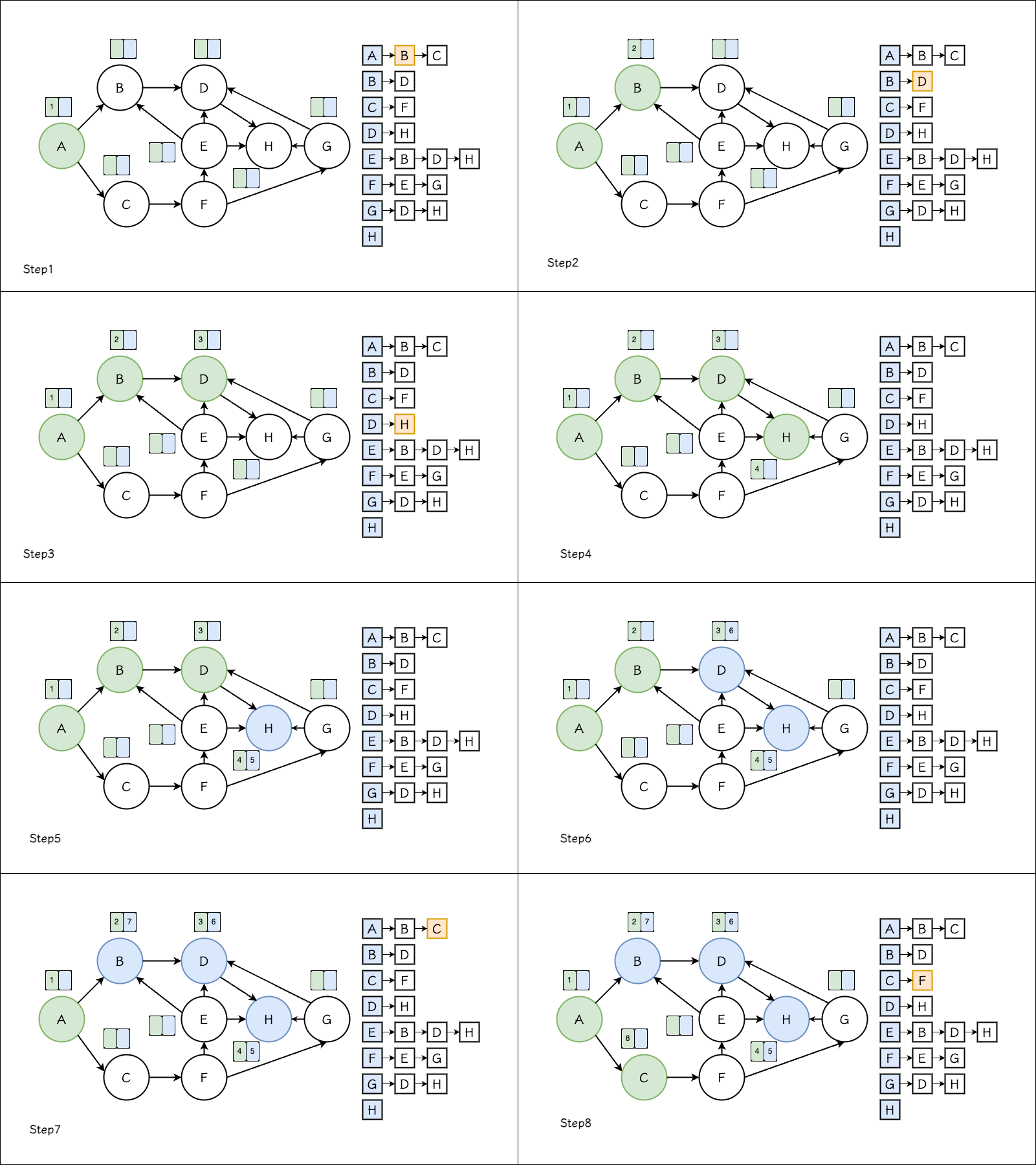
Step1 - vertex(A) as the start
(1) vertex(A) is marked visited (shown in green here)
(2) Since vertex(A) is discovered, set discover[A] to ++time (so here discover[A]=1), meaning it’s the start of dfs
(3) Next we search the nodes connected to vertex(A). Here we can observe that the first node connected to vertex(A) in the adjacency list is vertex(B), so the next start is vertex(B)
There’s no need to update
finish[A]yet, because the search starting from vertex(A) is still in progress; not all edges connected to vertex(A) have been searched.
Step2 - vertex(B) as the start
(1) vertex(B) is marked visited (shown in green here)
(2) Since vertex(B) is discovered, set discover[B] to ++time (so here discover[B]=2)
(3) Next we search the nodes connected to vertex(B). From the adjacency list we observe the next node is vertex(D)
Step3 - vertex(D) as the start
(1) vertex(D) is marked visited (shown in green here)
(2) Since vertex(D) is discovered, set discover[D] to ++time (so here discover[D]=3)
(3) Next we search the nodes connected to vertex(D). From the adjacency list we observe the next node is vertex(H)
Step4~5 - vertex(H) as the start
(1) vertex(H) is marked visited (shown in green here)
(2) Since vertex(H) is discovered, set discover[H] to ++time (so here discover[H]=4)
(3) Next we search the nodes connected to vertex(H). From the adjacency list we observe that vertex(H) has no next node, so we need to back off to the previous node, i.e. vertex(D)
(4) vertex(H) is marked finished (shown in blue here)
(5) Update finish to ++time (so here finish[H]=5)
Step6 - vertex(D) as the start
(1) Since it’s already marked visited, continue searching other connected but not-yet-visited nodes. From the adjacency list we observe that vertex(D) has no other connected nodes, so we need to back off to the previous node, i.e. vertex(B)
(4) vertex(D) is marked finished (shown in blue here)
(5) Update finish to ++time (so here finish[D]=6)
Step7 - vertex(B) as the start
(1) Since it’s already marked visited, continue searching other connected but not-yet-visited nodes. From the adjacency list we observe that vertex(B) has no other connected nodes, so we need to back off to the previous node, i.e. vertex(A)
(4) vertex(B) is marked finished (shown in blue here)
(5) Update finish to ++time (so here finish[B]=7)
Step8 - vertex(A) as the start
(1) Since it’s already marked visited, continue searching other connected but not-yet-visited nodes. From the adjacency list we observe that vertex(A)’s next connected node is vertex(C), so the next start is vertex(C)
Step9 ~ Step16 visiting and backtracking nodes in order
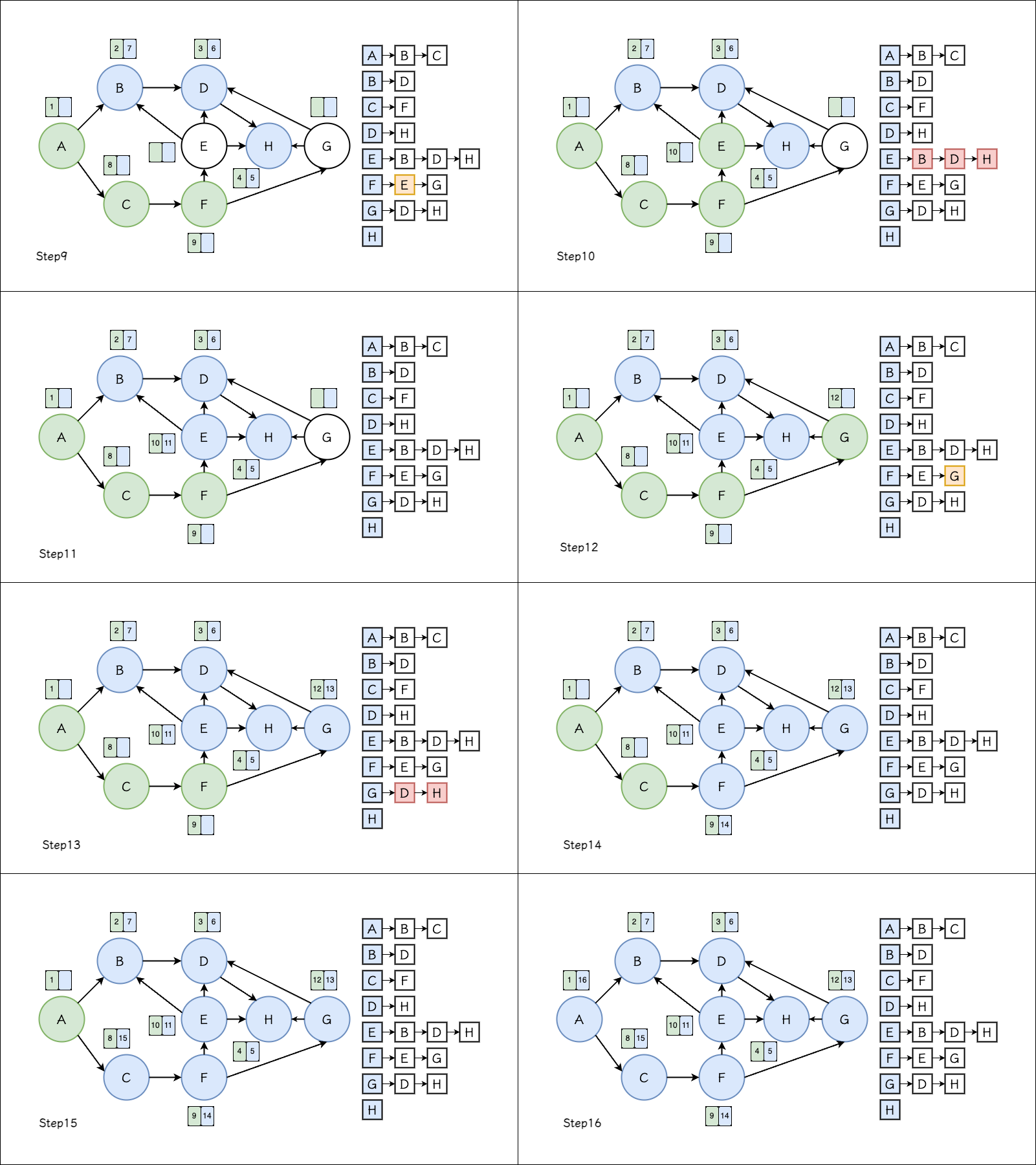
Step9 - vertex(C) as the start
(1) vertex(C) is marked visited (shown in green here)
(2) Since vertex(C) is discovered, set discover[C] to ++time (so here discover[D]=8)
(3) Next we search the nodes connected to vertex(C). From the adjacency list we observe the next node is vertex(F)
Step10 - vertex(F) as the start
(1) vertex(F) is marked visited (shown in green here)
(2) Since vertex(F) is discovered, set discover[F] to ++time (so here discover[F]=9)
(3) Next we search the nodes connected to vertex(F). From the adjacency list we observe the next node is vertex(E)
Step11 - vertex(E) as the start
(1) vertex(E) is marked visited (shown in green here)
(2) Since vertex(E) is discovered, set discover[E] to ++time (so here discover[E]=10)
(3) Next we search the nodes connected to vertex(E). From the adjacency list we observe that vertex(E)’s connected nodes have all been visited, so we go back to the previous node vertex(F)
(4) vertex(E) is marked finished (shown in blue here)
(5) Update finish to ++time (so here finish[E]=11)
Step12 - vertex(F) as the start
(1) Since it’s already marked visited, continue searching other connected but not-yet-visited nodes. From the adjacency list we observe that vertex(F)’s next connected node is vertex(G), so the next start is vertex(G)
Step13 - vertex(G) as the start
(1) vertex(G) is marked visited (shown in green here)
(2) Since vertex(G) is discovered, set discover[G] to ++time (so here discover[G]=12)
(3) Next we search the nodes connected to vertex(G). From the adjacency list we observe that vertex(G)’s connected nodes have all been visited, so we go back to the previous node vertex(F)
(4) vertex(E) is marked finished (shown in blue here)
(5) Update finish to ++time (so here finish[G]=13)
Step14 - vertex(F) as the start
(1) vertex(F)’s connected nodes have all been visited, so we go back to the previous node vertex(C)
(2) vertex(F) is marked finished (shown in blue here)
(3) Update finish to ++time (so here finish[F]=14)
Step15 - vertex(C) as the start
(1) vertex(C)’s connected nodes have all been visited, so we go back to the previous node vertex(A)
(2) vertex(C) is marked finished (shown in blue here)
(3) Update finish to ++time (so here finish[C]=15)
Step16 - vertex(A) as the start
(1) vertex(A)’s connected nodes have all been visited, and it’s already the graph’s start
(2) vertex(A) is marked finished (shown in blue here)
(3) Update finish to ++time (so here finish[A]=16)
dfs() ends
Here we can expand the timestamp each vertex costs, which looks like below:
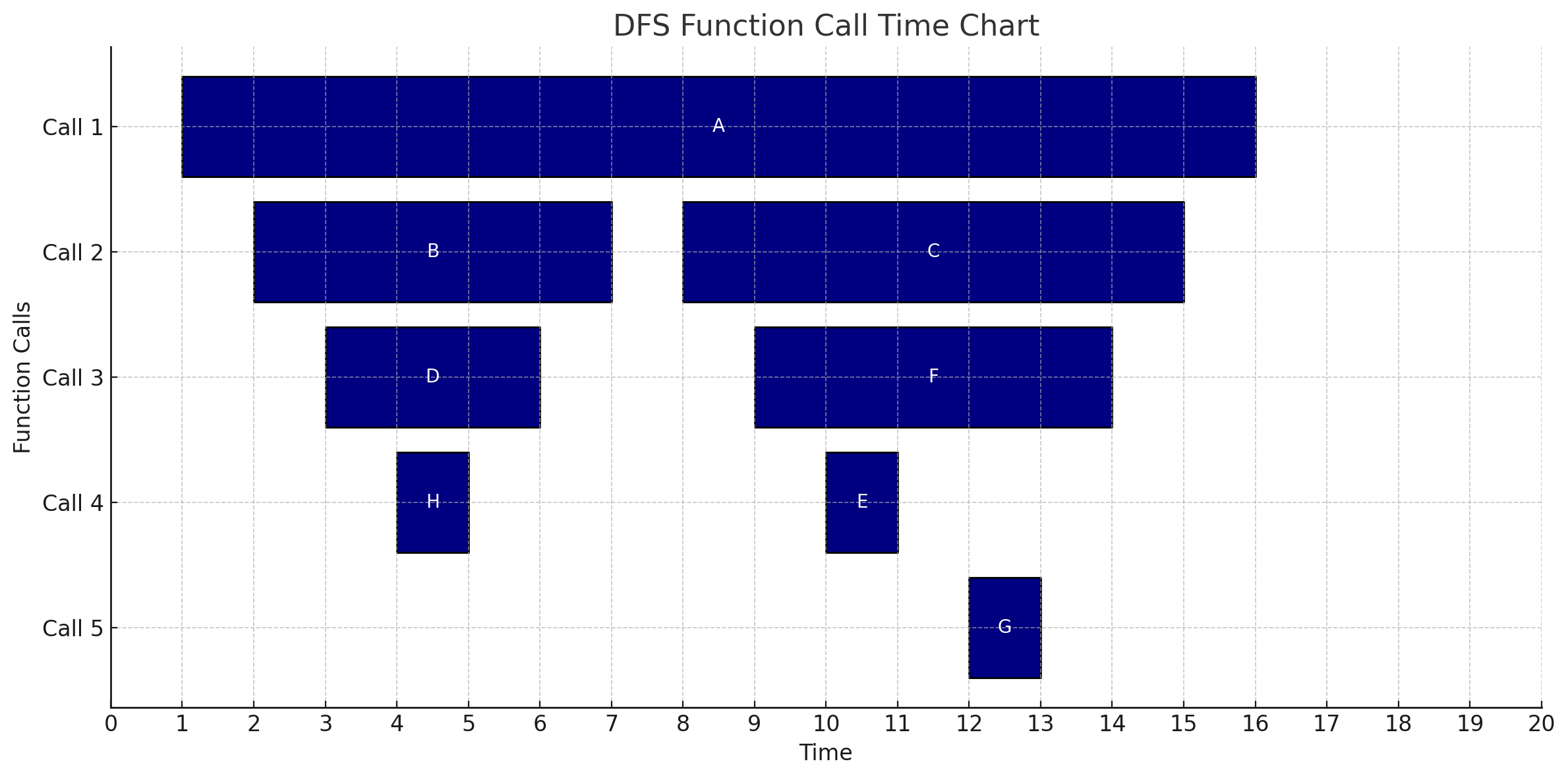
You can see DFS is also a recursive structure, so in practice it’s implemented recursively.
Code implementation
1 |
|
The way the tree is built is the same as BFS; the difference is this example is a directed graph. The program body consists of two functions, dfs and dfsVisit. First, look at dfs: it initializes the various variables and allocates memory based on num_vertex. And except for predecessor being initialized to -1, the other variables are initialized to 0. Then it iterates to check whether each node has been visited (if(visit[i]==0)); if a node hasn’t been visited yet (the white nodes in the figure above), it’s used as the start and passed to dfsVisit for visiting. This loop ensures every vertex in adjList is searched once.
Once a vertex is discovered and it’s white, it enters dfsVisit. The first thing it does is update visited[vertex]=1, meaning the node is found but the search starting from it isn’t finished, then update the discovery time discover[vertex] = ++time. With the current vertex as the search start, it then looks among the vertices connected to this node by edges for ones that haven’t been searched yet (visited[i]==0). So it iterates with the current node for(auto it=adjList[vertex].begin(); it!=adjList[vertex].end(); ++it), searching in the build order of the nodes in adjList. Once it finds a node not yet visited, it updates the current node as the predecessor and uses that node as the new search start, recursing to search for other new nodes. Once there are no other connected vertices not yet visited, it marks the current node as search-complete visited[vertex]=2, and at this point also updates the search-complete time finish[vertex] = ++time.
Output:
1 | Vertex Discover Finish |
You can observe that the output matches the result in the earlier algorithm introduction.
Extended concept
Like BFS, DFS can also obtain a Predecessor Subgraph through the predecessor, which likewise forms a tree structure called a Depth-First Tree.
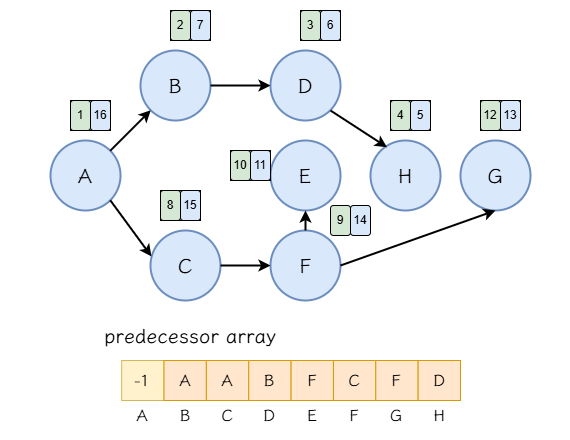
We can also derive a few properties about discover from the result:
- If $discover[X] > discover[Y]$ and $finish[X] < finish[Y]$, then vertex(X) must be a descendant of vertex(Y). Because this means vertex(X) was discovered later than vertex(Y) and finished searching earlier.
- If $discover[X] < discover[Y]$ and $finish[X] > finish[Y]$, then vertex(X) must be an ancestor of vertex(Y). Because this means vertex(X) was discovered earlier than vertex(Y) and finished searching later.
Reference
https://alrightchiu.github.io/SecondRound/graph-breadth-first-searchbfsguang-du-you-xian-sou-xun.html
https://alrightchiu.github.io/SecondRound/graph-depth-first-searchdfsshen-du-you-xian-sou-xun.html





If you find my articles helpful, please support Kevin!
 Use boba to safe Kevin!