
Kubernetes for DevOps Notes |【DevOps Skill Tree】
🌐 中文版:繁體中文
Basic
Explain what Kubernetes is
A platform for container orchestration and management, used for automated deployment and scaling of containers.
What are Kubernetes’s main features?
- Self-Healing: uses health checks to inspect running containers and takes corresponding action, e.g. restarting a container
- Load Balancing: distributes requests across different applications in the cluster
- Operations: applications packaged by Kubernetes can use the cluster’s API to update their state and trigger operations based on events and application state changes
- Automated Rollout: gradually updates applications, and can roll back when problems arise
- Scaling: horizontal scaling based on custom conditions
- Secrets: a mechanism to store usernames, passwords, and service endpoints privately, not viewable by every user of the cluster
What ways can you interact with Kubernetes resources?
You can interact with a Kubernetes cluster using the kubectl command-line tool.
When deploying an app to Kubernetes, which Kubernetes objects are used most?
- Deployment: creates and monitors a group of Pods
- Service: routes traffic to Pods within the cluster
- Ingress: routes external traffic into the cluster
What are the common Kubernetes objects?
Pod, Service, ReplicationController, ReplicaSet, DaemonSet, Namespace, ConfigMap, etc.
A container isn’t a Kubernetes object; the smallest object unit in Kubernetes is the Pod, which usually contains one or more containers.
Cluster and Architecture
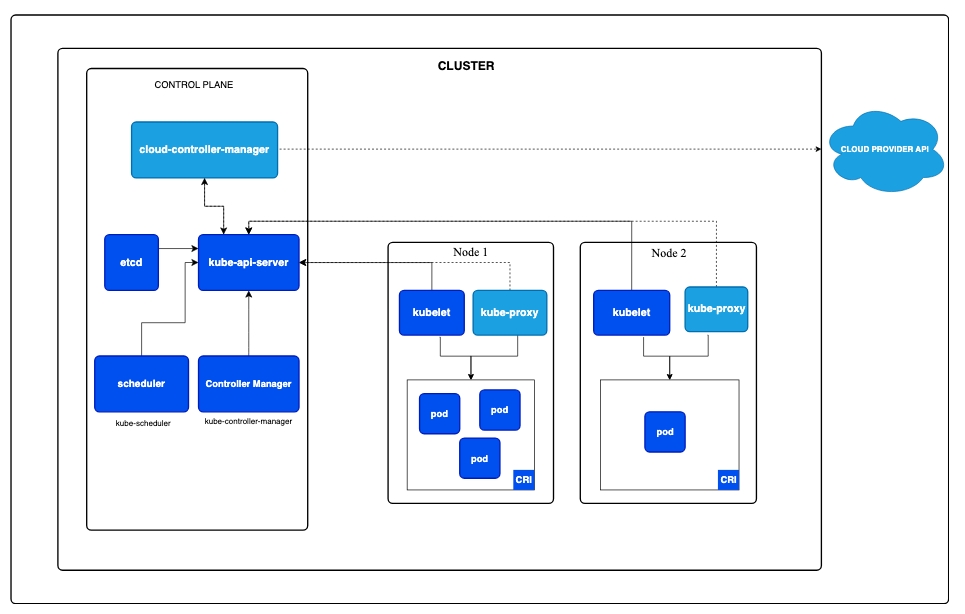
What is a Kubernetes cluster?
A collection of nodes running containerized applications, mainly divided into master nodes and worker nodes.
The master node is Kubernetes’s control center, containing several key components:
- API Server: Kubernetes’s API entry point, responsible for receiving API requests like deploying apps and scaling containers. All resource operations go through the API Server.
- Scheduler: responsible for scheduling new Pods onto suitable worker nodes, mainly based on resource needs and policy choices
- Controller Manager: manages the various controllers that maintain the cluster’s desired state, e.g. ensuring a specified number of Pods keep running
- etcd: the distributed database in Kubernetes, holding the whole cluster’s state and configuration
A worker node runs applications in Kubernetes, mainly running these components:
- kubelet: manages the Pods and containers on a node and monitors container state. It interacts with the master node via the API Server.
- kube-proxy: handles the node’s network configuration, ensuring every Pod in the cluster can communicate, and also handles load balancing
- container runtime: the container runtime (Docker, containerd) pulls images and runs containers
How do I tell whether the current Kubernetes environment is a master node or a worker node?
1 | kubectl get nodes -o wide |
It may output info like:
1 | NAME STATUS ROLES AGE VERSION |
How do you manage multiple Kubernetes clusters? How do you quickly switch between clusters with kubectl?
kubectl config use-context [CONTEXT_NAME]
Each cluster has a context; you can view all available contexts with:
1 | kubectl config get-contexts |
How do you avoid high memory usage causing a memory leak or OOM (Out Of Memory) in a Kubernetes cluster?
Method 1
Set resource requests and resource limits for Pods or containers to ensure containers don’t exceed their allowed resource usage, letting the app stop when it consumes too much and preventing node OOM.
Resource requests ensure a Pod’s minimum resource requirement, which lets the Scheduler find a suitable node when scheduling the Pod. Conversely, resource limits cap the maximum resources a Pod can use.
1 | resources: |
Method 2
Use other monitoring tools, e.g. Prometheus and Grafana, to monitor Pod memory usage.
Method 3
Enable the HPA (Horizontal Pod Autoscaler), which automatically adds or removes replicas based on CPU or memory usage.
1 | kubectl autoscale deployment [deployment_name] --cpu-percent=80 --min=2 --max=10 |
How do you list all API object types?
1 | kubectl api-resources |
Kubelet
If you disable the kubelet on a worker node, what happens to the running Pods?
Since the kubelet communicates with the API Server, disabling it means the worker node can’t interact with the API Server. The node’s status is marked Not Ready, and the Pods on it become Unknown. Once the control plane detects a worker node has been Not Ready for too long (reaching the threshold time, usually 5 minutes), it evicts the Pods on that node and reschedules them onto other available nodes.
Pods
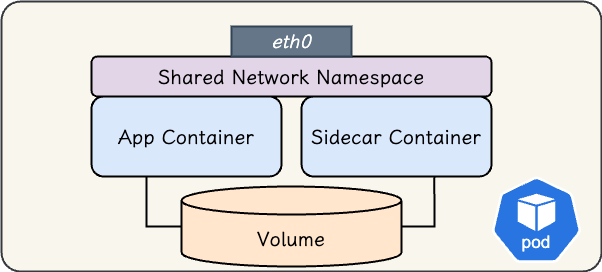
A Pod is the smallest object unit in Kubernetes, usually composed of one or more containers. A Pod shares network resources, storage, and the specification defining how containers run.
How do you deploy a Pod named my-pod using the nginx:alpine image?
1 | kubectl run my-pod --image=nginx:alpine |
This isn’t the common way to run a Pod; you usually run Pods via a Deployment.
How many containers are usually in a Pod?
A Pod can contain multiple containers, but in most cases there’s one. You can also deploy a sidecar container into a Pod, usually for collecting logs.
What phases can a Pod have? Briefly explain the Pod lifecycle
A Pod may go through these phases in its lifecycle:
| Value | Description |
|---|---|
| Pending | The Pod has been accepted by the cluster, but its containers may not be running yet; it may be waiting to be scheduled or waiting to download a container image |
| Running | All containers have been created and at least one is running |
| Succeeded | All containers in the Pod completed successfully and won’t restart |
| Failed | All containers in the Pod were terminated, and at least one was terminated due to failure, with no restart |
| Unknown | The Pod’s state can’t be obtained for some reason, usually due to a communication error between the Pod and the node |
What happens when you run a Pod via kubectl? Explain the flow
- Kubectl sends a request to the API Server to create the Pod
- The API Server validates the request
- etcd is updated
- The Scheduler in the control plane learns there’s an unassigned Pod by watching the API Server
- The Scheduler chooses a node to assign the Pod to
- etcd is updated with this info
- The Scheduler tells the API Server which Pod it chose
- The kubelet notices a Pod was assigned to its node but isn’t running
- The kubelet sends a request to the container engine (e.g. Docker) to create and run the container
- Once the Pod is running, the kubelet updates the status to the API Server
- etcd is again notified by the API Server to update the info
Ref: https://kubernetes.io/docs/concepts/workloads/pods/pod-lifecycle/
How do you know whether a container in a Pod is running?
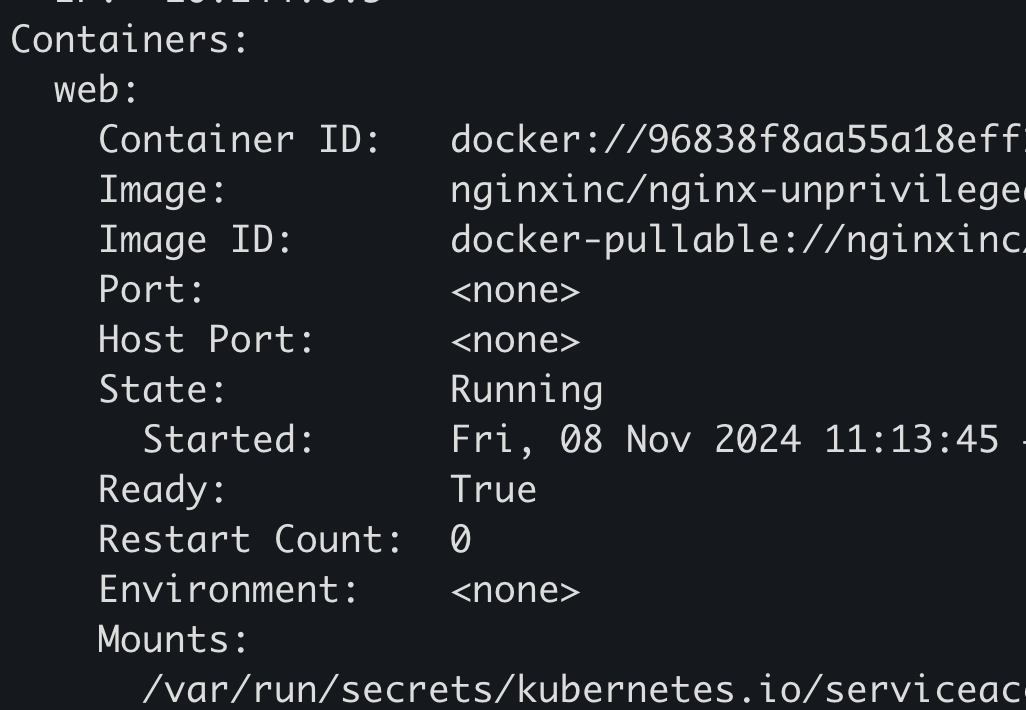
kubectl describe pod <POD_NAME> to check whether the container status is Running.
Or use kubectl exec to run a command inside the container.
When you find a Pod in CrashLoopBackOff, what could the error be? How do you check it?
This usually means the Pod repeatedly starts then crashes, over and over. There are many possible causes, such as:
- An application error forcing the container to exit
- A configuration error, like wrong environment variables or a missing config file
- Resource limits: the container doesn’t have enough memory or CPU allocated
- A health check failure: if the app doesn’t come up within the expected time, this error occurs too
- A container liveness probe / startup probe returning an error
For detailed troubleshooting, use kubectl describe pod <POD_NAME> to see the detailed cause, or kubectl logs <POD_NAME> to see the container’s logs.
What does the config below mean?
1 | livenessProbe: |
First, what is a liveness probe: its purpose is to restart a container when it isn’t in the desired state.
This YAML means: if the cat /appStatus command fails, Kubernetes kills the container and then applies the restart policy. initialDelaySeconds means the kubelet waits 10 seconds before first running the probe command (cat /appStatus), and from then on reruns it every 5 seconds (defined in periodSeconds).
What does the config below mean?
1 | readinessProbe: |
A readiness probe usually determines whether a container is ready to accept traffic. So this defines that until the Pod can connect to the container’s port 2017, it won’t be marked Ready. The first probe runs 15 seconds after the container starts, and it keeps checking every 20 seconds until it can connect to the defined port.
What happens when you delete a Pod?
- Kubernetes sends a SIGTERM signal to the container in the Pod to terminate the container’s main process
- The container then has some time to finish its current task and release resources (this time can be defined in
terminationGracePeriodSeconds); if it doesn’t shut down in time, a SIGKILL signal is sent to force termination
Why is there usually only one container per Pod?
If each Pod has one container, Kubernetes can simply adjust the number of Pods to scale the service’s capacity. Multi-container Pods are harder to scale, since multiple containers must be replicated together.
Static Pods
Ref
What are static Pods?
A kind of Pod managed directly by the kubelet daemon on a node, rather than by the control plane. A static Pod is usually defined directly in a designated directory on the node. The kubelet automatically detects the config files in that directory and starts the corresponding Pods.
Since a static Pod is controlled directly by the kubelet, it can’t be replica-managed directly by a ReplicaSet or Deployment, and therefore a static Pod can only run on the node where its definition file resides, and won’t be automatically scheduled onto other nodes.
Can you give a use case for static Pods?
Static Pods are used to run control-plane components. Usually the control-plane components like the API Server, kube-scheduler, etcd, and kube-controller-manager all exist as static Pods on the master node.
How do you know whether a Pod is a static Pod?
1 | kubectl describe pod <POD_NAME> -n <NAMESPACE> |
Check whether the result’s annotations or nodeName has a “mirror pod” annotation. If you find kubernetes.io/config.mirror in the metadata.annotations field, it means this Pod is a mirror Pod generated by a static Pod.
1 | NAMESPACE NAME READY STATUS RESTARTS AGE |
Output:
1 | Name: etcd-minikube |
You can see the mirror pod annotation is indeed there.
Where is a static Pod’s manifest file usually?
Usually in /etc/kubernetes/manifests; to delete a static Pod you usually just delete the related manifest file.
1 | ❯ minikube ssh |
Pods Commands
How do you confirm which worker node a Pod was scheduled onto?
1 | kubectl get pods -o wide |
Delete a Pod
1 | kubectl delete pod <POD_NAME> |
List all Pods across all namespaces
1 | kubectl get pods --all-namespaces |
Pods Troubleshooting and Debugging
When you run a Pod but it stays Pending, what could the cause be?
One possibility is that the Scheduler responsible for scheduling Pods isn’t running. You can confirm with kubectl get pod -A | grep scheduler.
What can the kubectl describe pod command do?
It shows various detailed info about the Pod, sometimes including the error cause.
Create a static Pod using the python image, running the command sleep 20
1 | kubectl run some-pod --image=python --command sleep 20 --restart=Never --dry-run=client -o yaml > statuc-pod.yaml |
Labels and Selectors
What is a label?
A label is a key-value tag attached to a Kubernetes object to mark its characteristics (e.g. app=nginx, env=prod). A label itself doesn’t affect how an object runs, but it lets a selector filter objects by these tags.
1 | kubectl get pods -l app=nginx # list pods with app=nginx |
What’s the difference between a label and an annotation?
Both are key-value, but their purposes differ:
- Label: for filtering and grouping, queried by selectors, with length and character restrictions on values
- Annotation: for storing non-identifying metadata (e.g. build info, hints), not used by selectors, able to hold longer, more complex data
What is a selector?
A selector selects a group of objects by label, commonly used when a Service finds which Pods to route to, or a Deployment decides which Pods to manage. Types:
- Equality-based:
app=nginx,env!=prod - Set-based:
env in (prod, staging),tier notin (frontend)
Deployment
What is a Deployment?
A Deployment declaratively manages a group of stateless Pods. You describe the “desired state” (how many replicas, which image), and the Deployment uses a ReplicaSet underneath to ensure the actual state matches, supporting rolling updates and rollback.
1 | kubectl create deployment nginx --image=nginx --replicas=3 |
What’s the relationship between a Deployment, ReplicaSet, and Pod?
A Deployment manages a ReplicaSet, and a ReplicaSet manages Pods. Each time you update the image, the Deployment creates a new ReplicaSet and gradually replaces the old ReplicaSet’s Pods with new ones. That’s a rolling update.
How do you control how many Pods are replaced at once during a rolling update?
Via strategy.rollingUpdate‘s maxSurge (how many extra Pods beyond the desired count) and maxUnavailable (how many Pods can be unavailable).
1 | strategy: |
Services
What is a Service? Why do you need it?
A Pod’s IP changes when it’s recreated. A Service provides a stable virtual IP (ClusterIP) and DNS name, and load-balances traffic to a group of Pods via a label selector.
What Service types are there?
| Type | Purpose |
|---|---|
| ClusterIP | default, accessible only within the cluster |
| NodePort | opens a fixed port (30000-32767) on every node, accessible from outside via <NodeIP>:<NodePort> |
| LoadBalancer | requests an external load balancer from the cloud provider |
| ExternalName | maps the Service to an external DNS name (CNAME) |
1 | kubectl expose deployment nginx --port=80 --target-port=80 --type=ClusterIP |
How does a Service know which Pods to send traffic to?
It matches Pods’ labels via a selector, and the matching Pods’ IPs are recorded in the corresponding Endpoints (or EndpointSlice) object, which kube-proxy then uses to set iptables/IPVS rules for load balancing.
Ingress
A Service’s LoadBalancer already exposes things externally, so why do you need Ingress?
Opening a LoadBalancer per service is expensive and hard to manage. Ingress provides a “layer-7 (HTTP/HTTPS) entry point” that routes traffic to different Services from a single entry by host or path, and can handle TLS termination centrally.
Does Ingress work on its own?
No. An Ingress object is just a “declaration of routing rules”; what actually executes them is an Ingress Controller (e.g. nginx-ingress, Traefik, AWS ALB Controller), which must be deployed first for the rules to take effect.
1 | apiVersion: networking.k8s.io/v1 |
ReplicaSets
What is a ReplicaSet?
A ReplicaSet ensures a specified number of Pod replicas are “always running.” If a Pod dies, it automatically creates a new one; if there are too many, it deletes the extras.
So should I use a ReplicaSet directly?
Usually not. A ReplicaSet is almost always created and managed by a Deployment, since a Deployment adds rolling-update and rollback capabilities. Operating a ReplicaSet directly is rare.
DaemonSets
What is a DaemonSet? When do you use it?
A DaemonSet ensures “exactly one Pod runs on every (or every matching) node.” It’s commonly used for node-level system services, such as:
- Log-collection agents (Fluent Bit, Filebeat)
- Monitoring agents (node-exporter)
- Network plugins (CNI), kube-proxy
When a new node joins the cluster, the DaemonSet automatically creates the corresponding Pod on it.
StatefulSet
How is a StatefulSet different from a Deployment?
A Deployment suits “stateless” apps (Pods are interchangeable). A StatefulSet suits “stateful” apps, providing:
- Stable, fixed network identity: Pod names are
<name>-0,<name>-1, which don’t change - Stable persistent storage: each Pod binds its own dedicated PVC and remounts the same data after recreation
- Ordered deployment and scaling: created in order (0→1→2), deleted in order
What scenarios use a StatefulSet?
Databases (MySQL, PostgreSQL) and distributed systems (Kafka, Zookeeper, Elasticsearch), where each node has a distinct identity and needs to keep its own data.
Storage
What are PV and PVC?
- PersistentVolume (PV): an actual storage resource in the cluster (NFS, cloud disk, Ceph, etc.), provided by an admin or a StorageClass
- PersistentVolumeClaim (PVC): a user’s “request” for storage, describing how much is needed and what access mode, which Kubernetes binds to a suitable PV
This design decouples “storage provisioning” from “storage consumption.”
What is a StorageClass?
A StorageClass defines the method for “dynamic provisioning.” When a PVC specifies a StorageClass, Kubernetes automatically creates the corresponding PV (e.g. automatically provisioning an EBS disk), without an admin pre-creating it manually.
What access modes are there?
- ReadWriteOnce (RWO): can be mounted read-write by a single node
- ReadOnlyMany (ROX): can be mounted read-only by multiple nodes
- ReadWriteMany (RWX): can be mounted read-write by multiple nodes (requires underlying storage support, like NFS)
Networking
What are the basic principles of Kubernetes networking?
Kubernetes requires:
- Every Pod has its own IP
- All Pods can communicate directly without NAT
- An agent on a node (like the kubelet) can communicate with the Pods on that node
These are implemented by CNI (Container Network Interface) plugins (Calico, Flannel, Cilium, etc.).
How does in-cluster DNS work?
CoreDNS provides in-cluster DNS. A Service has a DNS name <service>.<namespace>.svc.cluster.local, so Pods can access each other by name instead of IP.
Policies
What is a NetworkPolicy?
By default, all Pods can communicate with each other. A NetworkPolicy lets you use label selectors to define “which Pods can communicate with which Pods (or namespaces, IP ranges),” acting like a Pod-level firewall. Note: a NetworkPolicy requires CNI plugin support (e.g. Calico, Cilium) to take effect.
What are ResourceQuota and LimitRange?
- ResourceQuota: limits the total resources available in a namespace (e.g. total CPU, memory, Pod count)
- LimitRange: sets default and min/max resource values for individual Pods/containers in a namespace
Etcd
What role does etcd play in Kubernetes?
etcd is a distributed key-value database, the “single source of truth” for the whole cluster. All object state (Pods, Services, ConfigMaps, Secrets…) lives in etcd, and the API Server is the only component that talks to etcd directly.
Why is backing up etcd important?
If etcd data is lost, the entire cluster’s state is gone, so production usually backs up etcd snapshots regularly.
1 | ETCDCTL_API=3 etcdctl snapshot save snapshot.db \ |
Namespaces
What is a Namespace?
A Namespace lets you carve multiple “virtual clusters” out of one physical cluster, to isolate the resources of different teams, environments, or projects. Combined with ResourceQuota and RBAC, it achieves resource and permission isolation.
1 | kubectl create namespace dev |
Which resources are cluster-scoped and don’t belong to any namespace?
Most resources (Pod, Service, Deployment) belong to a namespace, but some are cluster-level and don’t belong to any namespace, such as Node, PersistentVolume, Namespace itself, and ClusterRole.
Operators
What is an Operator?
An Operator is a pattern for encoding “the operational expertise of running an application” as code. It extends the Kubernetes API with Custom Resource Definitions (CRDs), paired with a Controller that continuously watches these custom resources and reconciles the actual state to the desired state.
Can you give an example?
For example, to run a PostgreSQL cluster on K8s, after installing a PostgreSQL Operator, you just create a kind: PostgresCluster custom resource, and the Operator automatically handles creation, backup, failover, version upgrades, and other operational work.
Secrets
What’s the difference between a Secret and a ConfigMap?
Both separate config from the image; the difference is:
- ConfigMap: stores general, non-sensitive config (config files, environment variables)
- Secret: stores sensitive data (passwords, tokens, certificates)
Is a Secret really secure?
Note: a default Secret is just base64-encoded, not encrypted, so anyone who can read the Secret can decode its contents. For real protection, you need to additionally enable etcd encryption at rest and strictly limit who can read Secrets via RBAC.
1 | kubectl create secret generic db-cred \ |
Volumes
What’s the difference between a Volume and a PersistentVolume?
- An ordinary Volume‘s lifecycle is tied to the Pod; once the Pod is deleted, data in a volume like
emptyDiris gone - A PersistentVolume‘s lifecycle is independent of the Pod, so the data survives Pod deletion
What are common Volume types?
emptyDir: scratch space for the Pod’s lifetime, often used to share data between containers in the same PodhostPath: mounts a path on the node (be careful, it couples to the node)configMap/secret: mounts a ConfigMap/Secret into the container as filespersistentVolumeClaim: mounts a PVC (real persistent storage)
Access Control
How does Kubernetes do permission control?
Mainly through RBAC (Role-Based Access Control). The four core objects:
- Role / ClusterRole: define “what actions on which resources are allowed” (Role is namespace-scoped, ClusterRole is cluster-wide)
- RoleBinding / ClusterRoleBinding: bind a Role to a User, Group, or ServiceAccount
1 | kubectl create role pod-reader --verb=get,list,watch --resource=pods |
What is a ServiceAccount?
A ServiceAccount is an identity for “programs inside a Pod” (as opposed to a User for people). A Pod can use its ServiceAccount’s token to call the API Server, governed by RBAC.
What checks does a request to the API Server go through?
Authentication (who you are) → Authorization (RBAC, whether you can do it) → Admission Control (extra admission control, e.g. validating or mutating the request).
CronJob
What’s the difference between a Job and a CronJob?
- Job: runs a one-off task that “finishes” (e.g. data migration, batch computation), ensuring it completes successfully the specified number of times
- CronJob: adds scheduling on top of a Job, creating Jobs on a schedule via cron syntax (e.g. a backup every night)
1 | apiVersion: batch/v1 |
Helm
What is Helm?
Helm is Kubernetes’s “package manager,” similar to apt/yum. It packages a set of K8s manifests into a Chart, supporting parameterization via values.yaml, version management, and one-command install/upgrade/rollback.
1 | helm install my-release bitnami/nginx |
Why use Helm instead of just kubectl apply?
When an application is made of many manifests and deployed to multiple environments (dev/staging/prod with different parameters), Helm’s templating and version management are far more convenient than hand-maintaining a pile of YAML.
Security
What are some common Kubernetes security practices?
- Principle of least privilege: strictly limit ServiceAccount and user permissions with RBAC
- Don’t run containers as root: set
securityContext.runAsNonRoot: true - Encrypt Secrets: enable etcd encryption at rest and restrict Secret access
- NetworkPolicy: default deny, open only necessary Pod-to-Pod communication
- Image scanning: scan images for vulnerabilities, use only trusted sources
- Pod Security Admission: use the built-in Pod Security Standards (privileged / baseline / restricted) to limit Pod privileges
What is a securityContext?
A securityContext sets security-related attributes for a Pod or container, such as which UID to run as, whether privileged mode is allowed, and whether the root filesystem is read-only.
1 | securityContext: |
Misc
What are some handy kubectl debugging commands?
1 | kubectl describe <resource> <name> # see detailed status and events |
What’s the difference between kubectl’s imperative and declarative styles?
- Imperative: directly issue commands to change state, e.g.
kubectl create,kubectl run - Declarative: write the desired state as YAML and let Kubernetes reconcile it with
kubectl apply -f. Production usually uses the declarative style with GitOps (version-controlling all manifests).





If you find my articles helpful, please support Kevin!
 Use boba to safe Kevin!
