
AWS for DevOps Notes |【DevOps Skill Tree】
🌐 中文版:繁體中文
Regions & AZs
Region: a group of data centers spanning multiple geographic locations, e.g. us-east-1
Availability Zone (AZ): each region has multiple mutually-isolated locations called AZs. An AZ may contain one or more data centers with independent networking and power. us-east-1a, us-east-1b, etc.
Local Zone: no physical data center of its own, usually connected to an AZ. For example, Taiwan’s Local Zone connects to ap-northeast-1, aiming to serve edge locations to reduce latency.
AWS Outposts: physical servers deployed on the customer’s premises, providing local access to AWS services
IAM
The service used for access control in the AWS environment. It manages which users have permission to access which resources.
Security Best Practices: don’t use the root user for daily business; create corresponding users with appropriate permissions and do business with those.
Below are common IAM terms and their relationship diagram: IAM User, IAM Group, IAM Role, Permission policy, Identity-provider object. Their relationships are as follows.
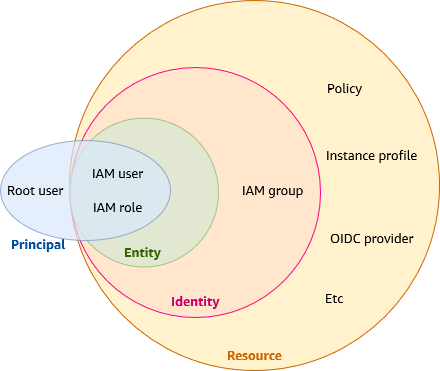
Whichever IAM entity (IAM User, IAM Role) it is, it needs a corresponding policy to grant it permissions. Here’s the structure of a policy.
IAM Policy
example policy
1 | { |
Version- 2012-10-17: the default policy language version
- 2008-10-17: an older policy language version
Statement- contains multiple policies, which can be custom or AWS-managed policies
Sid- the ID of an individual policy statement, which can describe the policy’s behavior
EffectAllow: allow the listedactionon the listedresourceDeny: deny the listedactionon the listedresource
Action- its format is
[service name]:[API operation on that service] - the action here is the permission
- its format is
Resource- usually the resource’s ARN
- can also use the wildcard
* - Example
"Resource": "arn:aws:s3:::amzn-s3-demo-bucket/*"
Condition- specifies the condition under which the policy takes effect
- Example.
"Condition" : { "StringEquals" : { "aws:username" : "johndoe" }}
List of Actions, Resources, and Conditions for AWS services
AWS managed policies; some handy policies can be used directly
How IAM works
https://docs.aws.amazon.com/zh_tw/IAM/latest/UserGuide/intro-structure.html
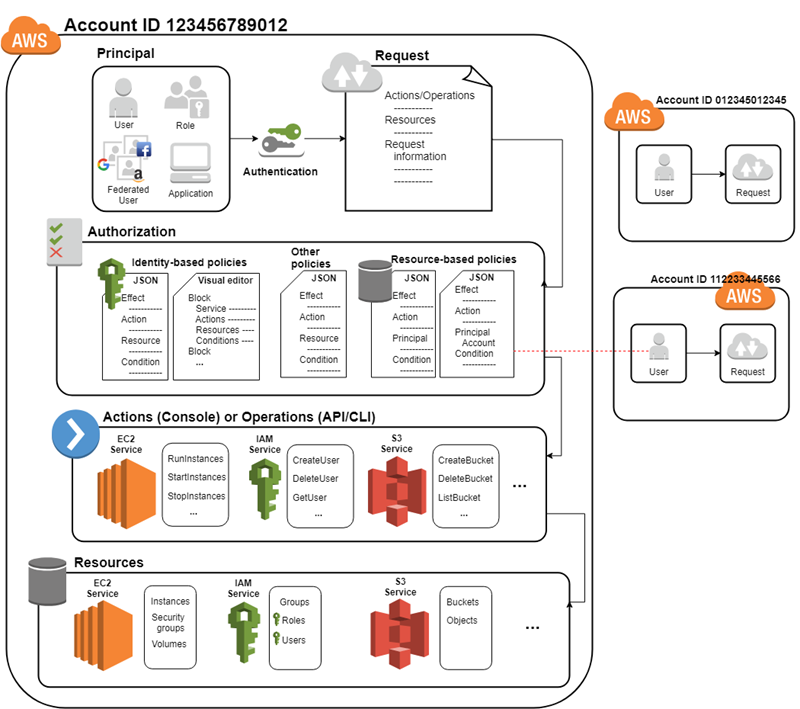
Source: AWS Developer Guide
A user or application authenticates to AWS using credentials (AWS or third-party). IAM compares the credentials with trusted principals, and if they match, authorizes access to AWS resources. IAM then requests to grant the principal access to the resource, and decides to Allow or Deny the principal’s access based on the policy’s rules.
VPC
What is a VPC?
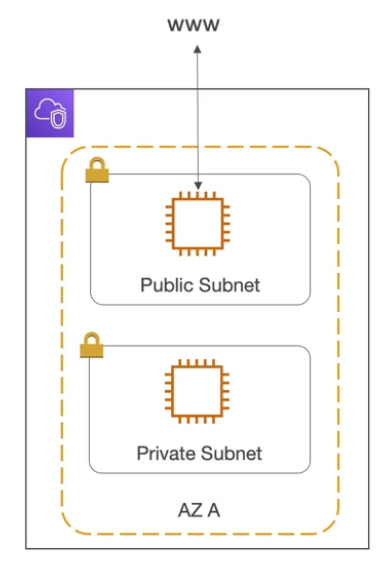
A regional resource; you can create a network domain for deploying AWS services.
E.g.
1 | CIDR: 10.0.0.0/16 |
Subnet
A VPC can be divided into subnets, which are AZ-level resources.
1 | CIDR: 10.0.0.0/24 |
They’re usually split into Public Subnet and Private Subnet. Normally without special configuration it’s a Private Subnet, unless the default route in the route table is set to an Internet Gateway. Also, to let resources in a Private Subnet access the external network, you need to set up a NAT Gateway.
Amazon VPC Quotas:
VPCs per region: 5 (Can limit increase)
Subnets per region: 200 (Can limit increase)
IPv4 CIDR blocks per VPC: 5 (up to 50) (Can limit increase)
Which IPs are reserved in the AWS environment?
x.x.x.0: the subnet’s first IP, used to identify the subnetx.x.x.1: VPC Routerx.x.x.2: DNS Serverx.x.x.3: reserved for future usex.x.x.255: Broadcast (though broadcast isn’t supported in a VPC)
Network ACL & Security Groups
What is a Network ACL?
- A stateless firewall that can control whether source-IP traffic can enter and leave a subnet
- Allow / Deny rules
- Inbound / Outbound
- An ACL can be attached at the subnet level
- Rules contain only IP rules
What is a Security Group?
- A stateful firewall that can control traffic into an ENI or EC2 instance
- Allow rules
- Can specify IP address, port, protocol
- Can include other security groups
VPC Flow Logs
What is a VPC Flow Log?
Mainly used to determine which source IPs’ packets flow into each interface. Users can create flow logs for a VPC, subnet, or network interface.
It can also be used to monitor and troubleshoot connectivity issues, including:
- Subnets to Internet
- Subnets to Subnets
- Internet to Subnets
VPC Peering
VPC Peering establishes a private connection between different VPCs, provided the two VPCs’ CIDRs don’t overlap.
Note that VPC Peering isn’t transitive. For example, if VPC_A peers with VPC_B and VPC_B peers with VPC_C, that doesn’t mean VPC_A and VPC_C can access each other.
1 | VPC_A <---> VPC_B |
VPC Endpoints
A VPC endpoint mainly lets different services access each other without going through the public network.
What’s the difference between a Gateway Endpoint and an Interface Endpoint?
First, back to the VPC-endpoint principle: without one, requests may have to flow over the public network. If an EC2 in a Public Subnet wants to access an S3 bucket, the request would go through the Internet Gateway and flow over the external network to S3.
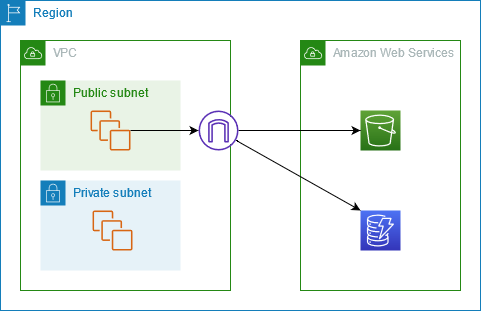
Alternatively, you access it via a VPC endpoint. The VPC endpoint for accessing S3 and DynamoDB is a Gateway Endpoint, whose feature is letting services in a subnet access S3 or DynamoDB via routing.
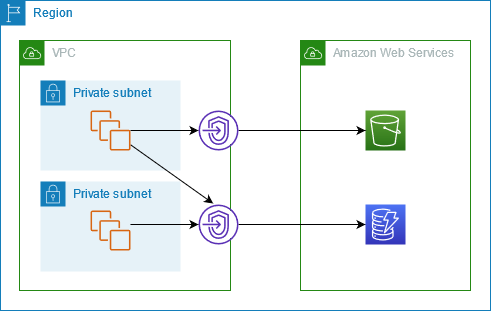
During creation, you select the subnet’s route table, and this entry is automatically added to the selected route table.
| Destination | Target |
|---|---|
| prefix_list_id | gateway_endpoint_id |
Unlike a Gateway Endpoint, a VPC Interface Endpoint can be used for most services. The main difference is that an Interface Endpoint can integrate with a security group and supports custom DNS resolution (private DNS name), but it’s more expensive.
https://docs.aws.amazon.com/vpc/latest/privatelink/gateway-endpoints.html
EC2
ELB
Auto-Scaling Group
S3
DNS
Route53
Lambda
- What is Lambda?
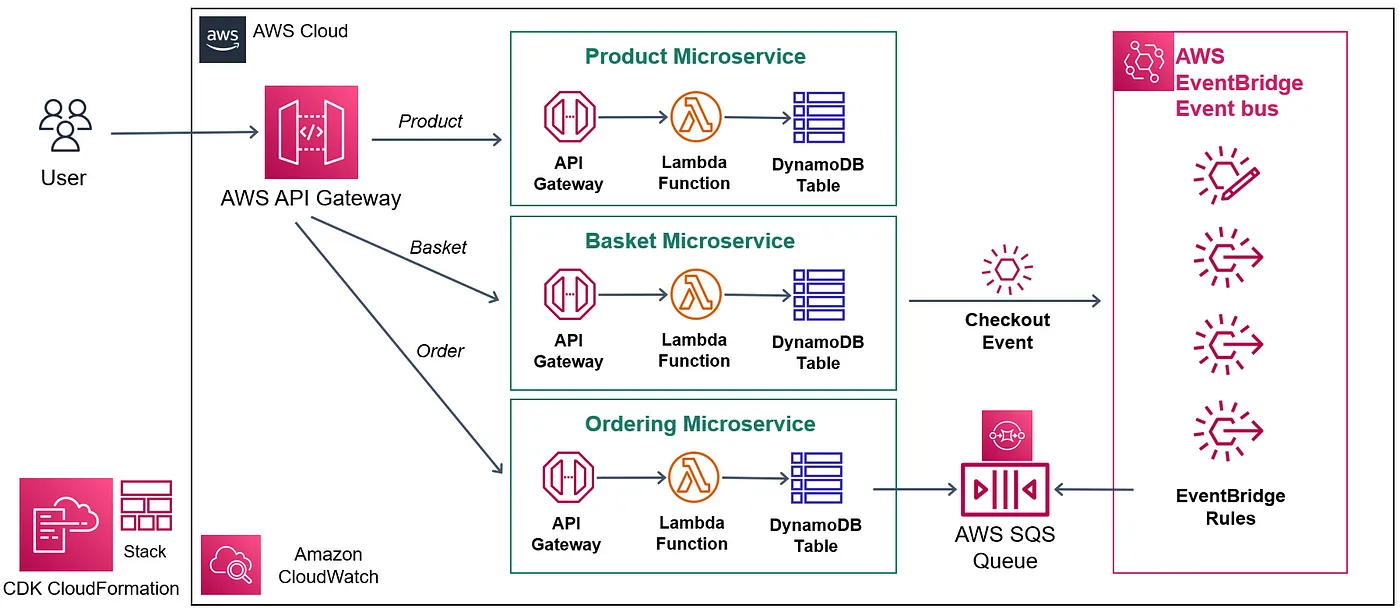
Lambda is an event-driven serverless service with custom business-logic code that triggers invocations of other services based on different conditions. It supports both synchronous and asynchronous requests and is highly scalable. You can set reserved concurrency to reserve a certain number of Lambda functions to handle large volumes of API requests, and on top of reserved concurrency, provisioned concurrency to warm up Lambda functions, pre-running the Lambda environment initialization to reduce cold starts and further lower latency.
Lambda supports many runtimes, such as Python 3.11, Nodejs20, Java 17, Java8, Ruby, etc. You can also define a custom runtime.
For Python, you define the behavior after the function is triggered in the handler.
1 |
|
See this doc for which runtimes will be deprecated. A deprecated runtime can still be triggered, but AWS won’t do security patches or maintenance for it, and if a deprecated runtime is attacked and affects AWS infrastructure, under the shared responsibility model AWS has the right to freeze the user’s function. So in short: proceed at your own risk.
- What are the ways to create a Lambda function?
You can upload a zip file, use a blueprint, or create it via a container image. Note that if you package an image, it’s best to package it on an Amazon Linux environment, since if the app involves certain low-level system calls, errors may occur, because Lambda itself runs on Amazon Linux EC2.
- Since Lambda’s own VPC is managed by AWS, how do you connect it to another custom VPC?
First, be sure the Lambda’s execution role has the AWSLambdaVPCAccessExecutionRole permission; only with it can a Hyperplane ENI be created when the Lambda is created, serving as the network interface between the Lambda function and the target resource.
- What’s the main difference between synchronous and asynchronous invocation of a Lambda function?
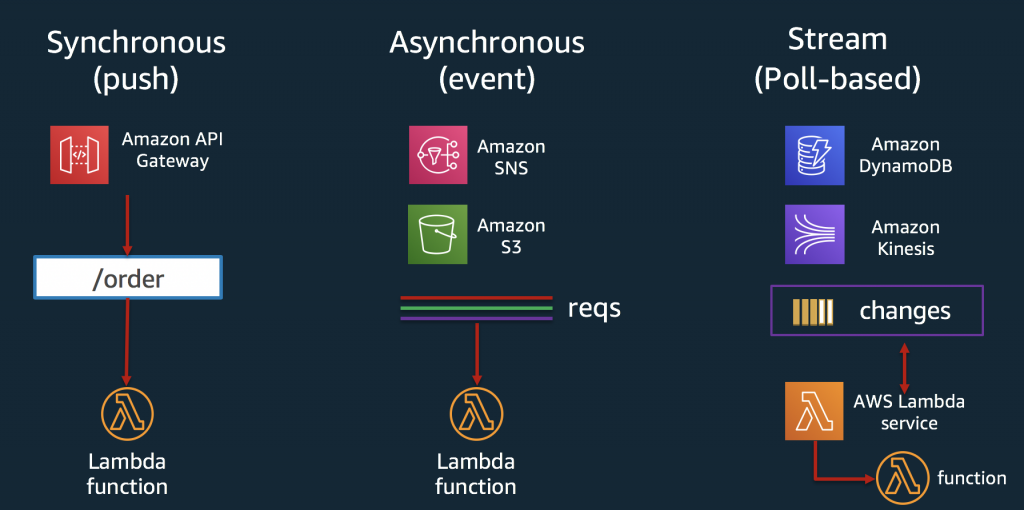
The main difference is whether it responds immediately. On synchronous invocation, you get a response immediately on success, while on asynchronous invocation the request waits in an event queue for Lambda’s poller to consume it, so the client may receive StatusCode: 202 on asynchronous invocation.
Here’s a simple synchronous invocation via the AWS CLI:
1 | aws lambda invoke --function-name my-function \ |
On a successful invocation, the response may look like:
1 | { |
And this is an asynchronous invocation via the CLI:
1 | aws lambda invoke \ |
A successful output would be:
1 | { |
- How do you handle errors in asynchronous Lambda invocation?
Normally if an error occurs, Lambda retries twice first, which you can also observe in the logs. If the error cause is throttling, Lambda returns the event to the event queue and still retries, but with exponential backoff up to 6 hours.
You can also set up a Dead-Letter Queue, usually to keep records of asynchronous invocations, which also helps further troubleshooting. A DLQ can typically be an Amazon SQS or Amazon SNS topic.
Reserved Concurrency && Provisioned Concurrency
To let a Lambda function auto-scale, it’s generally recommended to set reserved concurrency so the function always keeps a certain number of instances to handle requests.
The max reserved concurrency is: the account’s unreserved concurrency - 100
In short, at least 100 concurrency is kept on the account.
Provisioned concurrency specifies how many of these reserved functions need to be pre-warmed. Warming here means initializing the Lambda execution environment, like loading the runtime and initializing variables, and also running the initialization of variables outside the handler. This means the initialization happens once, and then the execution environment is kept to respond quickly to later requests.
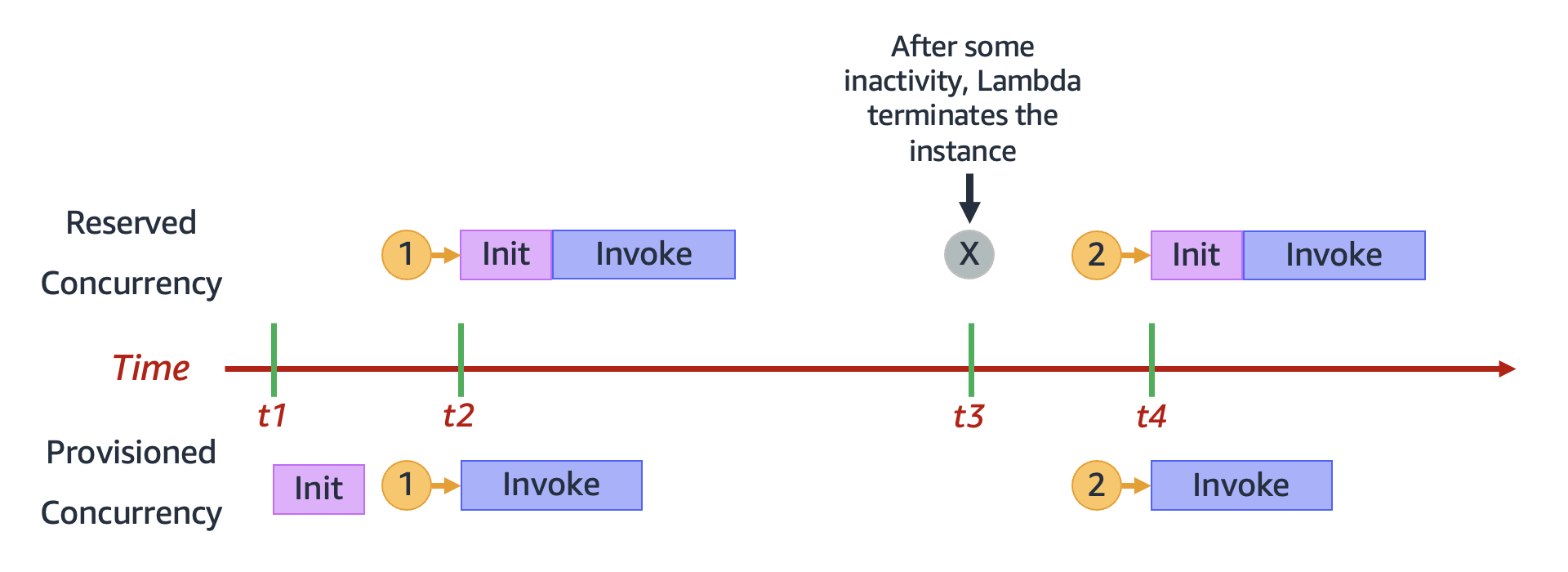
As the figure in the AWS docs above explains in detail, without provisioned concurrency, every new request after the Lambda terminates has to go through the Lambda Init phase again.
Ref:
How do you compute the needed concurrency?
$Concurrency = (average requests per second) \times (average request duration in seconds)$
Average requests per second times average request duration gives a rough estimate of how much concurrency you need. For a concrete measurement, look at Lambda Invocation Metrics for the average requests per second, then estimate the average request duration via the Duration metric.
API Gateway
SNS / Pinpoint
SQS
MQ
Cloudformation
AWS CDK
ECS
EKS
Fargate




If you find my articles helpful, please support Kevin!
 Use boba to safe Kevin!
