
Python for DevOps Notes |【DevOps Skill Tree】
🌐 中文版:繁體中文
Basic Data Types
data type
- You can get an object or variable’s data type with
type()
1 | >>> var = "This is a string" |
Variables
xvalidx_yvalidx-yinvalid- Python variables are case-sensitive
VARis not equal tovar
- What happens when you type
x=1?- It creates an integer object with value 1
- So a fixed-size address is allocated in memory to store 1
- And the name
xpoints to the reference for that object
1 | >>> x =123 |
- In Python, a variable is a reference to an object, meaning the variable name points to an object in memory, but the variable itself doesn’t contain the memory address
- So when you assign one variable to another, both use the same reference
- Multiple variables initialized to the same value can be declared like
a = b = c = 1
Booleans
1 | bool(0), bool(), bool("") -> False |
Strings
- How to convert “2 0 1 7” to the list [2, 0, 1, 7]?
int(i) for i in "2 0 1 7".split()
Lists & Tuples
- What is a tuple in Python? What is it used for?
- An ordered, immutable collection of elements in Python, basically for holding multiple items in a single variable
- Its biggest difference from a list is that once a tuple is created, its values can’t change
coordinates = (120.5, 23.5 )
List Basic Operations
1 | >>> x = [1,2,3] |
- How do you iterate a list?
1 | for item in list: |
- How do you iterate a list by index?
1 | for i , item in enumerate(list): |
- How do you iterate a list in reverse?
1 | for i reversed(list): |
- How do you merge two sorted lists?
sorted(list1, list2) - What is a list comprehension?
- A more concise, convenient way to build a list
- Syntax:
[expression for item in iterable if condition]
1 | squares = [x**2 for x in range(10)] |
https://docs.python.org/3/tutorial/datastructures.html#list-comprehensions
Dictionaries
How do you create a dictionary?
1 | >>> my_dict = dict(x=1, y=2) |
How do you delete a specific key? dictName.pop(KEYNAME)
1 | >>> print(my_dict) |
How do you merge two dictionaries?
1 | dict1.update(dict2) |
Iterators
OOP, Class
Object
What information an object in Python holds? or what attributes an object has? a. Explain each one of them
An object is a collection of attributes and methods acting on some data.
- Attributes E.g.
self.name,self.age - Methods E.g.
def greet(self): - Class Variable: a variable shared across instances of a class E.g.
class_variable =0 - Special Methods (Magic Methods):
__init__,__str__,__repr__ - Docstring: a string describing a class or method:
"""This is a method""" - Class Name: the name of the class an object belongs to, accessible via
__class__, e.g.object.__class__.__name__ - Module Name: which module an object’s class is defined in, accessible via
__module__, e.g.object.__module__ - Dictionary containing all an object’s attributes and methods, usable for dynamic access, e.g.
object.__dict__
Classes
Python Built-In Functions
Explain the difference between repr, any, and all?
__repr__() is a special method in Python used to tell others about an object’s contents.
1 |
|
When the code above runs, it prints the object’s memory address, which doesn’t describe the object itself, but repr can describe the object.
1 | class Person: |
any() returns True if at least one element in the iterable is True. It returns False if the iterable is empty or all elements are False.
all() returns True if all elements in the iterable are True. It returns False if the iterable is empty or any element is False.
Inheritance
Inheritance is a feature all object-oriented languages have: a class can inherit the corresponding attributes and methods from another class.
Raises exception
- What is an error? What is an exception? What types of exceptions are you familiar with?
- The errors you may get are Syntax Error and Exception
- A Syntax Error means the code doesn’t follow the syntax rules, which the Python interpreter catches during parsing and reports
- An Exception is an error during execution, usually from unexpected situations, like dividing an integer by 0 or accessing an empty file
- But exceptions can be caught and handled with
tryandexcept
- But exceptions can be caught and handled with
- Common exceptions
- ZeroDivisionError
- ValueError
- TypeError
- IndexError
- KeyError
- FileNotFoundError
- AttributeError
- ImportError
Example
1 | try: |
1 | Cannot divide zero |
Async && Concurrency
For the concepts of synchronous and asynchronous, see this article.
Files Manipulation
How do you write to a file?
1 | with open("example.txt", 'w') as file: |
Given a text file, print every third line
1 | def print_3rd_line(file_path) ->str: |
Given a text file, print how many lines it has
1 | def print_line(file_path) ->str: |
Given a text file, print how many words it has
1 | def print_word(file_path) ->str: |
Write a piece of text to the end of an already-open file
1 | text = "A brown fox jumped over the lazy dog." |
How do you write a dictionary to a file?
1 | import json |
Read a JSON file
1 | import json |
Write a JSON file
1 | import json |
Using Pathlib
Print the contents of a file in the current directory
1 | import pathlib |
Write a string to a file
1 | import pathlib |
OS operations
Python’s os module provides many low-level operating-system system calls, with a unified calling interface across multiple operating systems.
Methods the os module provides
1 |
|
How do you print the current directory?
1 | import os |
Given the file path /dir1/dir2/file1, print the file name
1 | import os |
How do you run a shell command from Python?
1 | import os |
How do you join different paths together?
1 | import os |
Traversing a folder with os.walk
The os module provides a handy method called os.walk to traverse an entire file tree. This function returns a generator that yields a tuple on each iteration, containing the current directory, the directory list, and the file list.
1 | def walk_dir(parent_path): |
Regular expressions
Python’s re module provides regular-expression operations.
Suppose there’s a collection of strings:
1 | mail-list = ''' |
Say you want to find kevin@amazon.com but only know the email starts with k. How do you find it?
1 | import re |
This means any letter from the character sets A-Z and a-z, then + means the preceding character appears one or more times in the match. Since . is a wildcard, it needs to be escaped with a backslash \.
The re module represents the common character set [a-zA-Z0-9_] with \w, and ordinary digits [0-9] with \d.
So the code above can be rewritten as:
1 | import re |
To access the returned match object better, you can define groups of the match result with parentheses, and get the matched group directly from the returned object by number.
1 | import re |
To access the returned match object even more conveniently, you can name groups with ?P<NAME>.
1 | import re |
How do you find all IP addresses in a file?
For an input like this:
1 | In the ever-evolving digital landscape, tracking online data often requires observing user interactions from various regions. For instance, a significant number of logins were recorded from IP addresses like 24.31.173.2 and 82.33.11.118, which reflect diverse user origins. Security teams frequently monitor these access points, noting unusual activity from IPs such as 45.56.148.51 and 99.116.96.74. |
1 | import re |
Again using the re module to find the IP addresses in the text.
Various ways to make requests
To send a request to a server in Python, you’ll mostly use the requests module.
1 | import requests |
Available HTTP methods
| HTTP Method | Request | Description |
|---|---|---|
| GET | requests.get(url) |
can additionally set a params dictionary |
| POST | requests.post(url) |
can additionally set a data dictionary |
| PUT | requests.put(url) |
can additionally set a data dictionary |
| DELETE | requests.delete(url) |
delete the specified resource |
| HEAD | requests.head(url) |
request only the resource’s response header |
| OPTIONS | requests.options(url) |
request all HTTP methods the resource supports |
You can also use the
http.clientmodule to send requests; this module is part of the Python standard library.
Encrypting data
In Python you can encrypt text with the cryptography package, and hash with hashlib.
Hashing with Hashlib
hashlib provides several hash functions: SHA1, SHA224, SHA384, SHA512, and MD5.
1 | import hashlib |
Before hashing text, you first convert it to a binary string with encode. Then create an MD5 hash object, which processes our message and computes the MD5 hash value.
Then update the hash object, passing the binary string via update to hash, and output the 16-byte MD5 hash.
Output
1 | 87f77fdd7fa847899a10a7aab651bd75 |
Misc Questions
What do Python Interpreter do?
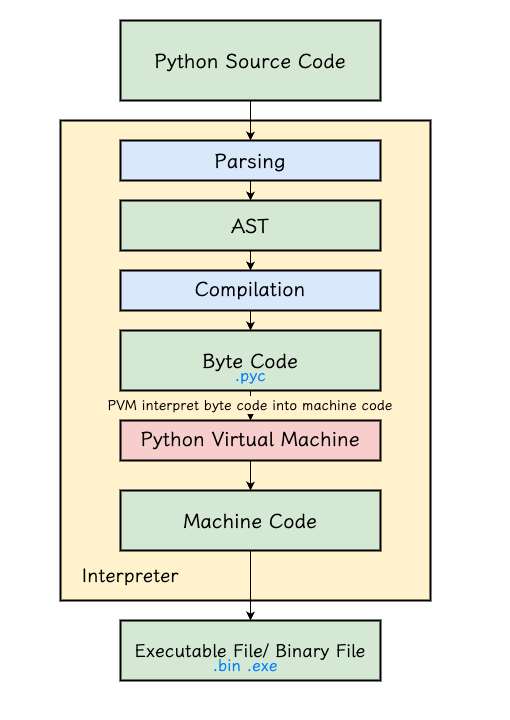
- Parsing
- In this phase the Python interpreter converts the code into an AST (Abstract Syntax Tree)
- The conversion involves lexical analysis and syntax analysis
- Syntax errors are usually caught in this phase
- In this phase the Python interpreter converts the code into an AST (Abstract Syntax Tree)
- Compilation
- The AST is converted into bytecode that the Python Virtual Machine (PVM) can execute
- Execution
- The PVM interprets and executes this bytecode
- The PVM is a stack machine that manages and executes bytecode line by line
For the detailed flow, see this article.
What is Python Global Interpreter Lock(GIL)?
- The Python GIL is a mutex in the Python interpreter (only in CPython) that ensures only one thread executes Python bytecode at a time, which helps solve memory-management problems such as race conditions
How GIL effect the multi-threading application?
- The GIL limits the concurrency of multi-threaded applications; it doesn’t help much with CPU-bound tasks, since a CPU has multiple cores to share the computation
- You can use multiprocessing to bypass the GIL’s limitation, or switch to a Python without a GIL, like IronPython
https://yhtechnote.com/global-interpreter-lock/
https://chtseng.wordpress.com/2024/02/29/python%E9%9D%9E%E5%90%8C%E6%AD%A5%E8%88%87%E5%B9%B3%E8%A1%8C%E8%99%95%E7%90%86/
Explain the difference between Concurrency and Parallelism in detail
Concurrency means execution on a single CPU/core where multiple tasks run interleaved
Parallelism means execution on multiple CPUs/cores, possibly containing multiple concurrent tasks
Reference




If you find my articles helpful, please support Kevin!
 Use boba to safe Kevin!
