
Getting to Know Lambda, feat. a Small Container-Reuse Experiment
🌐 中文版:繁體中文
Preface
First off, why does serverless always come up alongside Lambda?
Let me introduce this service.
FaaS (Function as a Service)
Once you talk about serverless computing, its core concept comes up: Function as a Service (FaaS). Here’s Wikipedia’s explanation of FaaS:
FaaS is a cloud computing model. Built on Platform as a Service (PaaS), serverless computing provides a micro-architecture where the end customer doesn’t need to deploy, configure, or manage server services; the server services needed to run the code are all provided by the cloud platform.
Right, the core of this concept is letting users focus on designing products or business logic without worrying about deploying, configuring, or setting up servers.
The first to put this concept into practice and launch a service was AWS’s Lambda, released in 2014. (Microsoft’s Azure Functions followed, of course.)
Lambda functions
Lambda runs your code on high-availability compute infrastructure and performs all administration of the compute resources, including server and operating system maintenance, capacity provisioning and automatic scaling, and logging. With Lambda, all you need to do is supply your code in one of the language runtimes that Lambda supports [1]. [name=AWS Documents]
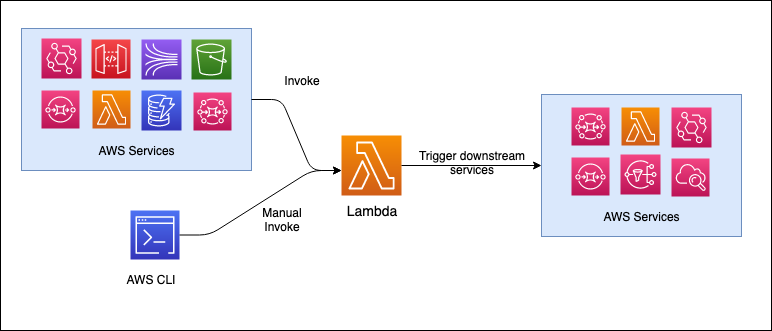
Behaviorally it’s basically the figure below. There’s some upstream trigger, usually a service that invokes the Lambda function, or a manual invocation via the AWS CLI. After Lambda finishes running the function, it returns the result to the original service and can forward to a downstream destination, which is usually another service.
Now suppose you’re a beginner just getting into Lambda. You might be eager to open the Console, use the sample code (or, for some people, delete the sample without reading it and just paste in your local code), test the Lambda function with the default event, and then find it doesn’t work.
Don’t rush. Before diving in, it’s best to have a concept of the Lambda runtime and Lambda program model.
Basic specs
- RAM
- Storage
Configuration, RAM
RAM is proportional to CPU processing power, so raising RAM also raises CPU processing speed.
128MB to 3008MB
Reference:
https://koding.work/aws-lambda-performance-is-related-to-memory-size/
Lambda Runtimes
Lambda supports development in multiple programming languages via runtimes. Each major programming language version has its own runtime. These runtimes provide the basic language libraries and execution environment.
Mainstream languages have officially-supported runtimes, like NodeJS, Python, Java, Go, Ruby, and so on, and you can also define a custom runtime. For example a C++ runtime; the official docs provide a GitHub repo and a post on how to use such custom runtimes [3].
I’ve defined a Perl runtime myself, but you’ll need to write your own images. :(
Also, Lambda runtimes are all developed on Amazon Linux. So if you need a custom runtime, it’s generally recommended to spin up a t2.micro EC2 (choosing an Amazon Linux AMI) and build the runtime there.
Lambda programming model
The programming model Lambda provides is common across all runtimes. It defines a handler to process incoming events. This approach essentially tells Lambda the function’s entry point. The runtime passes an object containing the invocation event and context into the handler, such as the function name and request ID.
If you create functions with different runtimes, you should see handlers in different languages in the console’s code block.
Handler (Python) [4]
1 | def handler_name(event, context): |
Handler (Java17)
1 | package example; |
Handler (Go)
1 | package main |
And so on.
Also, although a freshly-created Lambda only has the single Lambda-Handler file, you can actually access the /tmp directory in the Lambda execution environment. Each execution environment provides 512 MB to 10,240 MB of disk space in /tmp, in 1 MB increments [5]. I’ll get into the specifics when I cover the Lambda execution environment lifecycle.
Permissions
In Lambda, operations are performed on behalf of the source service mainly through an execution role.
So what is a Lambda execution role?
A Lambda function’s execution role is an AWS IAM role that grants the function permission to access AWS services and resources. For example, you can create an execution role that has permission to send logs to Amazon CloudWatch and upload trace data to AWS X-Ray. This page provides information on how to create, view, and manage a Lambda function’s execution role [6].
The biggest difference between an execution role and a regular role is that when the function is invoked, Lambda automatically provides your function with temporary credentials by assuming this role. The developer doesn’t have to call sts:AssumeRole in the function code.
The necessary setup for this is the role’s trust policy, which must specify the Lambda service as a trusted principal:
1 | { |
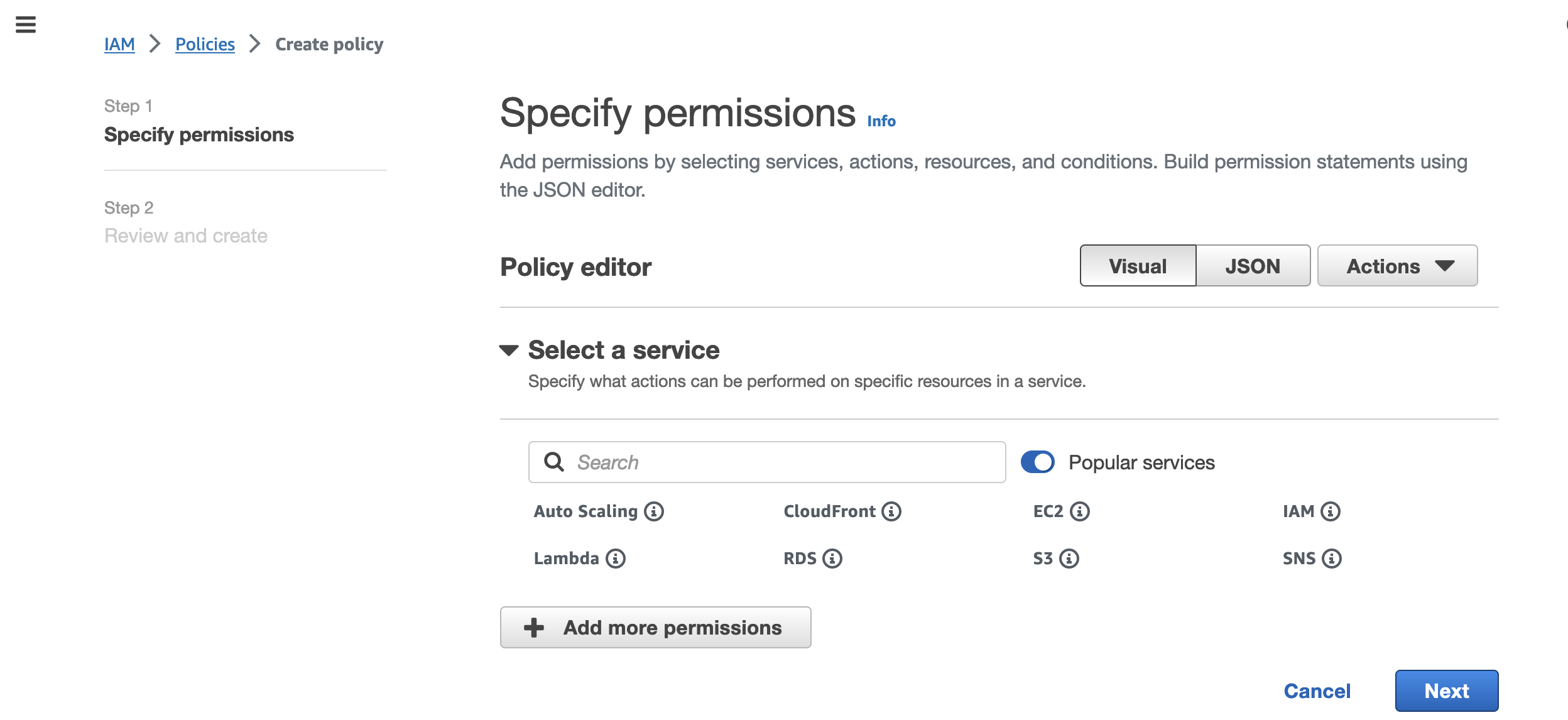
Once you have the execution role, you can attach policies to it, either AWS-managed policies or your own.
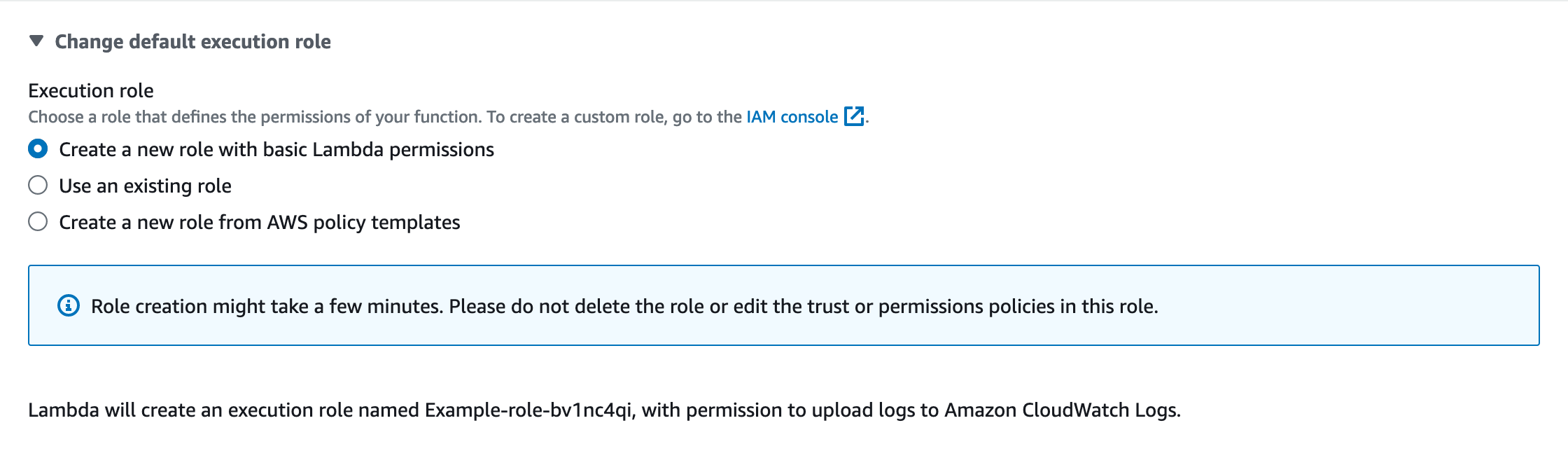
Of course, if you choose “Create a new role with basic Lambda permissions” when creating the Lambda, it creates a role with the LambdaBasicExecutionRole policy.
1 | { |
This policy basically grants the Lambda function the ability to create a log group, create log streams within it, and write logs.
When the Lambda is invoked, a log group containing the Lambda name is created in CloudWatch. If my Lambda is named TestInvocations, the log group name is /aws/lambda/TestInvocations.
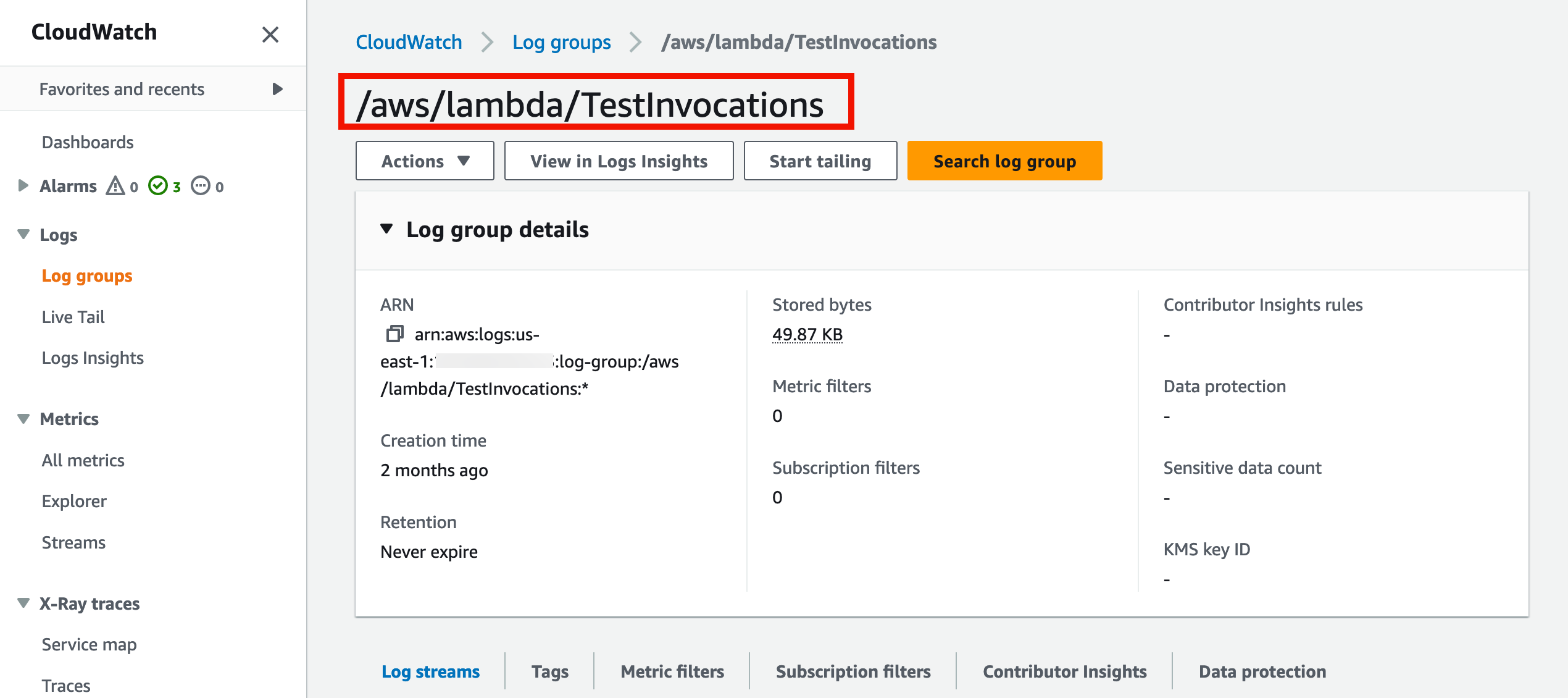
And underneath will be the corresponding log stream.
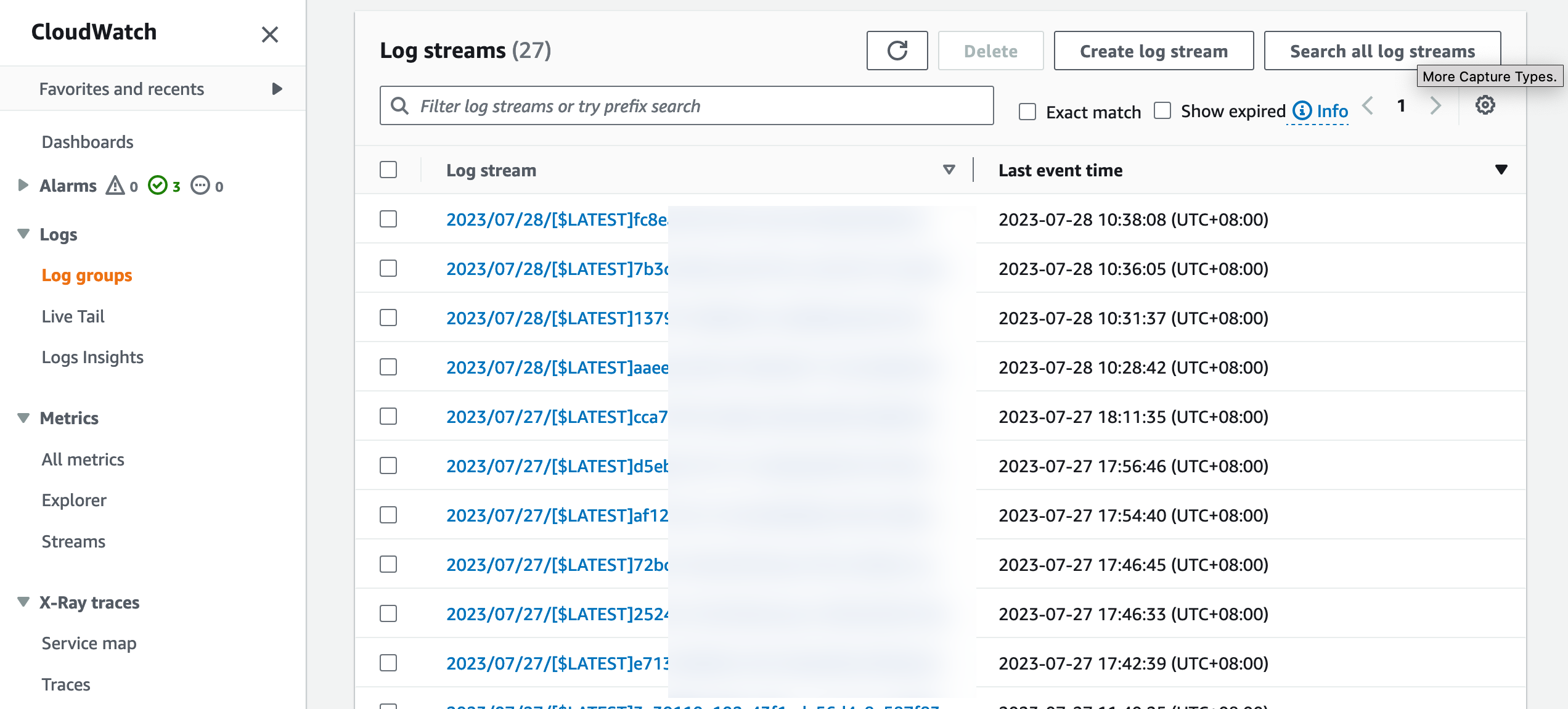
There’s something interesting here: each time you change the function or make a configuration adjustment (e.g. changing the timeout), the next invocation produces a new log stream.
That’s because each new configuration needs to be applied to a new sandbox, which reinitializes a new Lambda execution environment.
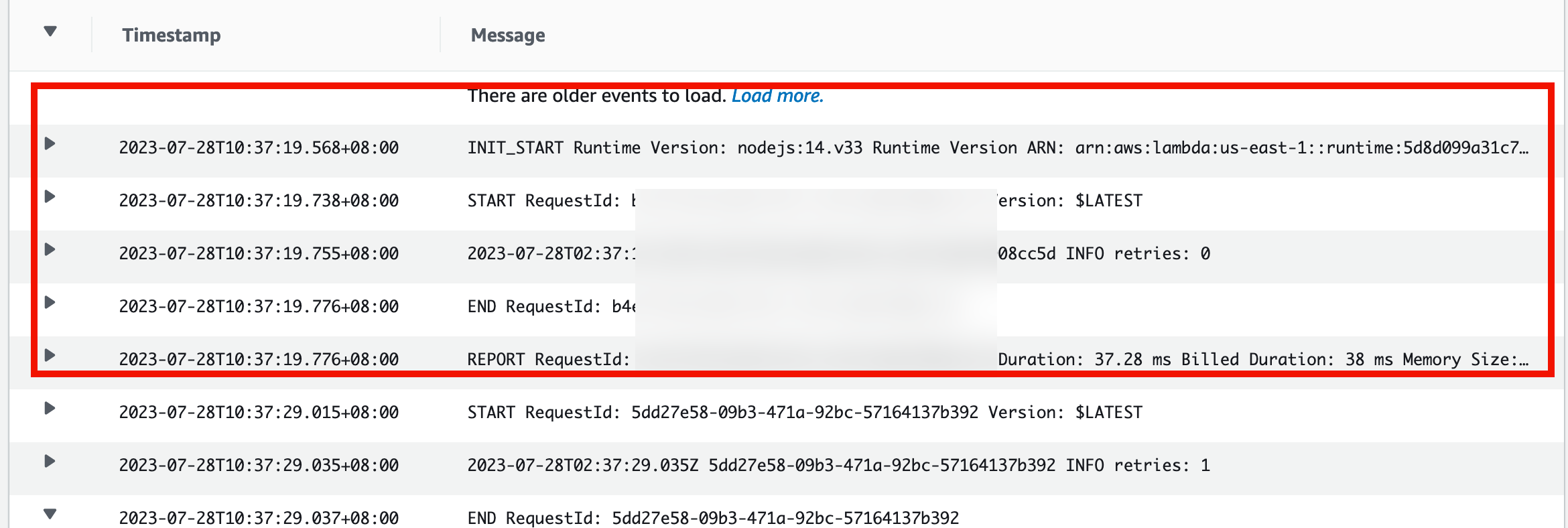
If you open a log stream, you’ll find every invocation comes with different messages:
- START
- (Print Output, if there are any)
- END
- REPORT
The span from Start to End is when Lambda is executing, and the timestamp difference for this span is bounded by your Lambda timeout setting. Let’s do a small experiment on this.
Experiment 1: Lambda timeout
Create a Lambda function named TestInvocation, choosing Python3.11 for the runtime and keeping default permissions. Then edit the code under the Code section of the Lambda console.
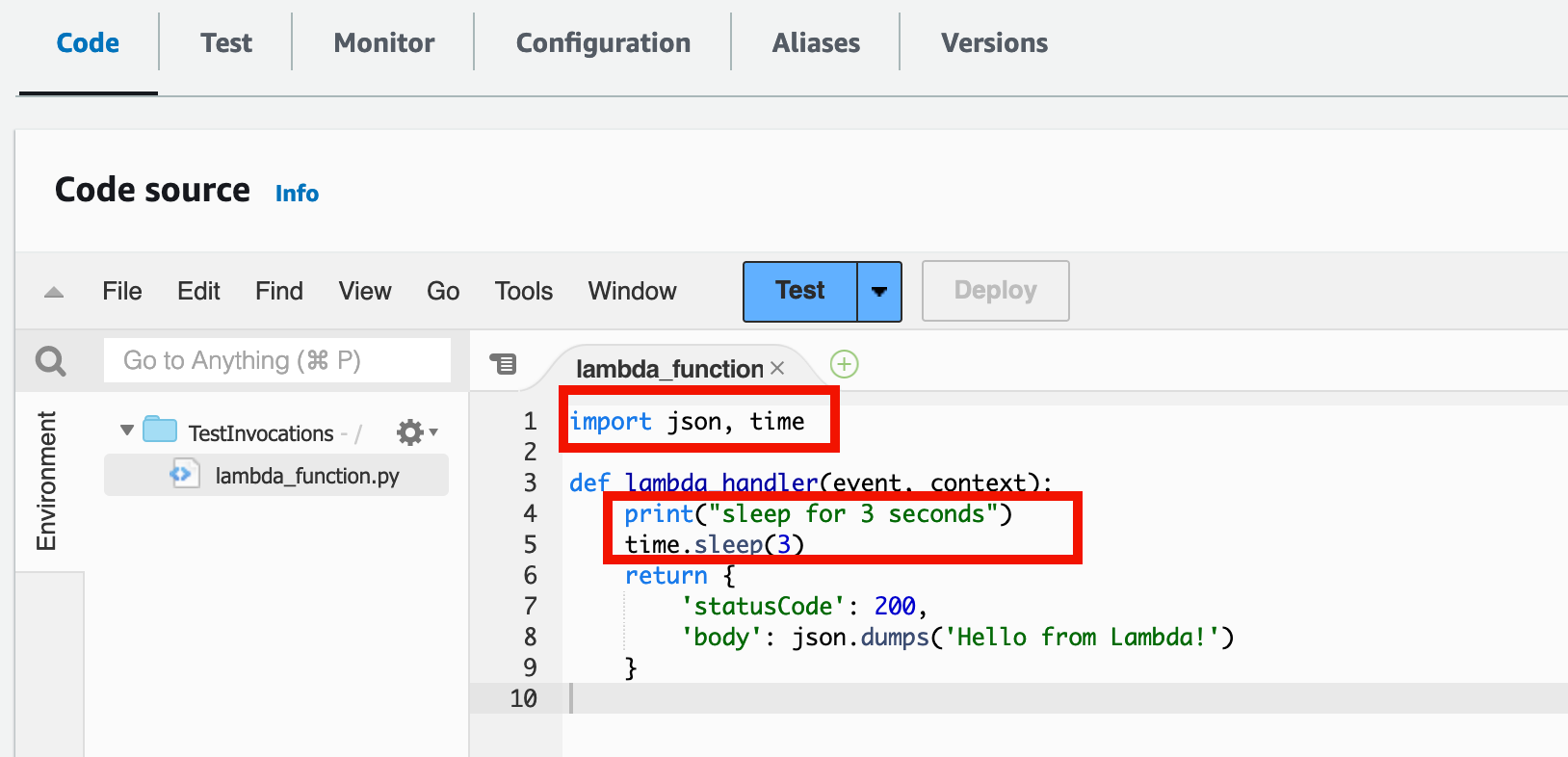
After creation, you get an empty Lambda handler. Here we import time and add a 3-second delay inside the handler. Then click Test; there’s a test JSON event you can use directly.
After testing, go to the Monitor page and click “View CloudWatch logs”.
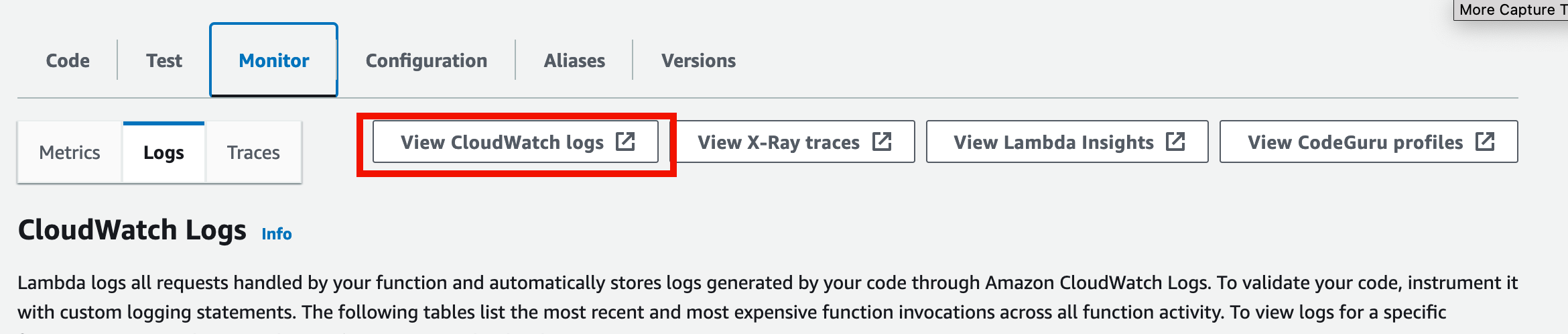
This jumps to the corresponding log group in CloudWatch. Click the newest log stream by timestamp to observe the result.
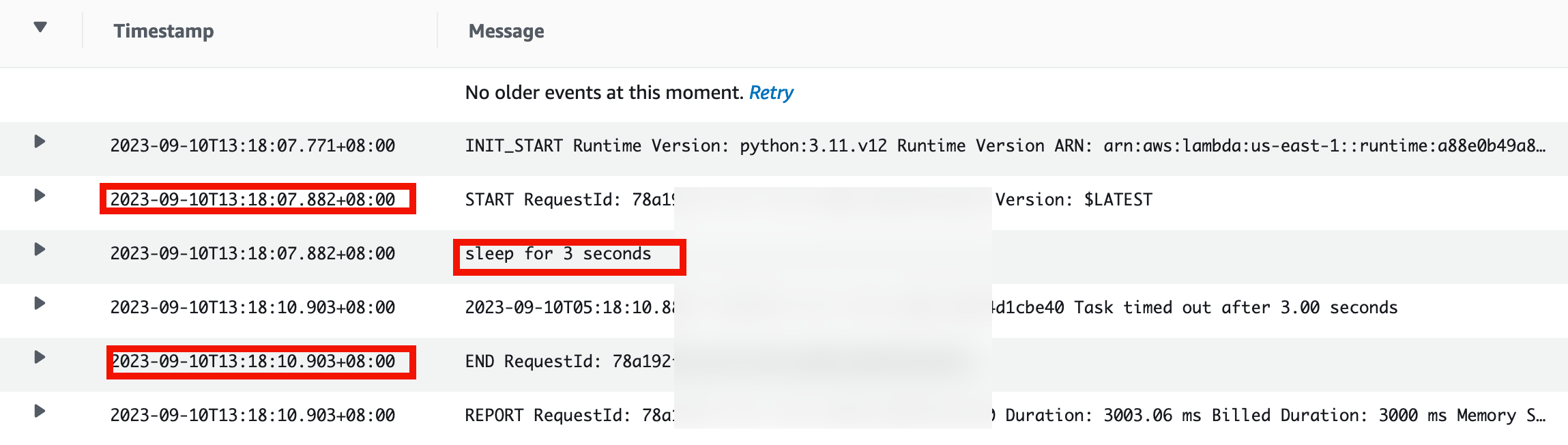
You can see there’s a 3-second gap between Start and End, with “sleep for 3 seconds” printed.
Sharp eyes will notice one log entry shows “Task timed out after 3 seconds”. That’s because a freshly-created Lambda function has a default timeout of 3 seconds. You can change this under “Configuration” in the Lambda console.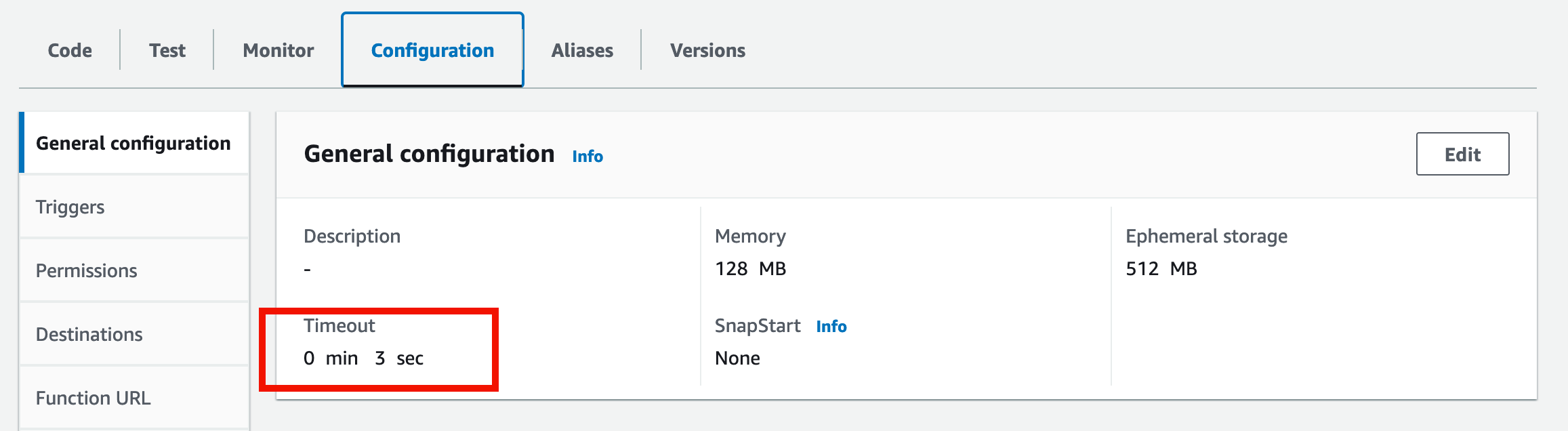
The maximum timeout is 15 minutes. So let’s set 15 minutes and change the handler’s delay to about 14 minutes to test.
This is a hard limit, meaning you can’t open a support case to raise the quota [8].
After waiting 14 minutes, the logs confirm it did run for 14 minutes.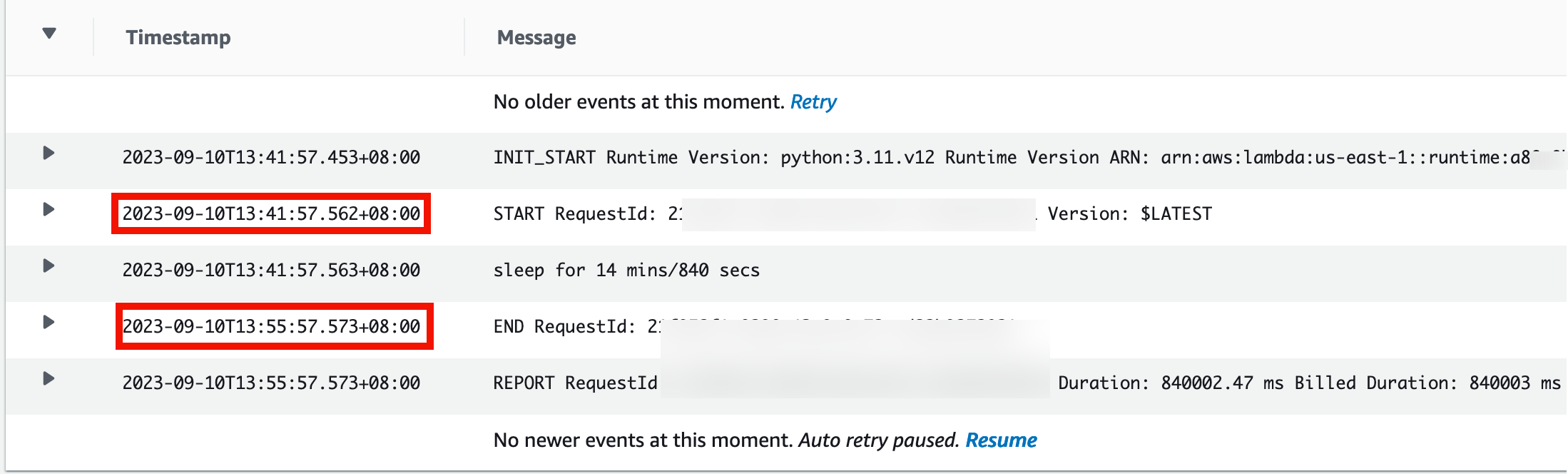
One thing not mentioned in the earlier log screenshots is INIT_START, the initialization phase that occurs every time an execution environment is initialized. The initialization phase includes Extension Init, Runtime Init, and Function Init [7].

image from AWS official docs
The first two init phases are more about building the execution environment, starting the runtime, downloading the deployment package into the environment, and so on. But at the Function Init phase, one more thing happens: it runs code outside the Lambda handler.
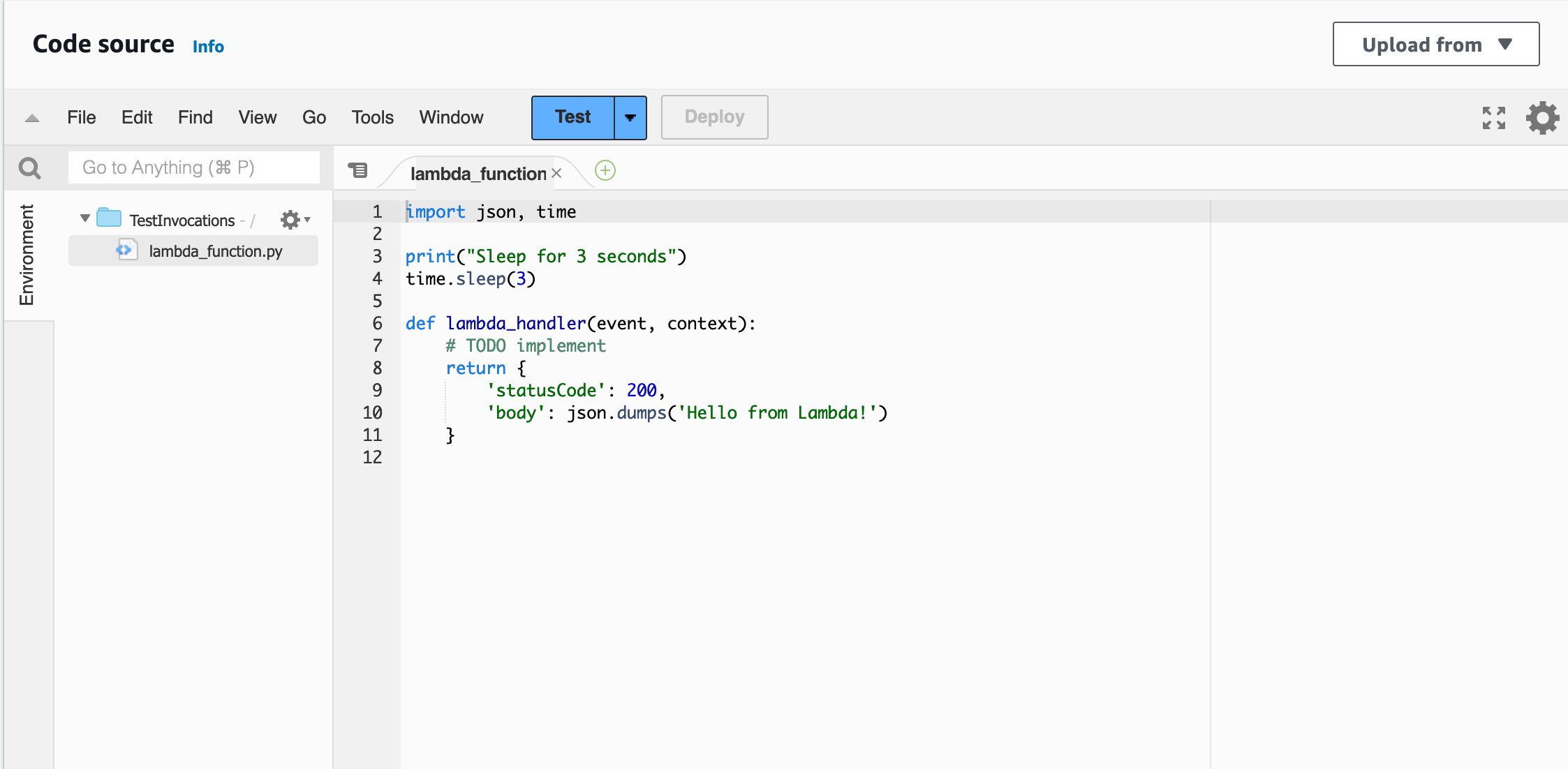
Here, outside the handler:
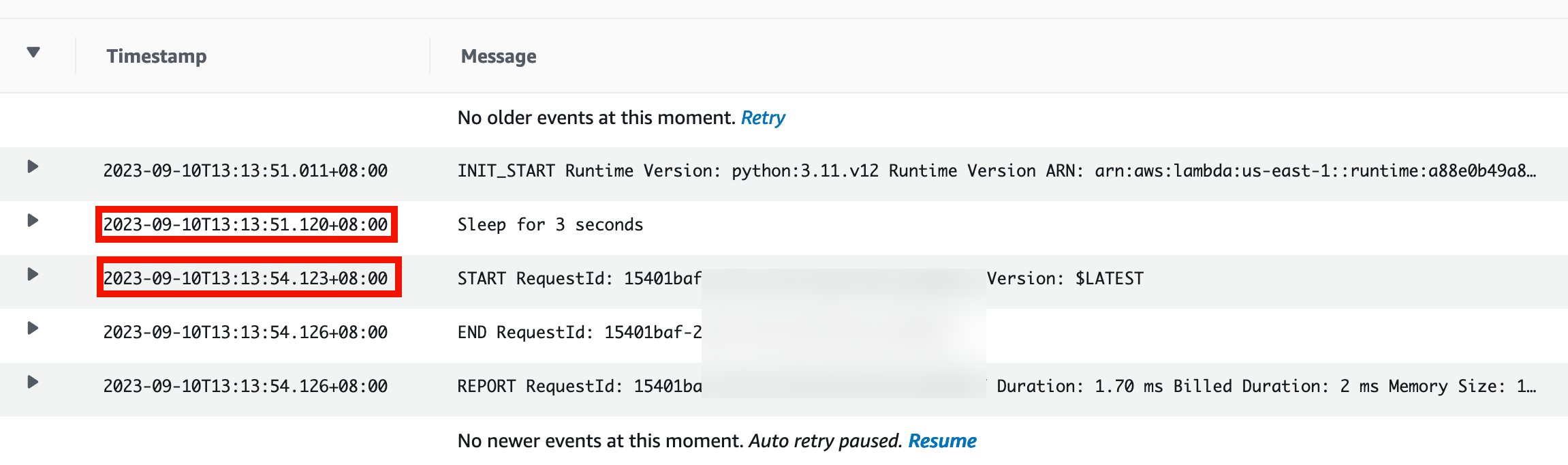
That’s a bit vague. Suppose you declare a global variable outside the handler, or initialize a DB connection outside the handler. These are well-suited to doing outside the handler, run during the span from Init-Start to Start, and as long as the same execution environment keeps being used, whatever Function Init does runs only once. This brings us to a Lambda characteristic called container reuse.
Experiment 2: a Lambda characteristic, container reuse
First, container reuse requires noting that a Lambda execution environment is a container. An ordinary Docker-like container environment tears the container down once execution finishes, but in Lambda’s use case it isn’t suitable to shut the environment down after every execution. Instead it keeps waiting for the next invocation request.
You can observe this characteristic in the logs. If you invoke the Lambda three times in a row on the Lambda page, you’ll see the subsequent invocation requests all appear in the same log stream, following after the previous invocation’s logs.
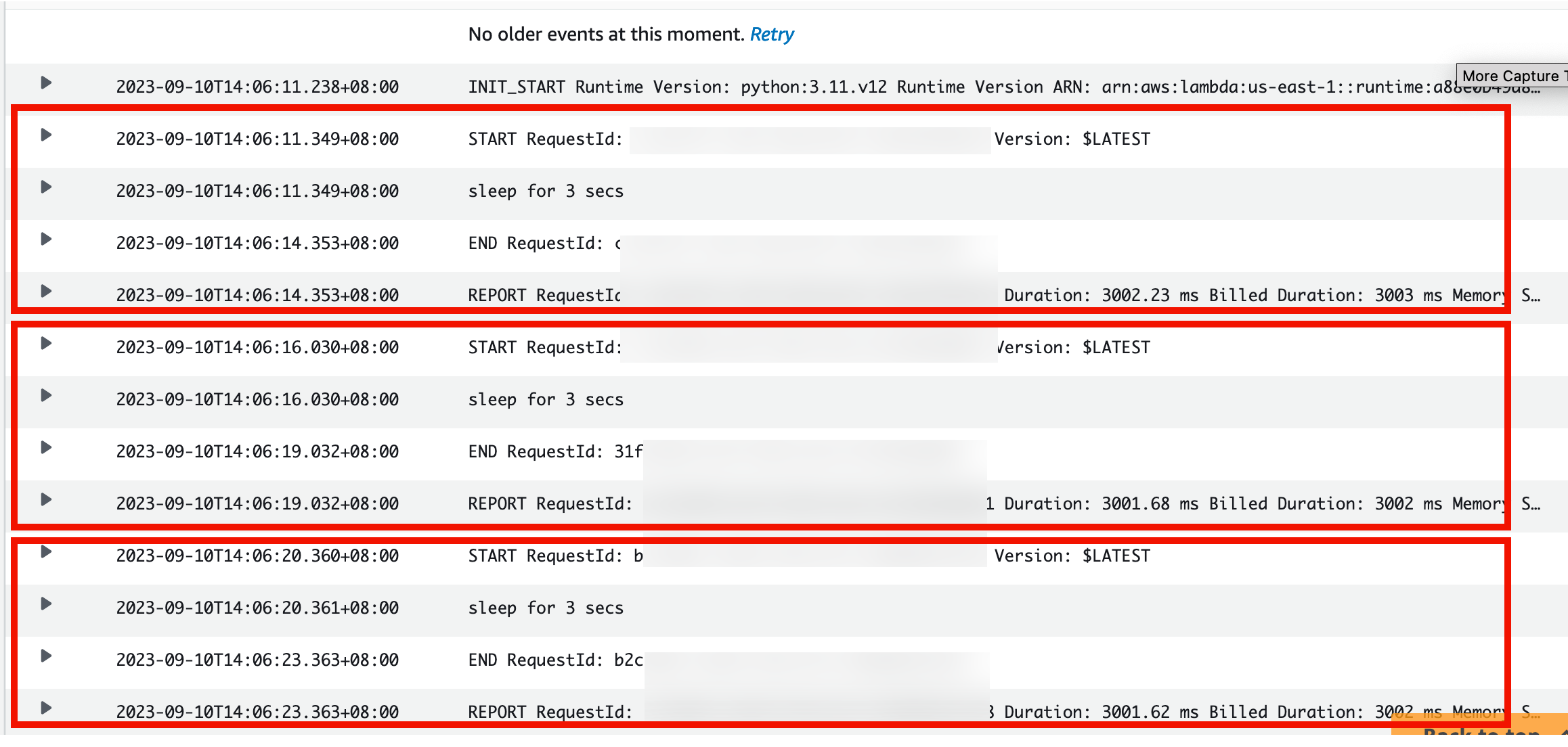
In other words, for the same Lambda execution environment, Lambda finishes one execution and goes straight on to the next request, meaning the same Lambda sandbox can be reused.
If you’re interested in Lambda container reuse, check out this official blog:
Understanding Container Reuse in AWS Lambda
https://aws.amazon.com/blogs/compute/container-reuse-in-lambda/
Here’s another interesting point: if you invoke using the Lambda console’s Test button, it waits for execution to finish before letting you click Test again.
What happens if we use the AWS CLI to invoke the function, opening three terminal tabs to invoke our Lambda at the same time?
Other key concepts
- Lambda execution environment
- Cold start
- Lambda deployment package
- Lambda synchronous / asynchronous invocation
- Lambda networking
References
[1] https://docs.aws.amazon.com/zh_tw/lambda/latest/dg/welcome.html
[2] https://docs.aws.amazon.com/zh_tw/lambda/latest/dg/lambda-runtimes.html
[3] https://aws.amazon.com/blogs/compute/introducing-the-c-lambda-runtime/
[4] https://docs.aws.amazon.com/zh_tw/lambda/latest/dg/python-handler.html
[5] https://docs.aws.amazon.com/zh_tw/lambda/latest/dg/lambda-runtime-environment.html
[6] https://docs.aws.amazon.com/zh_tw/lambda/latest/dg/lambda-intro-execution-role.html
[7] https://docs.aws.amazon.com/zh_tw/lambda/latest/dg/lambda-runtime-environment.html#runtimes-lifecycle
[8] https://docs.aws.amazon.com/zh_tw/lambda/latest/dg/gettingstarted-limits.html#function-configuration-deployment-and-execution






If you find my articles helpful, please support Kevin!
 Use boba to safe Kevin!
