
AWS Lambda Notes: Provisioned Concurrency and Reserved Concurrency
🌐 中文版:繁體中文
Recap
Earlier I covered a basic intro to Lambda, Lambda runtimes, permission configuration, and observing initialization time and function execution time from the logs.
At the end I left one question:
What happens if we use the AWS CLI to invoke the function, opening three terminal tabs to invoke our Lambda at the same time?
Experiment 1: setting Reserved Concurrency
We run this command:
1 | aws lambda invoke \ |
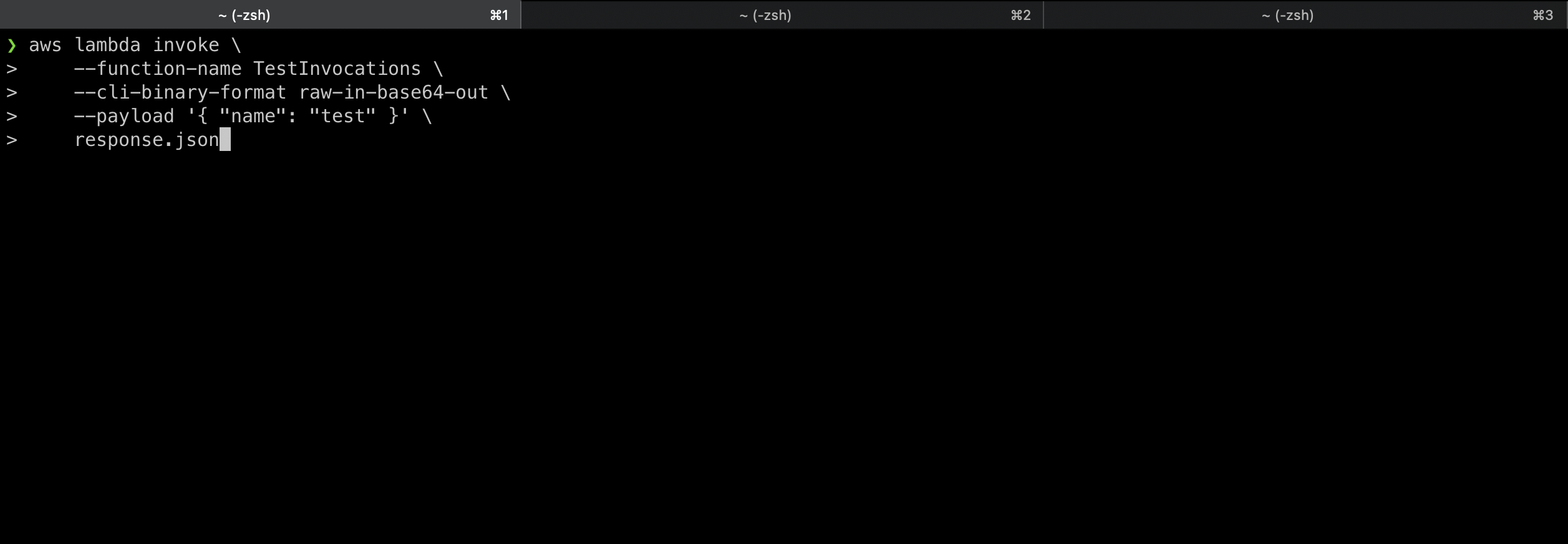
They all actually succeed, producing three log streams in CloudWatch.
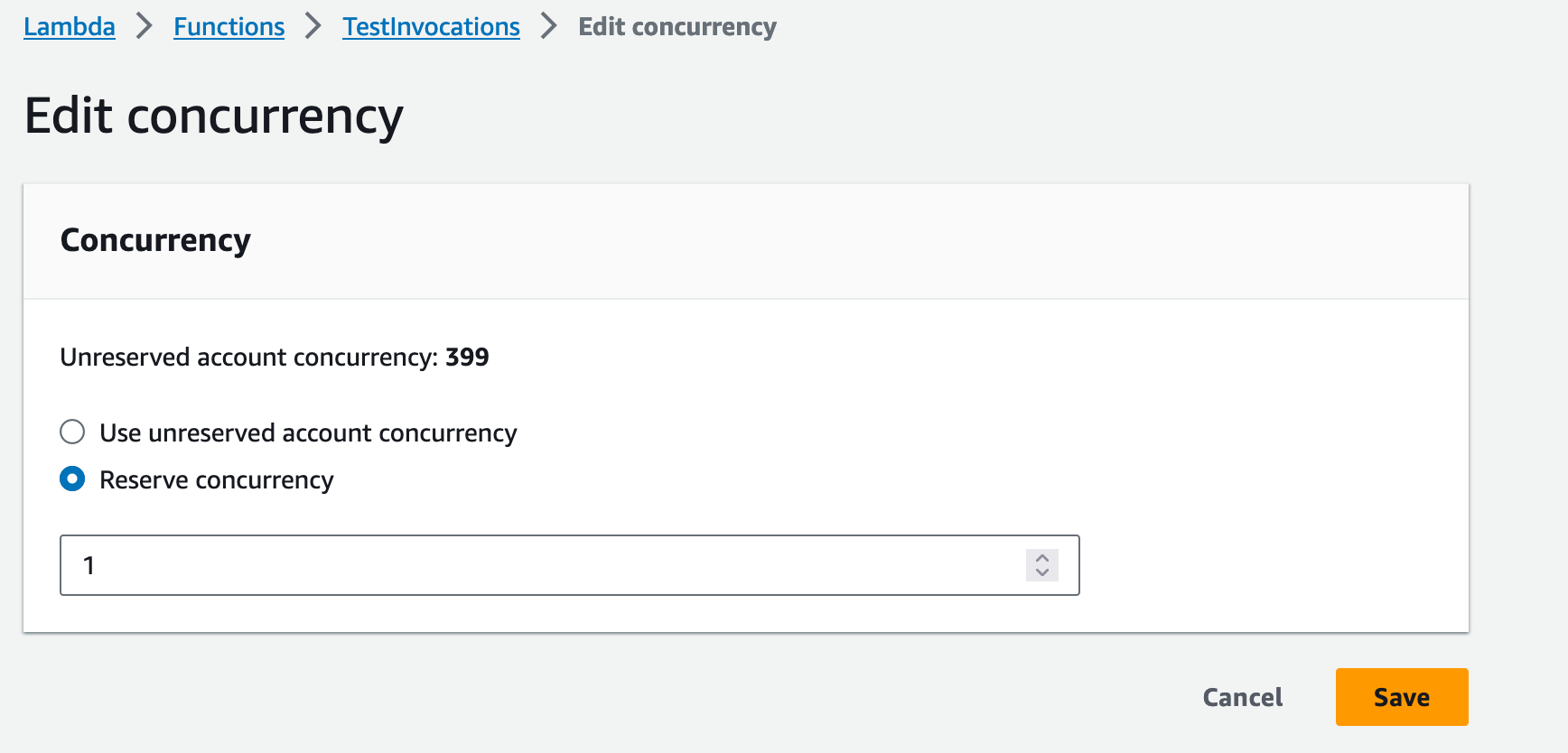
But if we tweak something, setting Reserved Concurrency to 1 and clicking save, then rerun the CLI invocation, let’s see what happens.

Now only one request returns 200; the rest are throttled, returning a TooManyRequestsException error message:
1 | An error occurred (TooManyRequestsException) when calling the Invoke operation |
This brings us to Lambda’s mechanism for handling large volumes of simultaneous requests.
First, what is Reserved Concurrency? And what is Unreserved Concurrency?
Reserved Concurrency
Concurrency means multiple requests at the same time. To handle these simultaneous requests, a Lambda function scales automatically. The nice thing about serverless is that you don’t have to think about how to configure scaling for Lambda, like setting up auto-scaling.
In Lambda, for a single function, the user only needs to consider “how many instances do you need to reserve for this Lambda function at any time?“
That’s when you can consider setting Reserved Concurrency for your function.
Reserved Concurrency is the maximum number of concurrent instances allocated to a function. When a function has Reserved Concurrency, no other function can use that concurrency.
If you set Reserved Concurrency to 1 in the Lambda console, 1 is deducted from Unreserved Concurrency.
This setting is a regional limit. If you set Reserved Concurrency to 100 for a function, the remaining 900 is shared by other functions in the region.
How much concurrency can you reserve for a function?
The answer is UnreservedConcurrency - 100 concurrency.
That is, a function can’t monopolize all concurrency for itself; at least 100 concurrency is left for other functions to share.
How do you decide how much concurrency to reserve for your function?
You can decide by observing the CloudWatch metric ConcurrentExecutions [1]. This metric shows the number of concurrent requests to your function across different time periods in a day. If this function receives at most 30 requests at once per day and the function is important to you, you can consider reserving 30 Lambda instances to handle requests.
Also worth mentioning: setting Reserved Concurrency for a function is free.
Provisioned Concurrency
Some might wonder: if the function scales with requests, then starting a new execution environment introduces latency for time-sensitive requests, right?
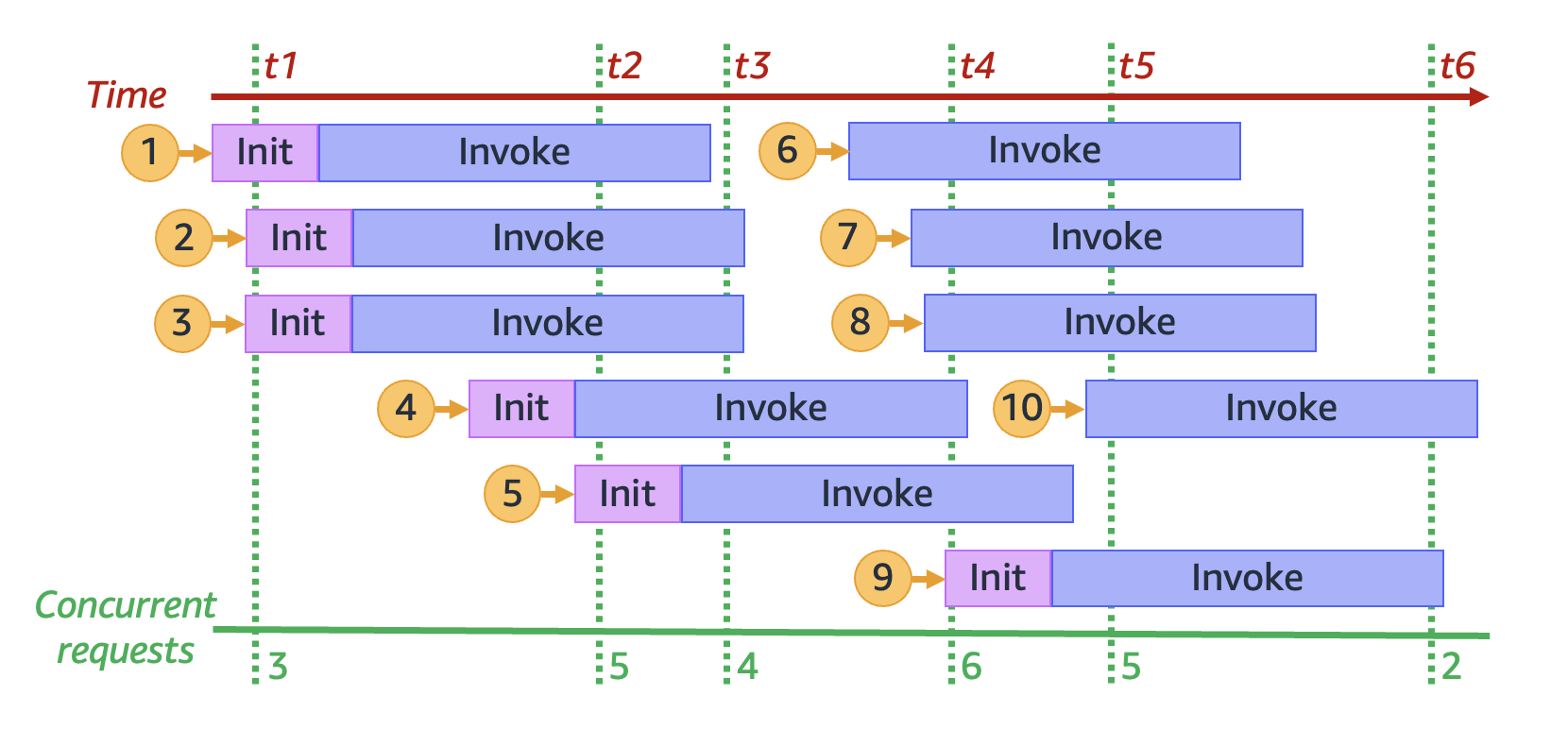
Image source: AWS official docs
That thinking is correct; see number 4 in the figure above, which is exactly this situation.
It means 3 execution environments are handling 3 requests, but when the 4th request comes in, a new Lambda execution environment must be initialized. That inevitably introduces latency, waiting for the runtime to start, the Lambda code and dependencies to download, and the code outside the handler to run (if any).
The point of Provisioned Concurrency is “pre-initializing multiple environment instances for a function to help reduce cold-start latency”.
Cold start latency is the uncontrollable delay while the Lambda execution environment is starting and loading (not including Function Init, the initialization time for code outside the handler). I’ll cover this part later.
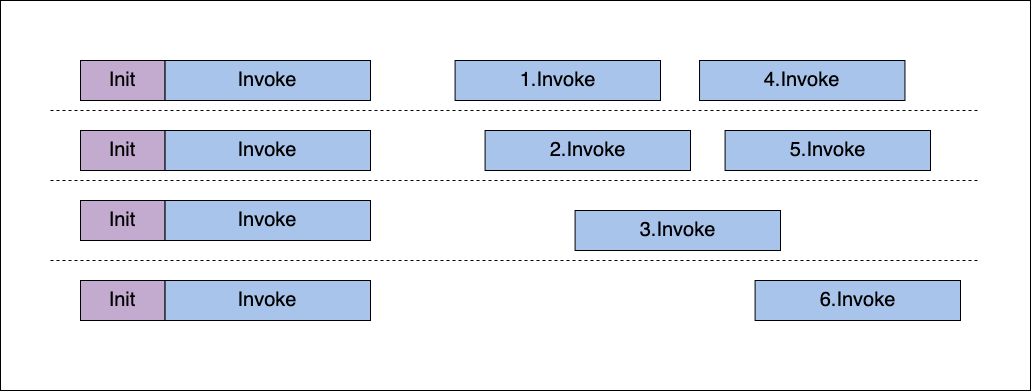
Back to Provisioned Concurrency: if it’s set, the figure looks more like the one below.
Suppose Provisioned Concurrency is set to 4. Then four Lambda execution environments are initialized from the start, and subsequent requests reuse those four. This guarantees four initialized Lambda environments always exist, which suits time-sensitive requests so they don’t take the initialization delay hit.
So how do you set Provisioned Concurrency? [2]
Note: setting Provisioned Concurrency for a function costs money.
Experiment 2: setting Provisioned Concurrency
There’s a prerequisite before setting Provisioned Concurrency: publishing a version of your function.
Every function defaults to $LATEST before a version is published, but Provisioned Concurrency can’t be set on the $LATEST version; that’s a limitation.
First find Publish new version under Version on the main page.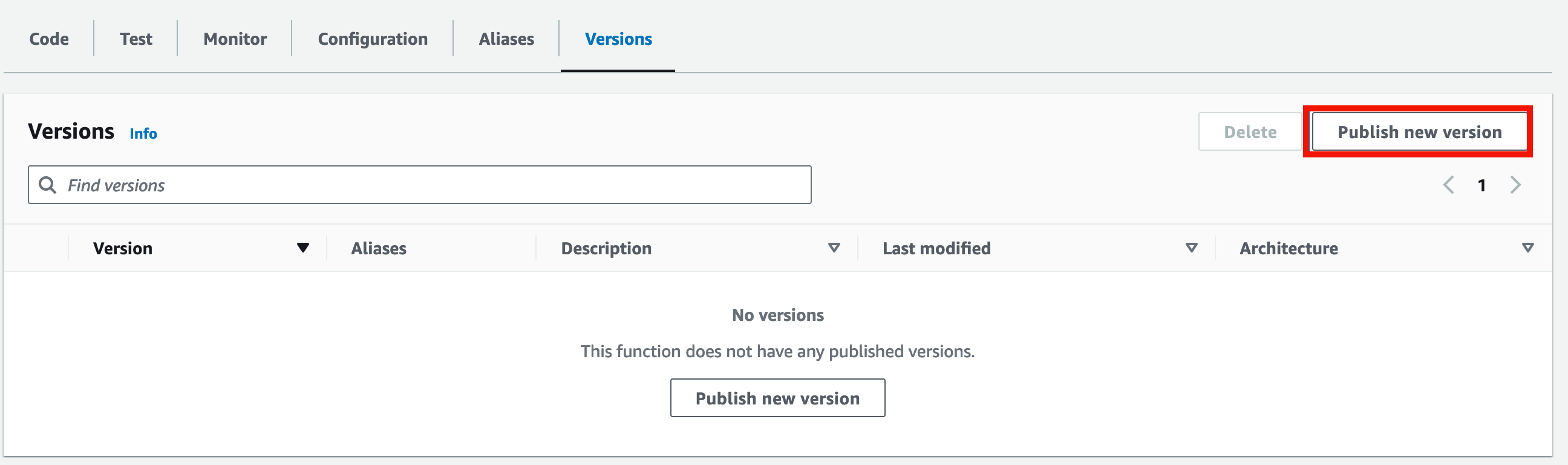
Then fill in this version’s description and click Publish.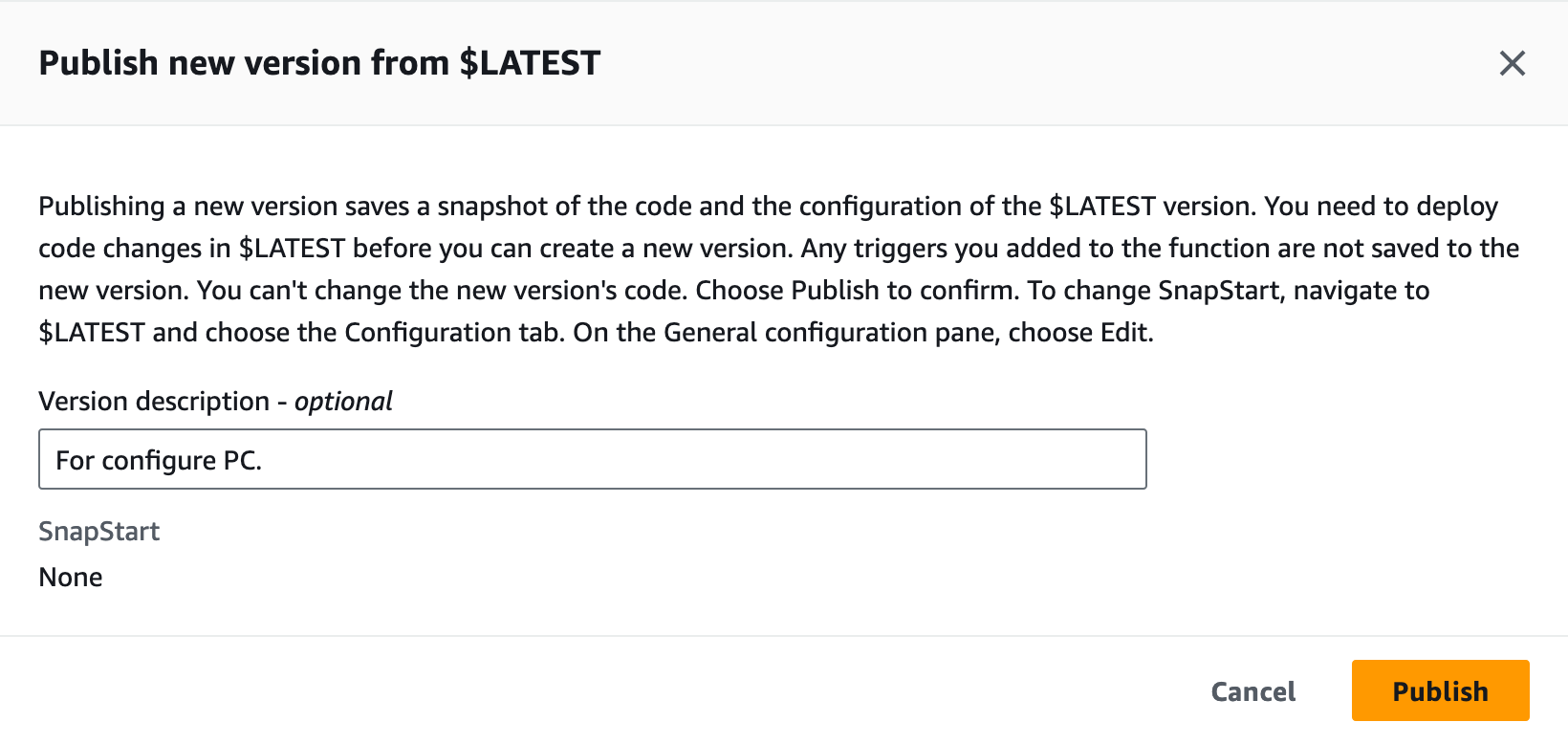
It redirects to the Version 1 Lambda console (slightly different from the $LATEST console). Now you should see the Provisioned Concurrency configuration screen; click it to set concurrency for Version 1.
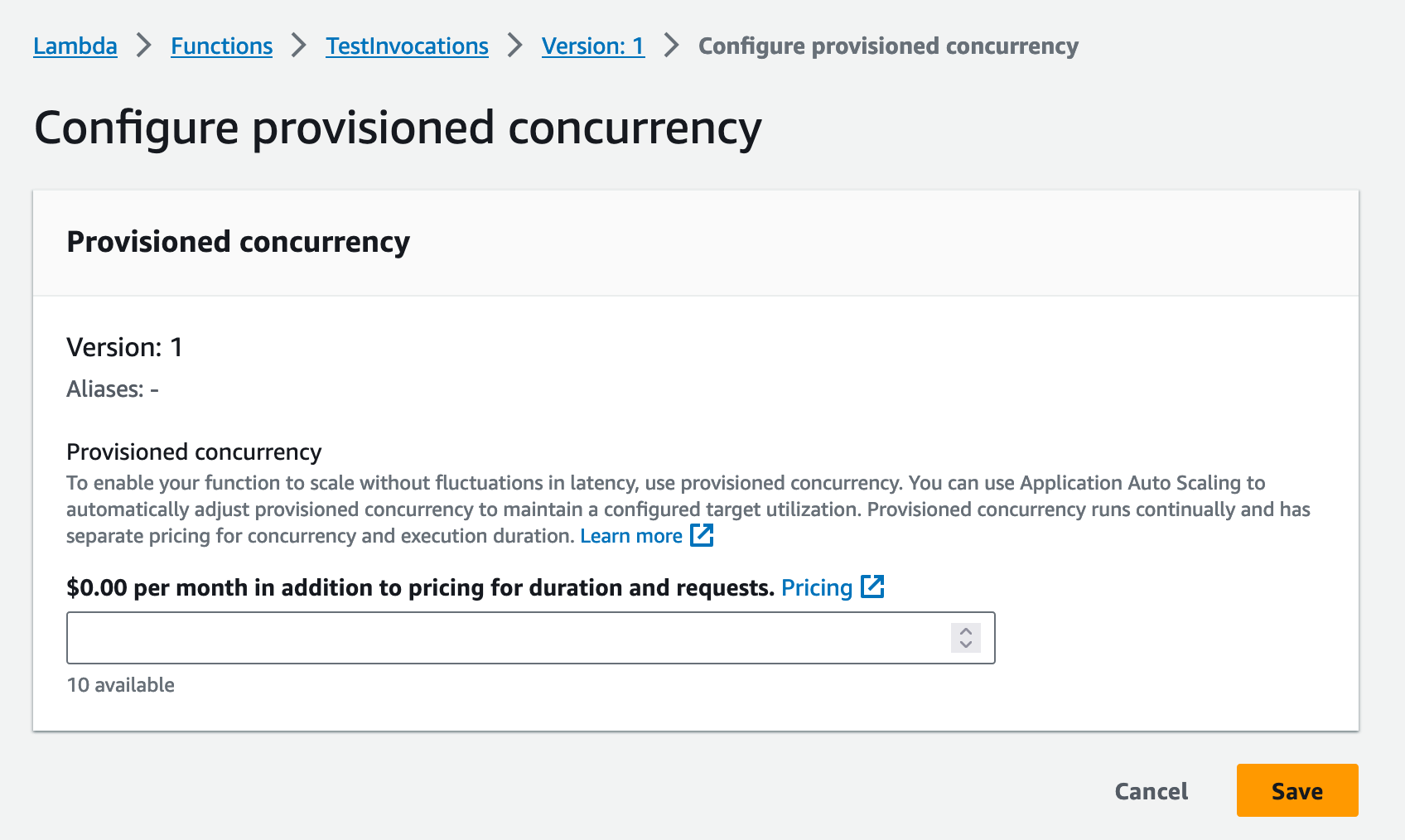
Below, enter the number of Lambda concurrency instances you want to keep in a warm-start state.
Notice “10 available”. Where does this number come from?
That number is actually your function’s Reserved Concurrency count.
Go back to the $LATEST version console.

Below you can see our setting is 10.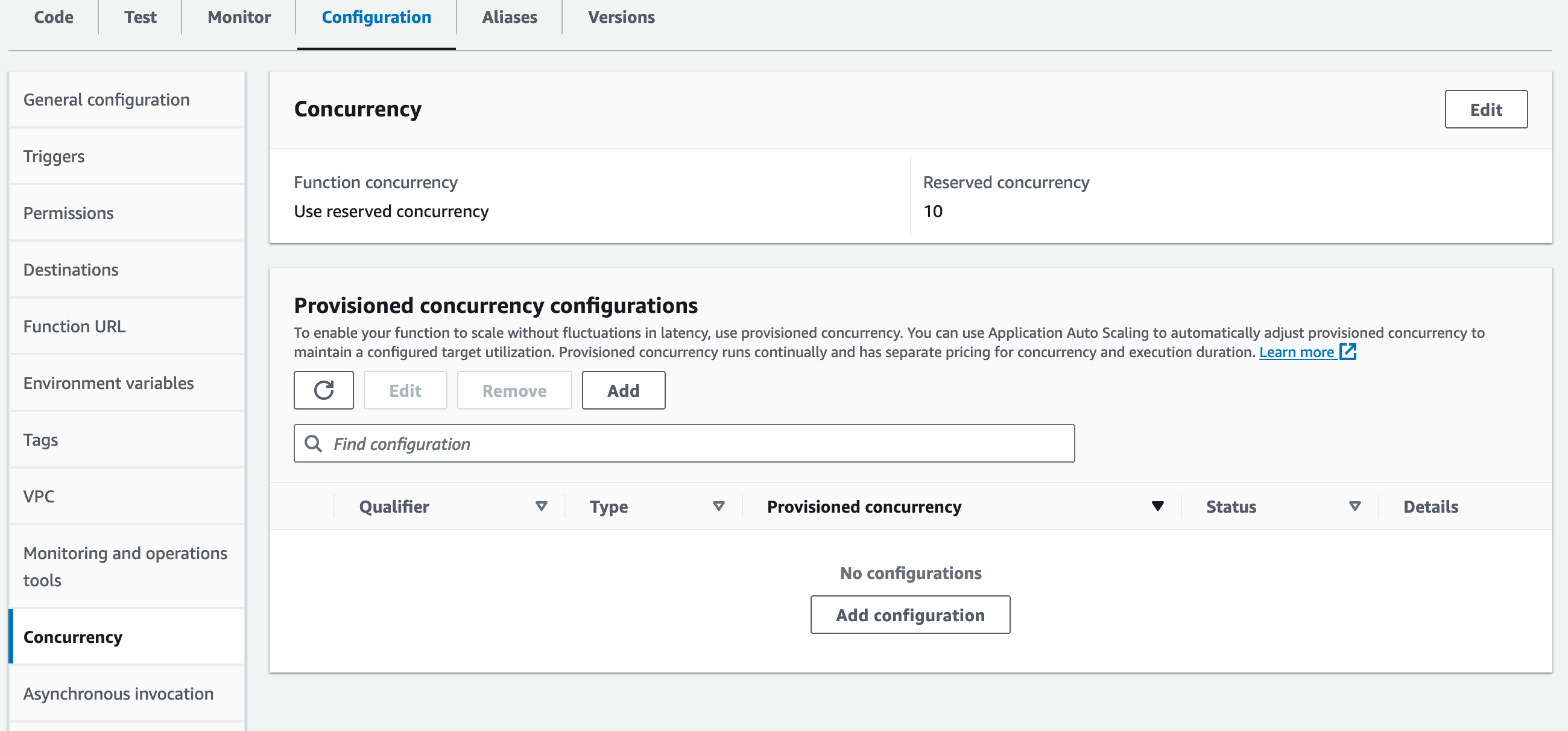
So the amount of Provisioned Concurrency we can set depends on the Reserved Concurrency set for that function.
Here we set Provisioned Concurrency to 5.

It takes some time to build the concurrency.
Then let’s test the configured Provisioned Concurrency.
First, here’s the test code (in the Version 1 function):
1 | import json, time |
We trigger the Lambda function via the AWS CLI:
1 | aws lambda invoke \ |
The --qualifier parameter takes a version name or alias name.
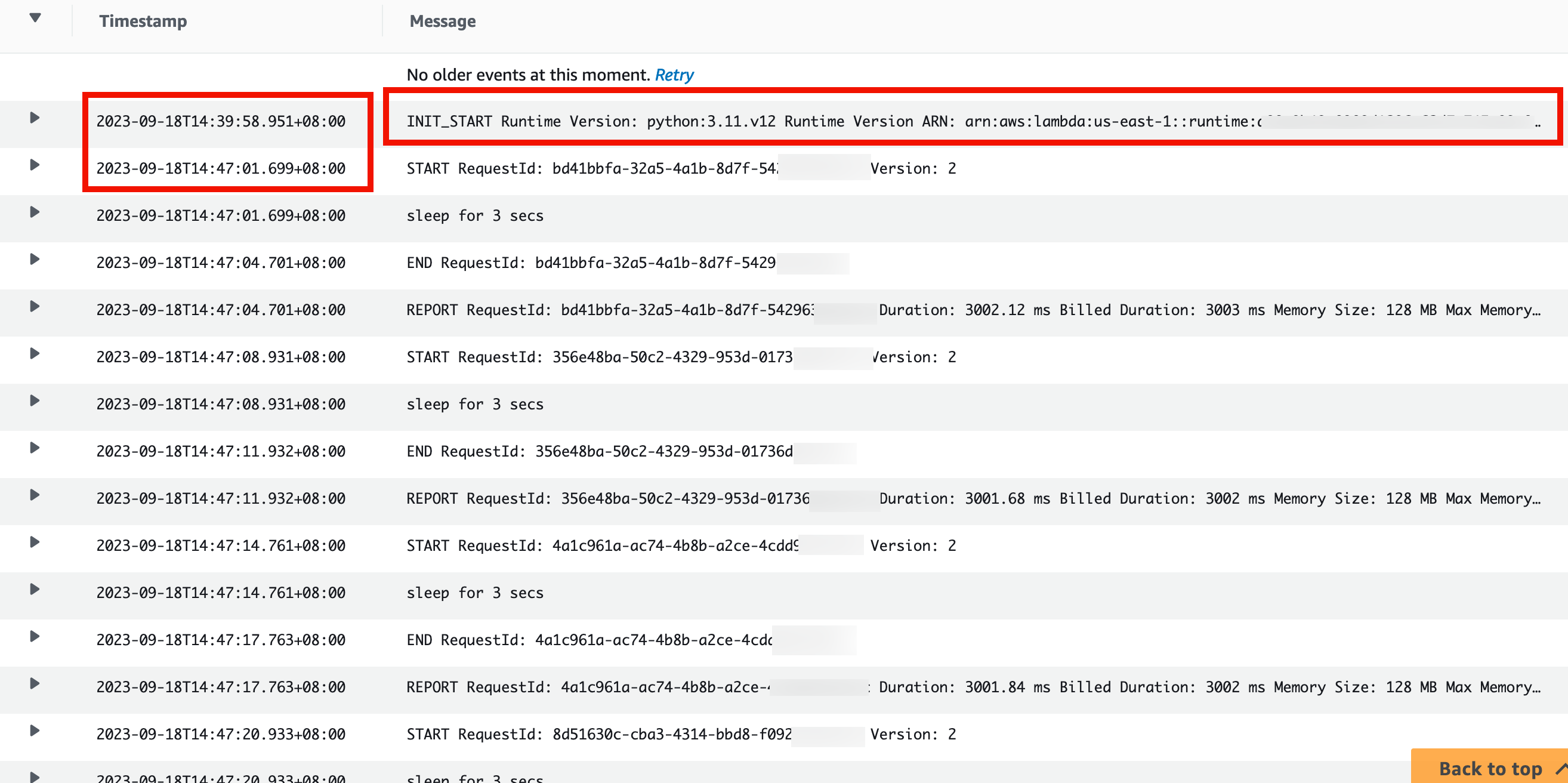
Before actually triggering it, pause and observe the invocation logs in CloudWatch.
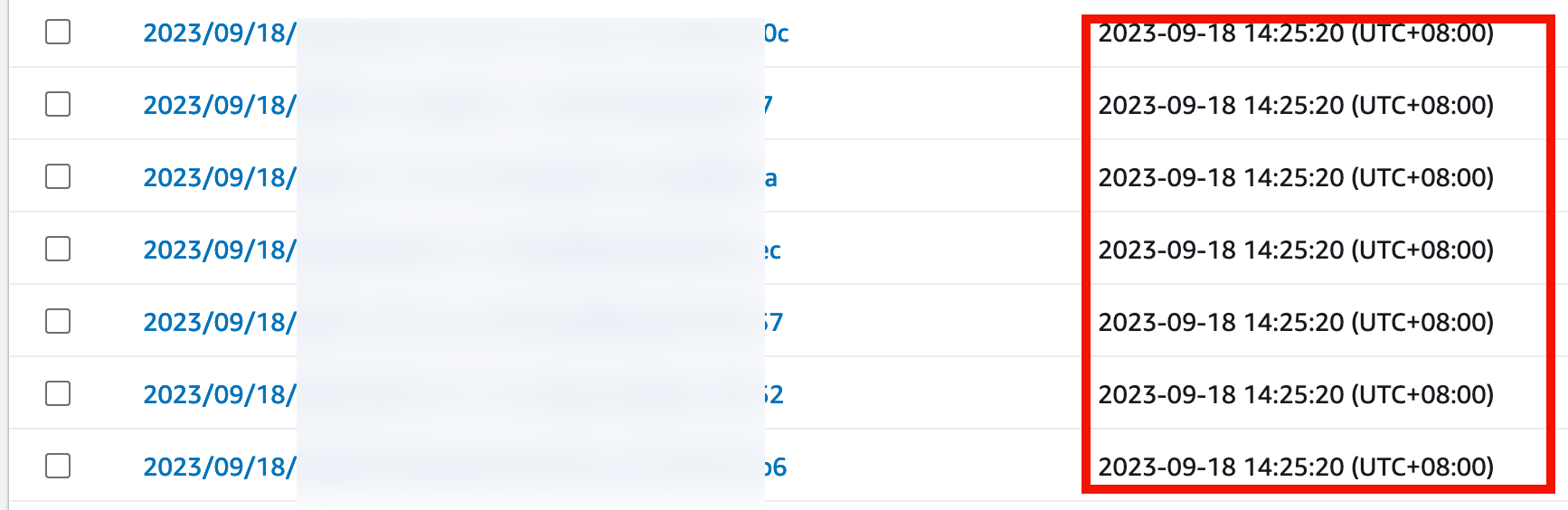
You’ll find multiple execution environments have already warmed up.
Why the count exceeds the Provisioned Concurrency number isn’t confirmed.
Maybe for availability?
After opening multiple terminals to send requests, you’ll find the same thing: because the execution environments are already warm, there’s no need to re-init, and requests run on existing environments via container reuse.
Reserved Concurrency vs. Provisioned Concurrency
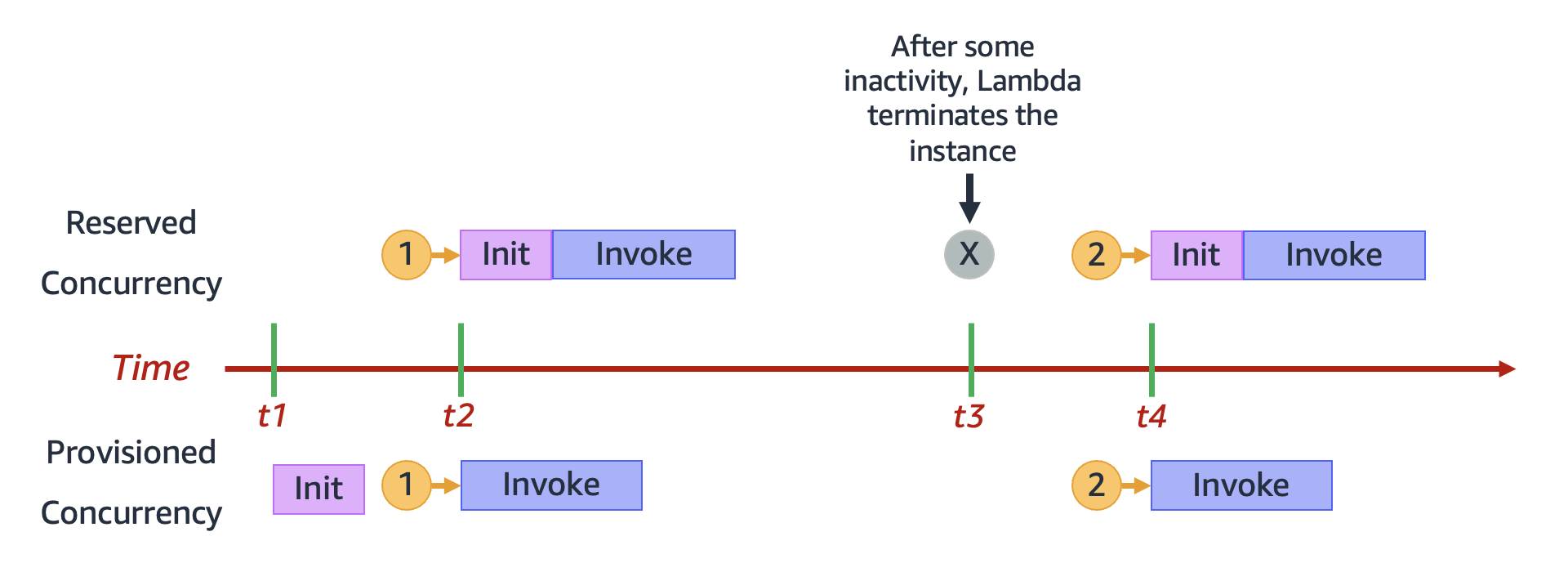
Image source: https://docs.aws.amazon.com/zh_tw/lambda/latest/dg/lambda-concurrency.html#reserved-and-provisioned
Here’s an official comparison figure explaining the difference between these two kinds of concurrency.
Below is my summary of the difference:
| RC (Reserved Concurrency) | PC (Provisioned Concurrency) | |
|---|---|---|
| Cost: | Free | Costs money |
| Characteristic: | Ensures a certain number of Lambda execution environments exist | Ensures a certain number of Lambda execution environments exist, with a certain number already initialized |
| Reaction at limit | Throttled TooManyRequest |
If RC quota remains, scales up the environment count, but still with cold starts; if no quota, throttled |
Also see the official comparison table [3].
Burst Concurrency
Burst Concurrency also aims to handle sudden spikes in requests.
But facing a sudden surge of many requests, Lambda may not be able to scale up immediately, in order to prevent the function from over-scaling and consuming too many resources.
So to match the function’s surge rate, you can set Burst Concurrency to increase the maximum rate at which Lambda execution environments are created. This is an account-level setting.
The Burst Concurrency limit differs by region:
us-west-2,us-east-1, andeu-west-1are generally capped at 3000ap-northeast-1,eu-central-1, andus-east-2are capped at 1000- Other regions are 500
Taking us-east-1 as an example, Burst Concurrency scales 500 units per minute (additional Lambda execution environments) until demand is met or the 3000 cap is reached.
Requests exceeding the limit are throttled (status code 429).
If interested, see the official docs on Burst Concurrency [5].
Cold Start
What does Lambda do during the Init phase?
- When the Lambda service receives a request to start a Lambda function via the Lambda API, the service itself downloads the function code.
- This code is stored in Lambda’s internal S3 bucket.
- If the function is built as a container, the function code is stored in Amazon ECR.
- It then builds an environment with the specified memory size and runtime.
- It then runs the initialization code outside the function handler.
Per [4], all the steps above except running the function’s init code fall within the cold-start range. Running the code outside the handler counts as warm start, which is the part we can control.
How can a function stay “warm”?
The official docs explain it via a pinging mechanism. The main approach is setting an EventBridge rule to invoke the function once a minute to keep the execution environment active.
The currently-recommended way to mitigate cold starts is still Provisioned Concurrency.
There’s also SnapStart, which I’ll cover later.
References
[1] https://docs.aws.amazon.com/zh_tw/lambda/latest/dg/configuration-concurrency.html#estimating-reserved-concurrency
[2] https://docs.aws.amazon.com/zh_tw/lambda/latest/dg/provisioned-concurrency.html
[3] https://docs.aws.amazon.com/zh_tw/lambda/latest/dg/lambda-concurrency.html#comparing-reserved-provisioned
[4] https://docs.aws.amazon.com/zh_tw/lambda/latest/operatorguide/execution-environments.html#cold-start-latency
[5]https://docs.aws.amazon.com/zh_tw/lambda/latest/dg/burst-concurrency.html






If you find my articles helpful, please support Kevin!
 Use boba to safe Kevin!
