
initrd vs initramfs | Linux Kernel
🌐 中文版:繁體中文
Introduction
Early in boot, a temporary filesystem is needed to perform initialization and configuration during the early boot stage. There are two mechanisms for using a temporary filesystem: initrd (Initial RAM Disk) and initramfs (Initial RAM Filesystem). initrd is the earlier approach, and most boot flows today use initramfs.
initrd
initrd (Initial RAM Disk) is a temporary root filesystem used in early Linux boot. It takes the form of a gzip-compressed block image, loaded at boot into a virtual RAM disk (e.g.
/dev/ram0) and then mounted by the kernel as the initial root.
It usually contains:
- The drivers needed to mount the real rootfs
- A
linuxrc(an init-like early user-space script) - Initialization scripts to mount
/proc,/sys, and so on
Booting with initrd
To boot via initrd, it must be loaded into memory at the bootloader stage, and the bootloader must tell the kernel the initrd’s memory address. But how does it know the initrd address?
Very old bootloaders told the kernel the initrd’s start address and size as parameters via the kernel command line; but in newer bootloaders (GRUB), the initrd is passed to the kernel through the boot protocol structure rather than the command line.
1 | console=tty0, 115200 root=/dev/nfs \ |
The kernel command line above means: set the console to tty0 at baud rate 115200, mount the rootfs over NFS (fetching the NFS rootfs from a private IP), and finally load and mount a RAM disk from physical memory address 0x10800000 with size 0x14af47.
In the bootloader you can set the start memory addresses for the kernel image and initrd. Here’s an example with U-Boot:
1 | => setenv kernel_addr_r 0x80000 |
U-Boot can also load the kernel image and initrd image over the network, saving the development time of flashing everything to flash ROM.
Overall flow:
- The bootloader loads the kernel image and initrd image into RAM
- The bootloader passes the initrd’s address and size via the boot protocol (or command line)
- After the kernel starts, it gets the initrd image from RAM
- It decompresses the initrd .gz into
/dev/ram0 - It mounts
/dev/ram0as the temporary root filesystem - The kernel spawns an early process to run linuxrc
- linuxrc mounts
/procand/sys, loads drivers, and mounts the real rootfs - linuxrc calls
pivot_rootorswitch_rootto switch to the real rootfs - The initrd RAM disk is unmounted and its memory freed
This linuxrc is a script containing the commands needed before mounting the real root filesystem, such as
mount -t proc /proc /procorbusybox sh.
After linuxrc finishes, the initrd early stage ends, at which point pivot_root / switch_root switches to the real rootfs, and only then is the initrd RAM disk freed.
In the kernel source, the prepare_namespace() function in init/do_mounts.c decides where the rootfs is and where the mount point is. Within it:
initrd_load()checks whether an initrd exists, and if so decompresses and mounts itmount_root()mounts the real rootfs- Finally
init_chroot("/")completes the switch
initrd flow
Switch to light mode to view, button at bottom right
1 | /* |
Let’s trace initrd_load, since it tries to load the initrd. Reading the code, we find: if the kernel enabled CONFIG_BLK_DEV_INITRD (initrd support, which you can check in the kernel config editor), it tries to load the early root filesystem from the initrd image passed in by the bootloader. On success it returns true, which tells the kernel: “I’ve already mounted the initrd, you don’t need to try mounting another rootfs.” On failure, or if not enabled, it returns false, and the kernel proceeds to mount_root() to mount the real rootfs.
1 |
|
initramfs
initramfs’s purpose is actually similar to initrd:
both provide a temporary root before the real root filesystem is mounted, letting us:
- Load necessary drivers
- Do some early-userspace initialization
- Finally switch to the real rootfs
The difference is entirely in implementation:
- initrd: a traditional filesystem image (e.g. ext2) that’s gzip-compressed. After the kernel decompresses it, it’s placed on a RAM disk like
/dev/ram0and mounted. - initramfs: a cpio archive (usually gzipped too). The kernel unpacks the cpio directly into rootfs (ramfs or tmpfs), with no block device and no intermediate
/dev/ram0layer.
For a built-in initramfs (compiled into the kernel), its unpacking roughly happens at:
- After
start_kernel()calls a sequence of initializations - Entering
rest_init()→kernel_init()→kernel_init_freeable() - which calls
populate_rootfs()to unpack the compile-time initramfs cpio into rootfs
Later, do_basic_setup() calls do_initcalls() to initialize various drivers and subsystems. So roughly speaking: initramfs is unpacked and mounted before do_basic_setup().
kernel_init_freeable
Switch to light mode to view, button at bottom right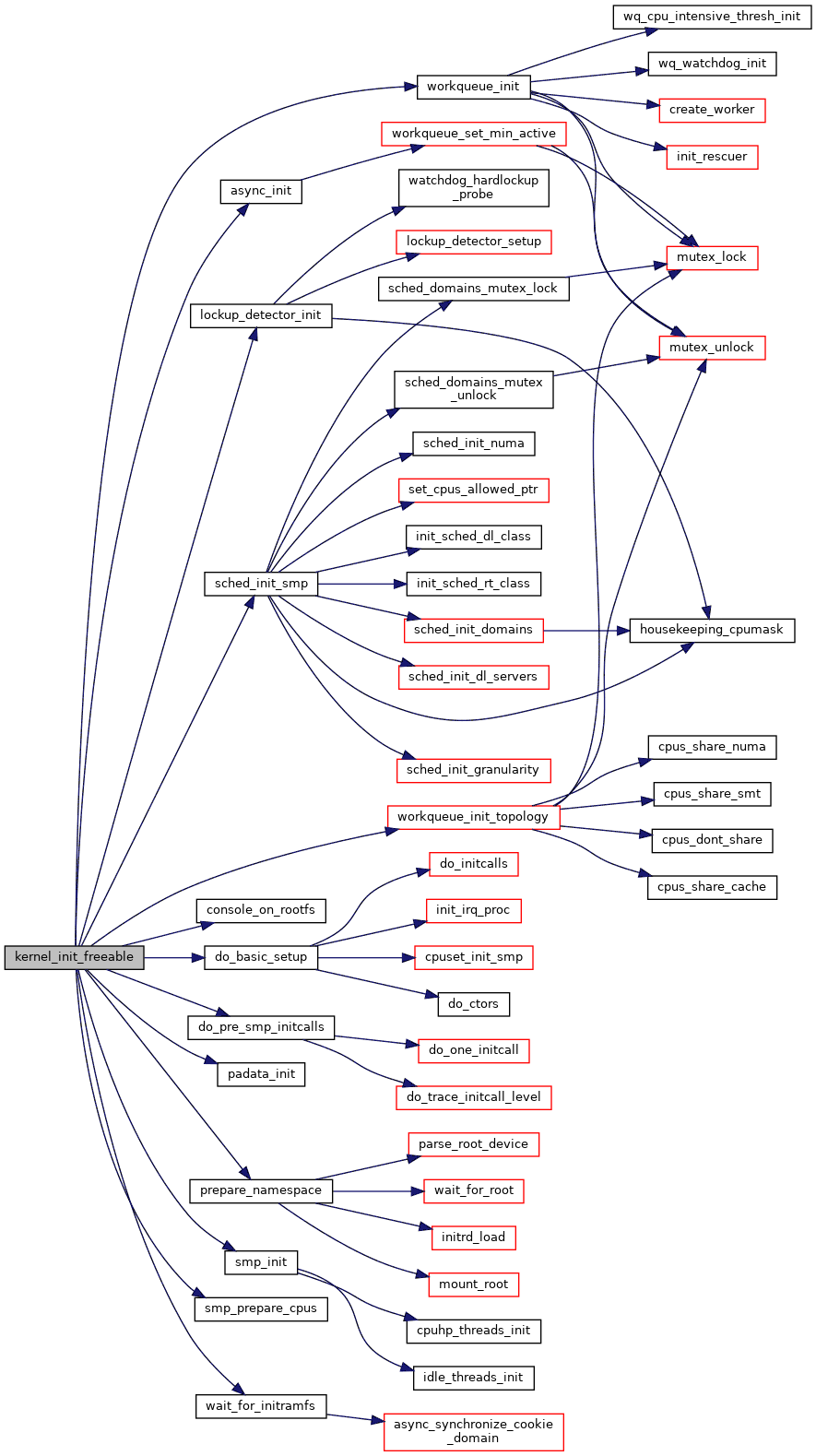
do_initcalls flow
Switch to light mode to view, button at bottom right
overall flow
Switch to light mode to view, button at bottom right
In the kernel source tree’s usr/ directory, you can see the initramfs-related files:
1 | kevin@MSI:~/linux-6.17.7$ ls -l usr/ |
The flow is roughly:
- You set
INITRAMFS_SOURCEin the kernel config, which can be a directory or a cpio file list - The build system calls
gen_initramfs.shto read your INITRAMFS_SOURCE - Then
gen_init_cpioproduces a cpio archiveinitramfs_data.cpio - This cpio is then converted to C/ASM data (initramfs_inc_data, initramfs_data.S)
- and finally linked into the kernel image
In other words:
You can package a “mini rootfs” into the kernel at compile time, without separately preparing a standalone initrd image.
BusyBox example, a minimal initramfs
Suppose we want a super-minimal initramfs needing only: a busybox binary, an /init or /bin/sh to serve as init, and a /dev/console device node. Its file tree might look like:
1 | / |
Here’s why there’s a symbolic link from init to /bin/busybox: when the kernel uses initramfs, it first looks for the /init executable in rootfs. If found, it runs it as the init process (PID 1); if not found, and neither rdinit= nor init= is specified, it proceeds to the subsequent root-mount flow to mount the real rootfs.
You can see this default in init/main.c:
1 | static char *ramdisk_execute_command = "/init"; |
The ramdisk_execute_command char pointer points to this executable.
If you add
rdinit=/bin/shorrdinit=/bin/busyboxto the kernel command line, you can override this behavior and directly specify the first program to run on the initramfs. This is a common usage:rdinit=/bin/shwith busybox drops you straight into a shell in early userspace to debug the boot flow.

If you find my articles helpful, please support Kevin!
 Use boba to safe Kevin!
